





zhtengw
Members
-
Joined
-
Last visited
Everything posted by zhtengw
-
-
1. I make a workaround in my plugin, you can just install the plugin and have a try. The plugin supports unRAID 6.11.0~6.11.5 and 6.12.0-rc1, 6.12.0-rc2 2. The PF (00:02.0) could be used by Unraid host. And the VFs(00:02.x) are only used for passthrough to VMs
-
# lspci -vvs 00:02.0 00:02.0 VGA compatible controller: Intel Corporation Device 4692 (rev 0c) (prog-if 00 [VGA controller]) DeviceName: Onboard - Video Control: I/O+ Mem+ BusMaster+ SpecCycle- MemWINV- VGASnoop- ParErr- Stepping- SERR- FastB2B- DisINTx+ Status: Cap+ 66MHz- UDF- FastB2B- ParErr- DEVSEL=fast >TAbort- <TAbort- <MAbort- >SERR- <PERR- INTx- Latency: 0, Cache Line Size: 64 bytes Interrupt: pin A routed to IRQ 139 IOMMU group: 0 Region 0: Memory at 6000000000 (64-bit, non-prefetchable) [size=16M] Region 2: Memory at 4000000000 (64-bit, prefetchable) [size=256M] Region 4: I/O ports at 5000 [size=64] Expansion ROM at 000c0000 [virtual] [disabled] [size=128K] Capabilities: [40] Vendor Specific Information: Len=0c <?> Capabilities: [70] Express (v2) Root Complex Integrated Endpoint, MSI 00 DevCap: MaxPayload 128 bytes, PhantFunc 0 ExtTag- RBE+ FLReset+ DevCtl: CorrErr- NonFatalErr- FatalErr- UnsupReq- RlxdOrd- ExtTag- PhantFunc- AuxPwr- NoSnoop- FLReset- MaxPayload 128 bytes, MaxReadReq 128 bytes DevSta: CorrErr- NonFatalErr- FatalErr- UnsupReq- AuxPwr- TransPend- DevCap2: Completion Timeout: Not Supported, TimeoutDis- NROPrPrP- LTR- 10BitTagComp- 10BitTagReq- OBFF Not Supported, ExtFmt- EETLPPrefix- EmergencyPowerReduction Not Supported, EmergencyPowerReductionInit- FRS- AtomicOpsCap: 32bit- 64bit- 128bitCAS- DevCtl2: Completion Timeout: 50us to 50ms, TimeoutDis- LTR- OBFF Disabled, AtomicOpsCtl: ReqEn- Capabilities: [ac] MSI: Enable+ Count=1/1 Maskable+ 64bit- Address: fee00018 Data: 0000 Masking: 00000000 Pending: 00000000 Capabilities: [d0] Power Management version 2 Flags: PMEClk- DSI+ D1- D2- AuxCurrent=0mA PME(D0-,D1-,D2-,D3hot-,D3cold-) Status: D0 NoSoftRst- PME-Enable- DSel=0 DScale=0 PME- Capabilities: [100 v1] Process Address Space ID (PASID) PASIDCap: Exec- Priv-, Max PASID Width: 14 PASIDCtl: Enable- Exec- Priv- Capabilities: [200 v1] Address Translation Service (ATS) ATSCap: Invalidate Queue Depth: 00 ATSCtl: Enable+, Smallest Translation Unit: 00 Capabilities: [300 v1] Page Request Interface (PRI) PRICtl: Enable- Reset- PRISta: RF- UPRGI- Stopped+ Page Request Capacity: 00008000, Page Request Allocation: 00000000 Capabilities: [320 v1] Single Root I/O Virtualization (SR-IOV) IOVCap: Migration-, Interrupt Message Number: 000 IOVCtl: Enable+ Migration- Interrupt- MSE+ ARIHierarchy- IOVSta: Migration- Initial VFs: 7, Total VFs: 7, Number of VFs: 4, Function Dependency Link: 00 VF offset: 1, stride: 1, Device ID: 4692 Supported Page Size: 00000553, System Page Size: 00000001 Region 0: Memory at 0000004010000000 (64-bit, non-prefetchable) Region 2: Memory at 0000004020000000 (64-bit, prefetchable) VF Migration: offset: 00000000, BIR: 0 Kernel driver in use: i915 Kernel modules: i915 # lspci -vvs 00:02.1 00:02.1 VGA compatible controller: Intel Corporation Device 4692 (rev 0c) (prog-if 00 [VGA controller]) Control: I/O- Mem- BusMaster+ SpecCycle- MemWINV- VGASnoop- ParErr- Stepping- SERR- FastB2B- DisINTx- Status: Cap+ 66MHz- UDF- FastB2B- ParErr- DEVSEL=fast >TAbort- <TAbort- <MAbort- >SERR- <PERR- INTx- Latency: 0 Interrupt: pin ? routed to IRQ 131 IOMMU group: 15 Region 0: Memory at 4010000000 (64-bit, non-prefetchable) [virtual] [size=16M] Region 2: Memory at 4020000000 (64-bit, prefetchable) [virtual] [size=512M] Region 4: I/O ports at <unassigned> [virtual] Capabilities: [70] Express (v2) Root Complex Integrated Endpoint, MSI 00 DevCap: MaxPayload 128 bytes, PhantFunc 0 ExtTag- RBE+ FLReset+ DevCtl: CorrErr- NonFatalErr- FatalErr- UnsupReq- RlxdOrd- ExtTag- PhantFunc- AuxPwr- NoSnoop- FLReset- MaxPayload 128 bytes, MaxReadReq 128 bytes DevSta: CorrErr- NonFatalErr- FatalErr- UnsupReq- AuxPwr- TransPend- DevCap2: Completion Timeout: Not Supported, TimeoutDis- NROPrPrP- LTR- 10BitTagComp- 10BitTagReq- OBFF Not Supported, ExtFmt- EETLPPrefix- EmergencyPowerReduction Not Supported, EmergencyPowerReductionInit- FRS- AtomicOpsCap: 32bit- 64bit- 128bitCAS- DevCtl2: Completion Timeout: 50us to 50ms, TimeoutDis- LTR- OBFF Disabled, AtomicOpsCtl: ReqEn- Capabilities: [ac] MSI: Enable+ Count=1/1 Maskable+ 64bit- Address: fee00038 Data: 0000 Masking: 00000000 Pending: 00000000 Kernel driver in use: vfio-pci Kernel modules: i915
-
# lspci -Dnnmm 0000:00:00.0 "Host bridge [0600]" "Intel Corporation [8086]" "Device [4630]" -r05 "" "" 0000:00:02.0 "VGA compatible controller [0300]" "Intel Corporation [8086]" "Device [4692]" -r0c "" "" 0000:00:02.1 "VGA compatible controller [0300]" "Intel Corporation [8086]" "Device [4692]" -r0c "" "" 0000:00:02.2 "VGA compatible controller [0300]" "Intel Corporation [8086]" "Device [4692]" -r0c "" "" 0000:00:02.3 "VGA compatible controller [0300]" "Intel Corporation [8086]" "Device [4692]" -r0c "" "" 0000:00:02.4 "VGA compatible controller [0300]" "Intel Corporation [8086]" "Device [4692]" -r0c "" "" 0000:00:08.0 "System peripheral [0880]" "Intel Corporation [8086]" "Device [464f]" -r05 "" "" 0000:00:0a.0 "Signal processing controller [1180]" "Intel Corporation [8086]" "Device [467d]" -r01 "" "" 0000:00:14.0 "USB controller [0c03]" "Intel Corporation [8086]" "Device [7ae0]" -r11 -p30 "" "" 0000:00:14.2 "RAM memory [0500]" "Intel Corporation [8086]" "Device [7aa7]" -r11 "" "" 0000:00:16.0 "Communication controller [0780]" "Intel Corporation [8086]" "Device [7ae8]" -r11 "" "" 0000:00:17.0 "SATA controller [0106]" "Intel Corporation [8086]" "Device [7ae2]" -r11 -p01 "" "" 0000:00:1c.0 "PCI bridge [0604]" "Intel Corporation [8086]" "Device [7ab8]" -r11 "" "" 0000:00:1c.2 "PCI bridge [0604]" "Intel Corporation [8086]" "Device [7aba]" -r11 "" "" 0000:00:1c.4 "PCI bridge [0604]" "Intel Corporation [8086]" "Device [7abc]" -r11 "" "" 0000:00:1e.0 "Communication controller [0780]" "Intel Corporation [8086]" "Device [7aa8]" -r11 "" "" 0000:00:1e.3 "Serial bus controller [0c80]" "Intel Corporation [8086]" "Device [7aab]" -r11 "" "" 0000:00:1f.0 "ISA bridge [0601]" "Intel Corporation [8086]" "Device [7a87]" -r11 "" "" 0000:00:1f.3 "Audio device [0403]" "Intel Corporation [8086]" "Device [7ad0]" -r11 "Realtek Semiconductor Co., Ltd. [10ec]" "Device [0897]" 0000:00:1f.4 "SMBus [0c05]" "Intel Corporation [8086]" "Device [7aa3]" -r11 "" "" 0000:00:1f.5 "Serial bus controller [0c80]" "Intel Corporation [8086]" "Device [7aa4]" -r11 "" "" 0000:01:00.0 "Ethernet controller [0200]" "Realtek Semiconductor Co., Ltd. [10ec]" "RTL8125 2.5GbE Controller [8125]" -r04 "Realtek Semiconductor Co., Ltd. [10ec]" "RTL8125 2.5GbE Controller [0123]" 0000:02:00.0 "Ethernet controller [0200]" "Realtek Semiconductor Co., Ltd. [10ec]" "RTL8125 2.5GbE Controller [8125]" -r05 "Realtek Semiconductor Co., Ltd. [10ec]" "RTL8125 2.5GbE Controller [0123]" 0000:03:00.0 "Non-Volatile memory controller [0108]" "Samsung Electronics Co Ltd [144d]" "NVMe SSD Controller SM981/PM981/PM983 [a808]" -p02 "Samsung Electronics Co Ltd [144d]" "NVMe SSD Controller SM981/PM981/PM983 [a801]"
-
写了一个支持11代12代intel GPU开启SR-IOV的插件, GitHub地址:https://github.com/zhtengw/unraid-i915-sriov 在unraid插件安装页面,输入此链接https://raw.githubusercontent.com/zhtengw/unraid-i915-sriov/master/i915-sriov.plg安装插件,然后重启即可使用。 插件支持unRAID版本:6.11.0~6.11.5, 6.12.0-rc1, 6.12.0-rc2
-
Hi, Simon. I created a bug report. I was trying to make iGPU SR-IOV work on unRAID. Then I built the custom kernel image mentioned above and also make a plugin(https://github.com/zhtengw/unraid-i915-sriov). After install the i915-sriov module, we can see several VFs in graphic devices. Then I can passthrough a VF to VM. The issue I met is, when a iGPU VF passthrough to VM, it cannot be recognized in the guest system. I enabled XML VIEW in VM settings, and found out that the PCI address in VM is the same as host. <hostdev mode='subsystem' type='pci' managed='yes'> <driver name='vfio'/> <source> <address domain='0x0000' bus='0x00' slot='0x02' function='0x1'/> </source> <alias name='hostdev0'/> <address type='pci' domain='0x0000' bus='0x00' slot='0x02' function='0x1'/> </hostdev> It is not true. Because the VM do not have a PF device, the VF pci address (like 0000:00:02.1) won't make the device work. Then I changed the address to 0000:00:02.0, and the guest system recognized the graphics card and made it work. So, I modify the the file /usr/local/emhttp/plugins/dynamix.vm.manager/include/libvirt.php: line 813 on every boot. sed -i "s/\(strSpecialAddress.*\)\$gpu_function/\1\"0\"/" /usr/local/emhttp/plugins/dynamix.vm.manager/include/libvirt.php Then the VM with iGPU VF works fine. I think it is a bug for passthrough iGPU's PCI address.
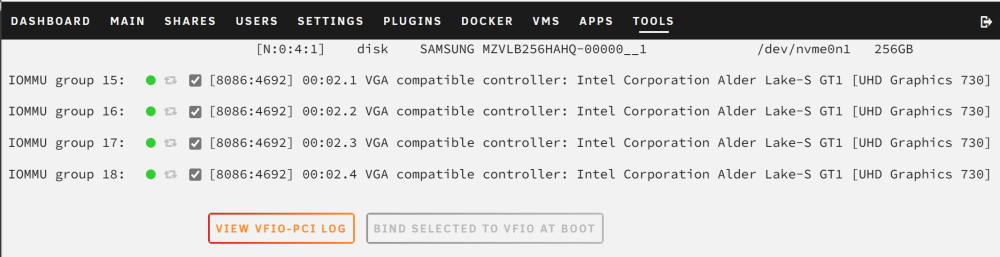

-
**edit** Now iGPU SR-IOV is supplied by a unRAID plugin named i915-sriov(https://github.com/zhtengw/unraid-i915-sriov). The custom kernel image is only for testing. **edit** Hi, all. I have noticed that unRAID 6.11.5 is running with linux-5.19, which can build against the i915-sriov module. So I build this custom kernel image. I have tested with i3-12100 with Windows 10 guest, and the iGPU VF works fine. Link: https://github.com/zhtengw/i915-sriov-dkms/releases/tag/v5.19-unraid




