





JunkoZane
Members
-
Joined
-
Last visited
Everything posted by JunkoZane
-
Cache has all deviced (2) that it suppose to have. How can I remove this error? I was talking about "Media" pool (correct it is raid0, but my plan is to assign one more (parity) drive to it
-
After a server restart pool started showing free space (before there were none, even though used space was lower than pool total capacity) and scrub finished with no errors... What changed - I've deleted a lot of unfinished and not started torrents (space allocation is turned off) and restarted the server. Diagnostics atached bellow. Can I use this pool data? And how to secure this pool with parity disk? the-beast-diagnostics-20260127-2114.zip
-
Thank you very much :)
-
Can I trust that data ? I've noticed some of my movies skips or behaves in strange ways (soundtrack changes for couple of minutes) Also, what's the best strategy to avoid that kind of issue? Use a parity disk ? Not to use this kind of hardware ? Should I continue to use BTRFS?
-
Sorry for late reply, After I run scrub nothing happens. GUI shows "aborted" and duration 00:00:00 I don't see any missing drives. Maybe I haven't finish my hdd upgrade correctly in the past... Were and how I can see that error ? Thank you the-beast-diagnostics-20260123-1953.zip
-
Good evening, I've found same error in my server. I'm not sure if these cases are related, but the difference is that I use 3 drives instead of 1. Could you please help me with this error? the-beast-diagnostics-20251228-1720.zip
-
It's so cool you did :) I played it once in my teenage years. Now I don't know if it's nostalgic or if that game really is that immersive and well written...
-
No errors so far, thank you!
-
Scrub started: Thu Jul 31 20:19:53 2025 Status: finished Duration: 0:16:37 Total to scrub: 522.25GiB Rate: 536.40MiB/s Error summary: verify=7072 csum=2414462 Corrected: 2421534 Uncorrectable: 0 Unverified: 0It always used to be like that. Scrub always finished with 0 uncorrectable or unverified
-
Done the-beast-diagnostics-20250731-1621.zip
-
Good day to everyone, I don't even remember when these errors have started, I just know that I can't restart my server without re-creating docker.img and using scrub on my cache pool. I've tried switching RAM (since it's a fairly new system and one thing that was unusual stands out was ECC unbuffered ram) to regular DDR4. Since other hardware components came from my previous build I figured I'll ask for your advice first and try to learn what these logs mean. Thank you in advance, Junko the-beast-diagnostics-20250730-1640.zip
-
Thank you, that helped
-
Good day, one morning my unRAID server was not responding. After a restart I've got an error message in the log: This is my cache drive (running in mirror mode). I've tried scrubbing, but nothing have changed (even thou a lot of error where corrected) Anyone have similar error in a similar setup? Thank you in advance the-beast-diagnostics-20250323-2228.zip
-
Hi there, turns out photoprism container was corrupt. Those error would start right after I'd start and use it. I'm glad my problems stopped, it will be a good opportunity to try out immich Thank you for your help!
-
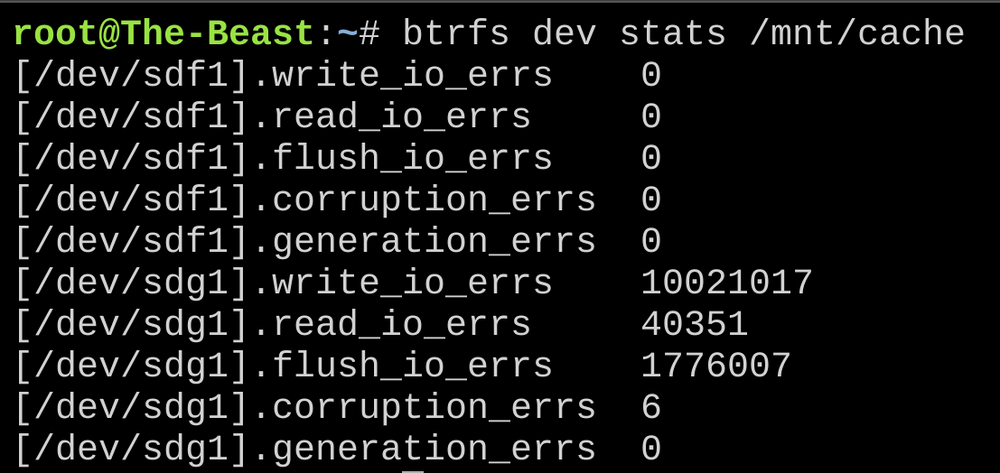
P.S. As far as I understand, now only newly installed SSD (sdg) spits out errors? So it seams problem might be elsewhere (in power cord or the PSU itself?)
-
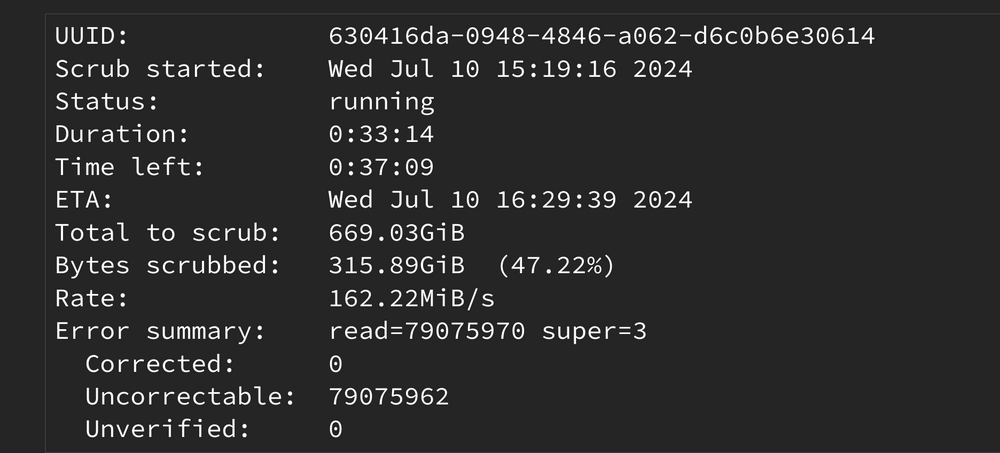
Can't find any, just errors... I did back up my /mnt/cache before SSD swap. I can live with couple of days loss, but what should be the procedure? the-beast-diagnostics-20240710-1643.zip
-
What should I do with these uncorrectable errors?
-
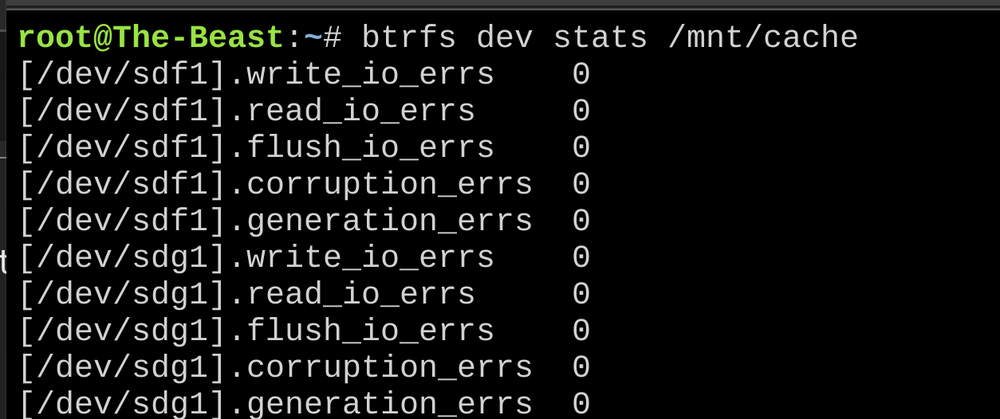
Before upgrade power cables were just fine. Although I've already changed SATA cables, I could say the same about those. I think I'll just get another new SSD, maybe these will work in my gaming rig. What should be the sequence to replace another SSD? Scrub BTRFS dev stats -z Scrub again Ensure BTRFS dev stats shows zeros Continue with replacement instructions Is that correct?
-
So - following your guide I've successfully changed one of the pool ("Cache") devices to a new one. But today I've noticed that my log file is 87% full... Have I changed the wrong "Cache" pool device? the-beast-diagnostics-20240707-1027.zip
-
Thank you
-
Worked like a charm Should I proceed with the instructions?
-
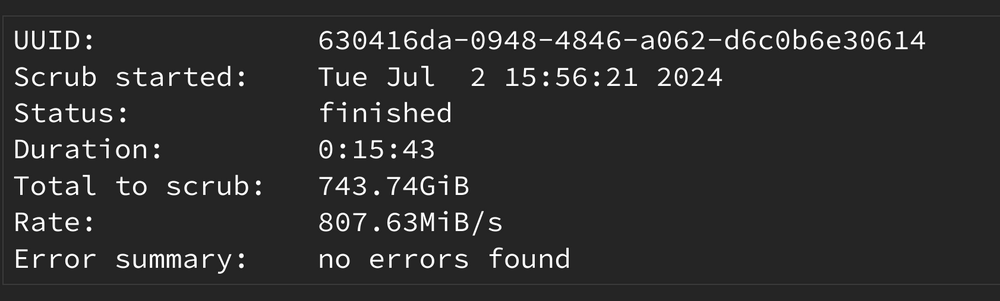
Second time was successful the-beast-diagnostics-20240702-1612.zip
-
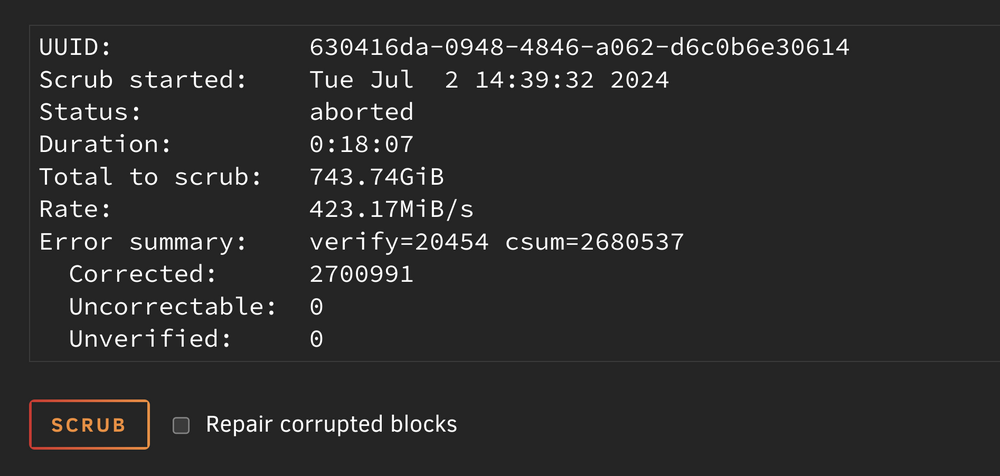
I've checked "Repair corrupted blocks". And i've noticed it was aborted. But not by me the-beast-diagnostics-20240702-1523.zip
-
Despite these errors?

-
Hello again, sorry somehow I missed your last comment. A year passed by with docker failing to start from time to time. I just deleted the docker image every time and recreated containers. I've tried replacing cables and motherboard. Now I suspect new SSD was faulty all along (since this whole thread was started after I installed them into server to replace my old cache drives). Now I'm prepared to replace one of those SSDs to end this misery once and for all. What should be the replacement sequence? Appreciate your help! (to such noob as myself ) the-beast-diagnostics-20240702-1336.zip



