





danbru1989
Members
-
Joined
-
Last visited
Everything posted by danbru1989
-
I did as you suggested and sdd1 mounted successfully and started doing a bunch of read/writes. fatfarmhqserver-diagnostics-20230908-1134.zip
-
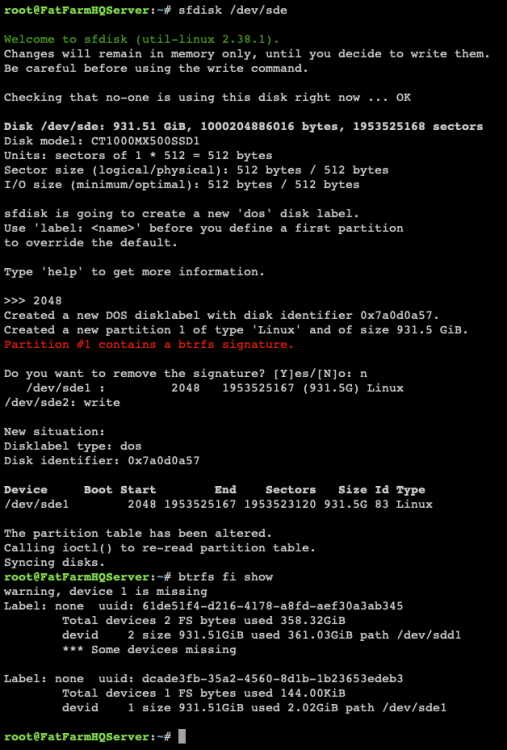
Here's the results. Thank you for your persistent help with this. The 361gb on sdd1 is my previous cache. I think that the 2.02gb on sde1 is from a 2nd cache pool I started on that drive only during my troubleshooting and testing. If that's the case, that data is not important to save. I think that it might be best to just get sdd1 up and running the cache pool reliably, then I can just format sde1 and add it to the cache pool.
-
I’m not familiar with everything you are instructing, but it looks promising to me. Should I try mounting sdd1 again in the cache pool?
-
root@FatFarmHQServer:~# fdisk -l /dev/sdd Disk /dev/sdd: 931.51 GiB, 1000204886016 bytes, 1953525168 sectors Disk model: CT1000MX500SSD1 Units: sectors of 1 * 512 = 512 bytes Sector size (logical/physical): 512 bytes / 4096 bytes I/O size (minimum/optimal): 4096 bytes / 4096 bytes root@FatFarmHQServer:~# fdisk -l /dev/sde Disk /dev/sde: 931.51 GiB, 1000204886016 bytes, 1953525168 sectors Disk model: CT1000MX500SSD1 Units: sectors of 1 * 512 = 512 bytes Sector size (logical/physical): 512 bytes / 512 bytes I/O size (minimum/optimal): 512 bytes / 512 bytes root@FatFarmHQServer:~#Yes it was. How could it be gone? I’m not sure what I did.Here's the output:I have two cache drives in a pool. i thought that I could easy take one to go do another project with it and then add it back to the pool and keep trucking. Before I removed the cache drive from the pool, I moved all cache data to the array. Once it appeared that I was safe, I removed the cache drive. With one out, I started up the array to run on one cache drive only. Things seemed to be going fine. At some point after finishing my project, I noticed that my operating cache drive was giving an error and it was “Wrong”. What did I do and how can I recover the data on the single cache drive that I was using? The only option that I see is to format it to get it back to a working cache pool! There goes all my cache data… I would appreciate your help much! fatfarmhqserver-diagnostics-20230907-1639.zipI'm new enough to UnRaid that I've never configured a video card passthrough for a VM, so I might be missing something simple... My UnRaid rig has a GeForce GTS 250 in it. I think that the card is working, but it was given to me and I have not actually tested it in another computer. If I select the GTS 250 in my Windows 10 VM config, I just get a blank screen when connecting via VNC and only the UnRaid OS status screen displays on the attached monitor. So I'm not really sure where to go from here... Do I need to install drivers? How? Thanks! fatfarmhqserver-diagnostics-20230829-1212.zipThank you for that link. It lead me to the firmware upgrade process linked below for others. I'm now running firmware version: M3CR046 on my MX500. Hopefully all my problems will disappear. Thank you again for your help!I just figured that out while you were posting. Thank you!After a restart, I could see my files on the cache drive. Because I only have one cache drive, I've set all my shares to the array for Primary Storage hoping that all my data will move over there and I can upgrade the firmware on my MX500. Is this the correct approach? Do I need to do anything special with Docker or VMs in the interim?Wow... 😳 Thank you for referencing that for me! I'll try upgrading the firmware. How do I check my current version? And it sounds like I won't be getting the data back – correct? (Not too big of a problem, I can rebuild the data from other sources. Just a real pain...)I'm very new to unRaid and know enough to break things. The other day my 1TB SSD cache drive disappeared from the array. I can't remember exactly what I did, but I think that I get the server a restart. When that didn't work, I think that I removed the cache drive from the array and added it back in. Now it looks as though the formatted the drive or something when I re-added it. However, the drive utilization is 41% and I haven't touched it since re-adding the drive. Is my data still on the drive? How can I recover it? The Fix Common Problems plugin says "Unable to write to cache" "Drive mounted read-only or completely full." fatfarmhqserver-diagnostics-20230825-1359.zip


