Couch
Members
-
Joined
-
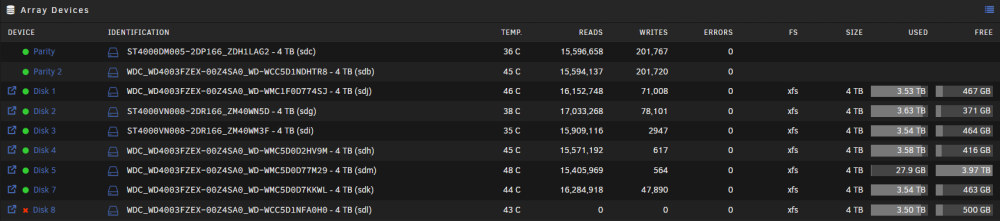
Okay, backup done and solution seems to have worked Steps taken: backed up system and shut it down replaced unresponsive disk with another one started up system and ran pre-clear on disk assigned disk to now empty spot and started array rebuild disk so far it looks to be solved, thank you so much for the help! ❤️
-
Couch changed their profile photo
-
Ahh i might have misunderstood then, so i just replace the disk and let it rebuild, nothing else? Also nothing has changed yet, as my backup is at 95% currently, and i am waiting for that to finish before making changes
-
Just making sure i got these the steps correct here, since my other moves were not the greatest backup data shutdown array remove bad disk and add other disk, start array let it rebuild shutdown array create new config and assign disks back where they belong rebuild array am i missing something?
-
Okay, my backup is taking way longer than expected, currently 39 hours remaining of total backup so i'll return as soon as i have had a chance to finish it
-
Ah, well i might have to adjust a bit then Moved due to me now having spare disks at the time, so i had to collect my data between disks. And i am aware it does not work as a backup Thank you ❤️
-
Very sorry I do not know why disk 5 has been replaced recently, so i had to move stuff away from it temporarily. Disk 6 missing is on me, i put the disks in 7-8 by mistake, but have not bothered moving them. Yes i let it rebuild every time there is anything, and it runs parity checks weekly Yes, i will try rebuilding hopefully over the weekend when i have a bit of time Thank you very much!
-
Okay, i checked connectors and they all seem to be plugged in right, i am using 1 splitter for 2 disks, but they are not the disks with issues Power-supply is an older used one, so it might have bad connectors hera-diagnostics-20240109-1029.zip Attached is the new diagnostics Again thank you for your help and your guidance
-
Thank you, i will look through these steps tomorrow
-
No worries it fixed it when i had the issue last, as mentioned all my disks are heavily used and i have plenty of them Can you elaborate on it being the wrong steps? Yes, i am nearing my storage cap, and will need to expand soon Attached is my diagnostics Thank you for helping hera-diagnostics-20240107-2006.zip
-
Hello, i am kind of new to troubleshooting on linux based OS's I have had an unraid box running for about 2 years, with little to no issues, but now my disk 8 in my array keeps being disabled, The following steps have been tried: New config new controller/cables replaced disk (i only have very used disks, but plan to replace as soon as i can afford it) reformat disk/preclear it I have tried looking at the logfiles, but i am a little lost to where to find the right ones, and what to look for. Please help and please let me know how i can make helping easier