KamiNo0tokoABC
Members
-
Joined
-
Last visited
-
Thank you for your help, that's a great plugin I will def start using
-
Yeah, I've pulled them out and I'm gonna see if I can use the before mentioned UFS explorer to find anything
-
Ah I see, I believe I just saw a post relating that, so I should be able to connect each drive and see what I find?
-
how would that work being a striped array? Is there no way to scan the whole array?
-
alrighty, any disk? or the connected array?
-
I have paused rebuild
-
ok, should I let it finish rebuild? and then how would I use UFS explorer/rebuild?
-
I feel like it did ask that and I didnt take it as a warning.... freaking crap
-
Is there no ways to scan for files, should I kill the rebuild? If so what the hell is it rebuilding?
-
Oh good lord, I don't know. The old disk is completely dead.
-
abcserver-diagnostics-20230711-0911.zip
-
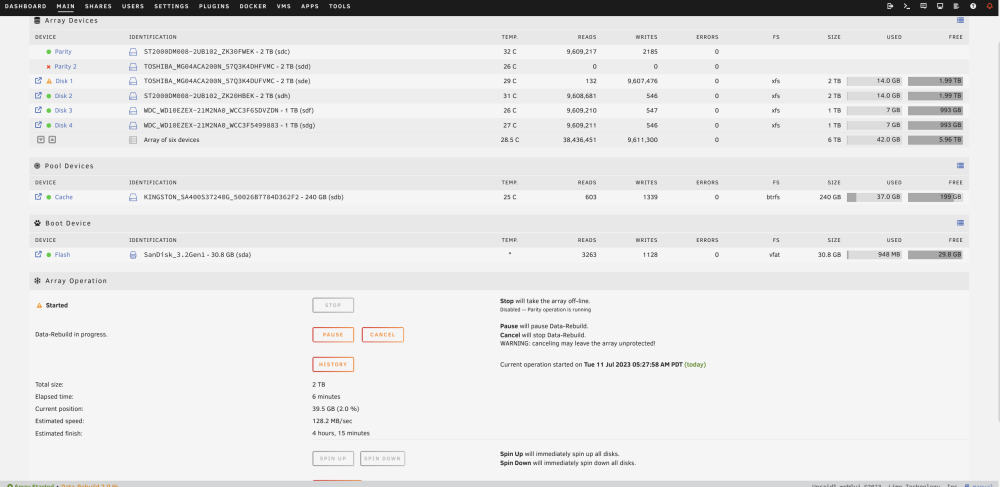
We are a small office and I've used Unraid for a number of years now at home and now at our office. Recently an Old drive went out, a parity drive, the array can withstand up to 2 faults so all was fine. upon placing drive in, format was needed for the drive, it rebuilt 2 terabytes and now I have 1 device disabled and one emulated with another rebuild taking place and my shares are gone. Maybe a few gigs of data nothing crazy. But i've never had my shares just dip, a little bit worried right now with a sinking feeling and it sucks Unraid Ver. 6.12.2