





frustratedtech71
Members
-
Joined
-
Last visited
Everything posted by frustratedtech71
-
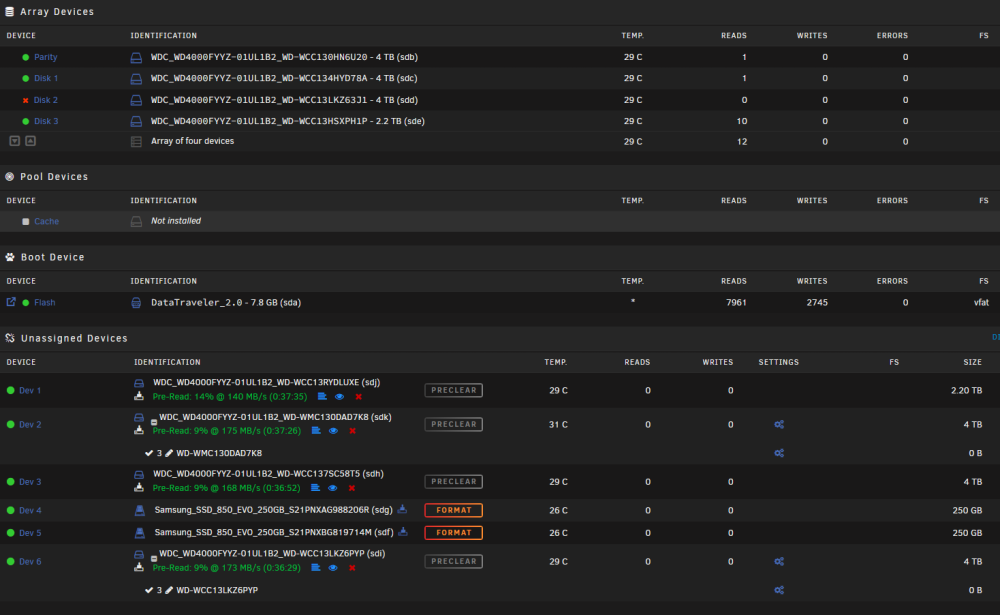
Stumbled across this thread and hoping that someone can help. I've been running unraid 6.12.4 and previous versions without issue, that was until today when I moved the disk and usb key to a new server with more hdd slots. I had been running a trial licence on the new prospective hardware for a while and decided to pull the plug and swap from one to the other. I shutdown the servers gracefully, swapped the previous production server hdd and placed into into the corresponding devices on the new to me server. On first boot one of the disks despite being in the right location is now reporting an incorrect size should be 4TB and now reporting 2.2TB. I've since added more disks to the previosly empty slots and added 2x Samsung Pro SSD for future use to relocate Plex data to and maybe cache. What was once a 4 hdd machine is now a 8hdd+2SSD. The array will not boot however as there are too many "Wrong" disk and in the system log its advising to unmount and run xfs_repair I'm usually a windows guy and have been for a few decades so deflated and wanting to recover everything before I feel the wrath of the better half and all our plex media family holidays, video/photos etc plus some testing VM's etc and home assistant. Any help gratefully received. Thanks in advance. Exert from logs - which repeats itself Oct 4 20:28:06 Tower emhttpd: error: get_filesystem_status, 7329: Structure needs cleaning (117): scandir Structure needs cleaning Oct 4 20:28:06 Tower kernel: XFS (md2p1): Metadata corruption detected at xfs_dinode_verify+0x131/0x732 [xfs], inode 0x11d3c71 dinode Oct 4 20:28:06 Tower kernel: XFS (md2p1): Unmount and run xfs_repair Oct 4 20:28:06 Tower kernel: XFS (md2p1): First 128 bytes of corrupted metadata buffer: tower-syslog-20231004-1950.zip Tower_Main.pdf
-
I've ended up switching to a Kingston data traveler and it's now working absolutely fine. Couldn't be bothered with the hassle to be honest and just needed everything up and working again. I do have an identical server so when I get chance I'll have another go and see what I can recover
-
Thanks for your reply. It looks like I was being super impatient as eventually the server did respond and I was able to get into the webui. However when I then went to upgrade from 6.9.2 the update checker hightlighted a failing usb drive. So ordered a replacement which turned up today and that is showing as incompatible with the USB creator tool despite it being a sandisk cruzer fit 32gb but usb3 LINK which seems odd. Tried to manually prep the usb stick and it refuses to complete the make_bootable batch file without errors. So just wondering whether to order the older equivalent USB2 LINK Or switch to a Kingston DataTraveller or Lexar LINK The list on the website/wiki is not being updated so just keen to swap this out and get back to normal painless operations. Thanks
-
First time posting as not had an issue since first switching from a trial licence to a pro a couple of years ago. Seems I've possibly been really lucky thus far. Mainly used for media duties with the *arrs dockers etc installed etc and a small amount of storage. Last night we suffered a brown out and now despite the server booting, responding to ping to its configured address and able to connect via putty it never reaches the WebUI. To get the server to boot this far I've replaced the *bz files on the USB drive mentioned HERE that had been displaying an "unraid /dev/root: Can't open blockdev" error, so a little further on than the initial boot. Wondering what could be the issue. I've grabbed the diagnostics from the server ( attached ) Any help much appreciated. Thanks in advance. tower-diagnostics-20230328-1949.zip
