



Skip to content
View in the app

A better way to browse. Learn more.

Unraid

A full-screen app on your home screen with push notifications, badges and more.

To install this app on iOS and iPadOS
  1. Tap the Share icon in Safari
  2. Scroll the menu and tap Add to Home Screen.
  3. Tap Add in the top-right corner.
To install this app on Android
  1. Tap the 3-dot menu (⋮) in the top-right corner of the browser.
  2. Tap Add to Home screen or Install app.
  3. Confirm by tapping Install.

amorsy

Members
  • Joined

  • Last visited

Everything posted by amorsy

  1. Thanks A lot @JorgeB , I have changed the following settings: SATA ( from Legacy to AHCI ) Write Cache - Enable ( before it was disabled ) now getting 150 Mb/s Thanks again ❤️
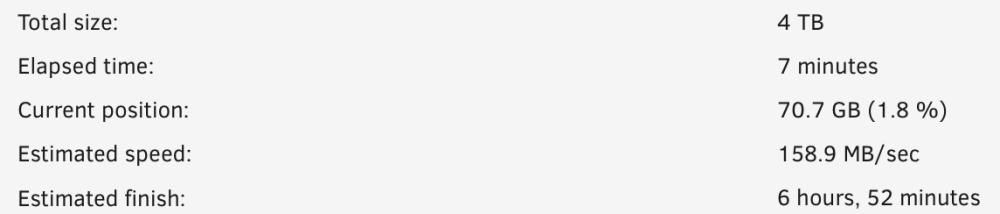
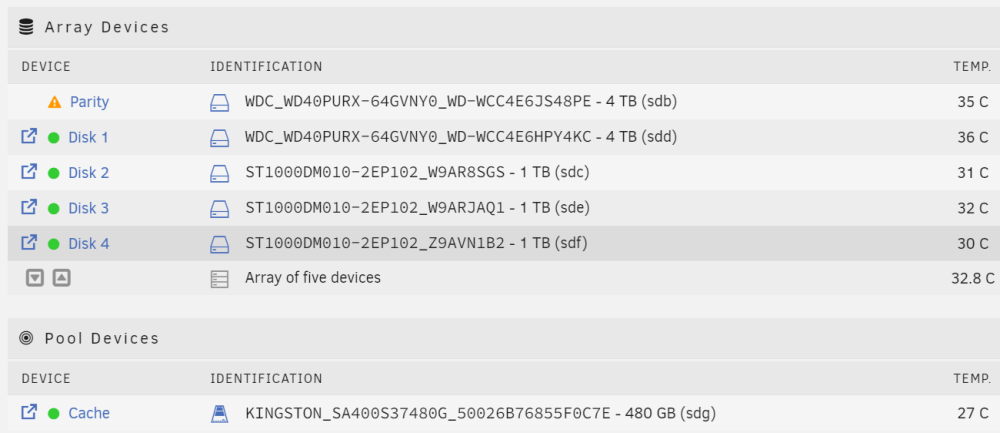
  2. Dear Unraid Community, I have HP ML110 Gen 7 - E3 1220 - 4GB RAM, I'll be upgrading the CPU/RAM to 1280/16 RAM. ( parts requested, awaiting arrival ). but until then i have connected my HDDs as following : ( i know i'm using green HDDs, but all of these HDDs are brand new ) parity sync takes too long (2 days, 8 hours) with speed of 20 Mbps . which is very slow. I have attached the diagnostics. can you please help me diagnose what is the issue and how can i fix it ? Best Regards. homenas-diagnostics-20240329-0149.zip

Account

Navigation

Search

Search

Configure browser push notifications

Chrome (Android)
  1. Tap the lock icon next to the address bar.
  2. Tap Permissions → Notifications.
  3. Adjust your preference.
Chrome (Desktop)
  1. Click the padlock icon in the address bar.
  2. Select Site settings.
  3. Find Notifications and adjust your preference.
