





I.M.APseudonym
Members
-
Joined
-
Last visited
-
Dockers are easy, I can just point the appdata/config mappings to the new location, but I don't know where to start with the VM's.
-
I've moved unraid servers, and am not seeing any of my docker containers or VM's. That makes sense, because in copying the data over from the old server to the new server, I've changed the path names. But I don't know how to point things to the new locations. If I need to, I can rebuild everything and start from scratch. I guess if I really had to I could just manually re-create the containers and vm's and then copy the data files over, but I suspect there has to be a better way. Is there a best practice way to restore the vm's and containers from the data that's located elsewhere on the share?
-
In case anyone has this same problem in the future, the solution was to use tools/new config.
-
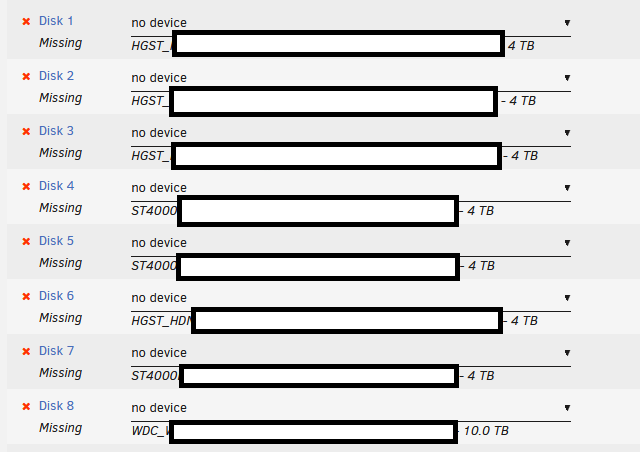
Whoops, I meant to include another picture. If I select one of the new drives, it just tells me it's wrong. Is that going to be a problem? /edit to add: At the bottom it won't let me start the array anyway because it says there are too many wrong/missing disks.

-
I'm moving unraid from an old server (with a bunch of small drives) to a new server (with fewer but larger drives). I've copied over the data to the new drives using a trial unraid install. When I plug in the flash drive now, I'm presented with a down array. I used to use 8 disks, but now am only using three. Do I only need to map over the three unassigned drives to three slots and then not worry? Or is there something else I need to do? I'm just worried about losing my data, because it took forever to copy things over, and my old server isn't really usable anymore. Attached is the drive assignments, but as I said I'm going from eight to three, so I don't know if that messes anything up. Thanks in advance.
-
This worked, thanks!
-
No, where is that network.cfg file going to be located? Thanks for your help.
-
Hello, I am trying to switch from an old dell R720 to an old desktop I had sitting around. When I boot up from my USB that I have unraid running from, the new install doesn't seem to see the NIC, or at least it isn't getting an IP address. I have confirmed there is a heartbeat, and when I was running a new install of unRAID it had no problems with the NIC. I have disabled bonding and bridging, and even when I assign a static IP that should work unRAID just tells me that there may be a cable unplugged. That's not the case though. It's hard to get logs because there's no internet access, and for now the USB is plugged back into the old server (where the internet is working just fine). But I can boot it up if more information is needed, I'm hoping there's just something obvious I'm missing. Is there something I should be aware of when going from enterprise grade hardware down to consumer stuff and trying to bring an existing unRAID install?
-
I'm not sure what changed it changed, but I decided to do the "automatic tuning" in bios, and just set the computer for general desktop use, and the system has now been running for 20 hours without rebooting, so the issue may be fixed. I wish I had a real root cause to point to, but I at least wanted to update with what got it working in case someone was having similar issues. Thanks for the help everyone.
-
My mobo (b350-f) is blacklisted under memtest per this list:https://forums.passmark.com/memtest86/5743-list-of-motherboards-with-issues-when-running-memtest86-in-multi-cpu-selection-modes. I'm going to pretend I was aware I was running mismatched memory, I'll try to pull the mismatched sets and see if a configuration works there. I've tried enabling the syslog server as suggested, but the logs keep getting wiped (or just have one line, which was really confusing to me). I'll re-enable them and paste if you think they'll be different than any of the logs I've posted so far. I've also upgraded the bios on my box, and it's still doing the same thing.
-
I disabled the recommended setting and am still having the same problem. Attached are the most recent diagnostics. waystation-diagnostics-20230418-1844.zip
-
I didn't see a setting that matched exactly that, but I confirmed all of the settings were not customized, or anything other than stock. I can try updating the firmware, but this system has been running windows and linux for years without problems, so I'm kinda doubting it's bios related. But it's a good thought, and I appreciate you suggesting it.
-
It hung at some point overnight. Unresponsive to website, and I couldn't ping it. I have it hooked up to a KVM, and it seemed unsresponsive even when I switched over. I did a hard reboot, these are the logs after it rebooted. waystation-diagnostics-20230416-1311.zip
-
Attached are the requested diagnostics. Please let me know if any additional information is required. I'm a little confused about why my name suddenly disappeared when the system rebooted itself, but that's also in line with what I was saying about the logs disappearing. waystation-diagnostics-20230415-2020.zip
-
Doing so now, I'm going to have to rebuild things because I wasn't thinking and used my last name as part of the share names and I'd rather not post logs with that, but I'll just start from scratch, rename the share, and post the diagnostics. Thank you for responding.
