





Gnix
Members
-
Joined
-
Last visited
-
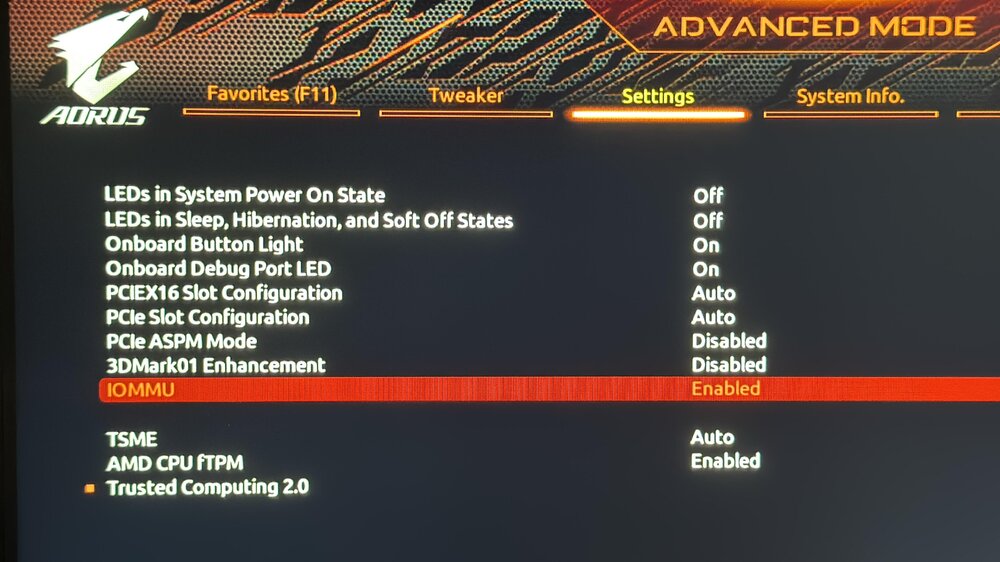
Checked your bios settings in your post, compared to mine I dont think I can see any differences although I am having a hard time finding some of the options in the actual BIOS. I have IOMMU on Enabled, but are there additional settings for it, or is that all?
-
Hi, I did NOT manage to get the LSI working yet, any help would still be greatly appreciated :) Let me know if I can help you further with information on my end. Also interested to find out in which slot you have your LSI. o/
-
I'm trying to use a Fujitsu D3307-A12 HBA (IT Mode, LSI 3008-based) with my Gigabyte X570 Aorus Xtreme (rev 1.1) motherboard, BIOS version F39g. Unraid version: 7.1.2. The HBA is confirmed working: it was tested in a different system (Asus X870E mainboard), where it booted and appeared in both BIOS and OS without issues. In the X570 Aorus Xtreme system (running Unraid), the HBA is not detected: It does not appear in BIOS No splash screen during POST No entry in lspci Status LED on the card stays off I've tested the HBA in all three PCIe x16 slots, without success. All slots are verified working with other devices (e.g. GPUs). BIOS Settings I've tried:CSM: Enabled Above 4G Decoding: Enabled PCIe Slot Configuration: Forced to Gen3 for all relevant slots Fast Boot: Disabled Secure Boot: Disabled SATA/NVMe: Confirmed working independently PCIe ASPM Mode: Tried both Enabled and Disabled Bifurcation: Left on Auto (no RAID/NVMe splitting) IOMMU: Tried both Enabled and Disabled Note: other PCIe cards (GPUs, NICs, etc.) all work in these slots without issue. I've also tested with minimal configuration (only CPU, RAM, PSU, GPU, HBA). PSU is known good. No other PCIe cards installed during the test. Interestingly, when the same HBA is installed in an Asus X870E system running Windows, it boots normally, shows the LSI BIOS splash screen, and is correctly detected by the OS. Is there a known incompatibility with this HBA and the X570 Aorus Xtreme? Are there additional BIOS settings I might be missing to enable compatibility? Thanks in advance. Unraid version: 7.1.2
-
Thanks for all of the answers. Getting a different set of cables fixed the issue
-
I am unsure to be honest, thought there was only 1 type. I have the inter-tech 88885237 cables, tech sheet added below. Drawing_88885237.pdf
-
Hello everyone, Couldnt find any answers that helped browsing the internet so here goes: Trying to get some drives to run on my new unraid server through a LSI SAS 9201-8i card in IT mode with updated firmware through this guide. The drives are working, all are visible when I just use a SATA cable to connect them to the motherboard directly. I have used 2 different breakout cables to check for a single faulty one, but neither will show the drives. I've added the diagnostics zip hoping someone can help me out. If anyone requires additional information please let me know and I will send it asap. Thanks in advance. - Danny tower-diagnostics-20230405-2043.zip
