dhickie
Members
-
Joined
-
Last visited
-
It does indeed appear to have been a faulty drive. After pulling out the data drive, replacing it with a new Ironwolf drive and doing a data rebuild, the new drive is behaving just fine, even with the energy saving features turned on. I have to admit I've not seen this as a failure mode before, but given both the parity and data drives are faulty (bought from the same retailer at the same time), I'm guessing it was a bad batch of drives or they got dropped somewhere in the warehouse. Off for warranty replacement they go.
-
That's my thought as well. I figure it has to be one of (from most likely to least likely): A faulty drive An incompatibility between the motherboard (an Asus Q87M-E) and the Ironwolf drives A fundamental issue with the Ironwolf drives I've just replaced the data drive with another Ironwolf 8TB drive from a different retailer (in case there are bad batches of disks involved), which I'll restore from Parity and retest to see that fixes it. I'll keep my findings documented here for any potential googlers coming this way in future. (I also tried updating the motherboard BIOS to the latest version as it was running one from 2013, which didn't help at all)
-
Hi JorgeB, I've tried disabling EPC and Low Current Spinup on both HDDs and retested, but it has the same issue. Before testing I confirmed that the drives were spinning, and as before it spent 3.5 minutes clacking away before starting to read successfully. I also ran a full Parity check (which ran without any errors), and noticed that both Ironwolf drives did the same thing at the beginning of the check, before settling down to 200-250MB/s read rate and running uneventfully for the remainder of the 10 hour check.
-
SMART report is also attached here, which doesn't appear to show anything wrong with the drive. ST8000VN004-2M2101_WSD9V7EN-20230424-2331.txt
-
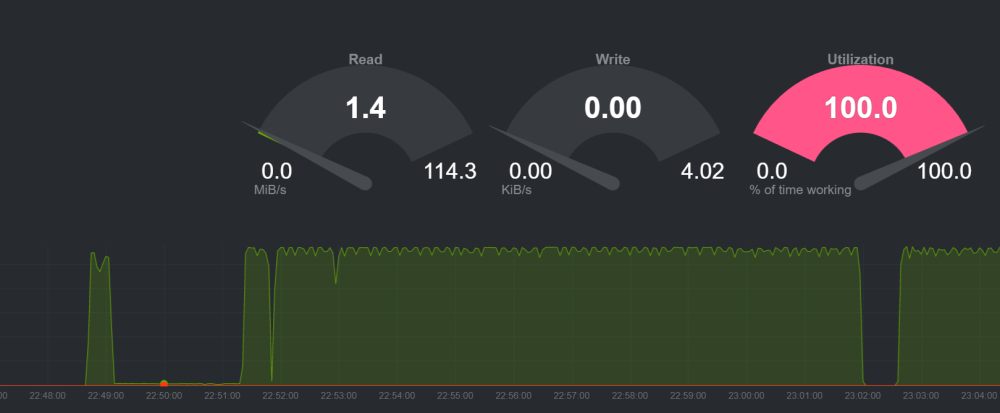
Hi everyone, I'm fairly new to the Unraid world but have a lot of (mostly software based) technical experience. I have a ~1 month old Unraid server which is set up with the following storage: 2 Samsung 870 EVO SSDs in a cache pool 2 Seagate Ironwolf 8TB drives for the array (one parity) I started running in to issues when playing 4K content from my Plex container, where videos would start to buffer shortly after starting. After installing the Netdata container to monitor the system more closely when the issue occurs, I identified the following: When a large (50+ MiB/s) read starts after the drive has had at least 10 minutes idle (but still spinning), the read will work fine for about 30 seconds, before slowing to 1-2 MiB/s While this is happening, Netdata reports that the disk is 100% busy, and the CPU is 40% utilized with IOWAIT After 1-3 minutes, the read rate returns to normal, and the disk utilization returns to a normal level for the rate of data being read The issue won't occur again until the disk has been left idle for at least 10 minutes I can reliably reproduce the issue playing content through Plex, and copying large files off an SMB share. Attached are a screenshot of Netdata showing the disk read rate, on which you can see the long dip at the start while the disk isn't returning data correctly, and a short video I took of the noise the hard drive makes while the issue is occuring. Could it just be as simple as a bad drive out of the box? And if that's likely, are there any tools I can use to confirm that for an RMA? IMG_5937_1.mov