dougnliz
Members
-
Joined
-
Last visited
-
Settings -> Global Share Settings under Cache Settings. You'll need to stop the array to change it.
-
Cleaning up some space on my cache drive and lowering the setting for Min Free Space resolved the Emby Docker stopping problem for me.
-
Well the rsync --sparse finished. The old drive has 2.8TB used and the new one has 2.9TB used. The rsync command said it copied 4.2TB of data. Afterwards I updated to 6.3.3 and ran the reiserfsck on the old drive and it checked out fine, no corruption. I'm not sure what to do next. Do I just go ahead and finish my conversion? Thanks, Doug
-
Thanks for the info. I'm trying the --sparse command first but I really don't think that's the issue. I certainly didn't put them there, but I suppose some process could have. I have a feeling it goes back to some of the corruption issues I had last year with the SAS2LP card and the reiserfsck is going to be the solution, but we'll see. Thanks again, Doug
-
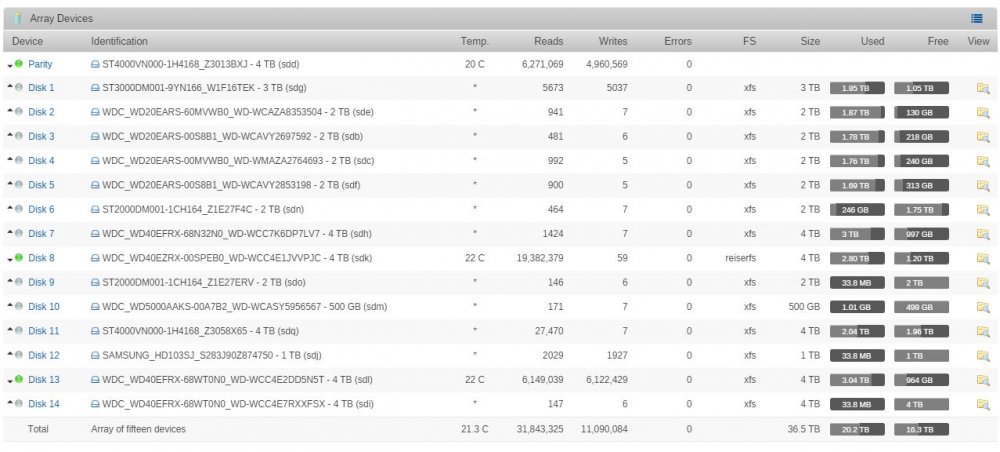
Hey guys, I need some help converting my last reiserfs disk. All the rest have gone fine, but this one is behaving oddly. I'm copying Disk 8 (4TB) to Disk 13 (4TB) using the rsync command in the wiki page. As you can see the it's already copied more data than the array shows the original drive having. I tried this once already and it filled up my 4TB drive and wasn't done yet. The main page tells me the drive is only using 2.8TB, but it fills up a 4TB drive trying to do the copy? What's going on? Below is a pic and enclosed are the diagnostics. tower-diagnostics-20170404-2052.zip