mogball
Members
-
Joined
-
Last visited
-
New NIC solved it. For anyone else running into similar issues and looking for a replacement NIC I went with a TP-Link 3468 which worked on first boot without intervention. Thanks Frank for the reply!
-
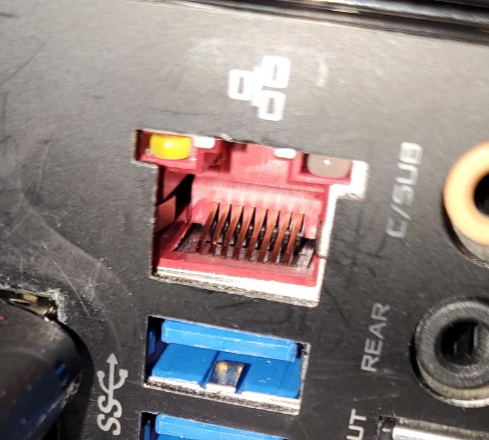
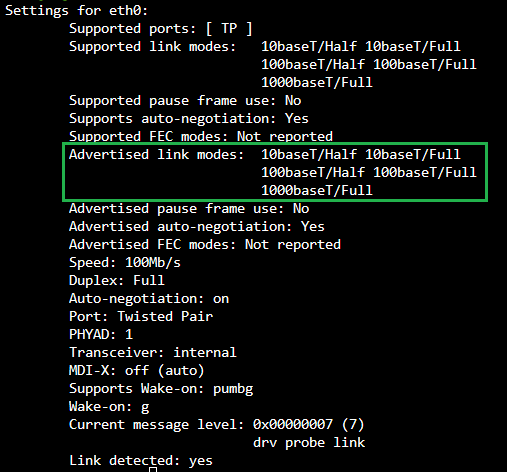
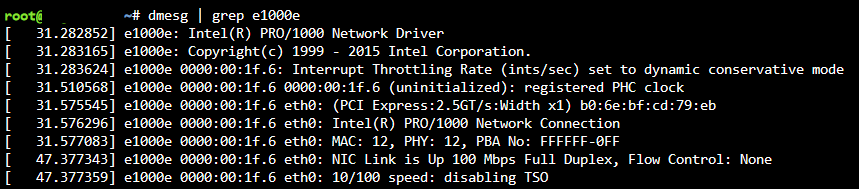
Thanks Frank, I double checked the port and the pins look fine to me: I did notice the two pins on the left looked like they may have had something on them (hard to see in this photo sadly) so I cleaned them with alcohol and I'm still getting 100Mbps. The difference now is it's advertising 1000baseT/Full where it previously didn't (baby steps?): To be safe I tried a couple cables and ports again but same result, 100Mbps. I also tried manually setting the speed via ethtool to 1000 with the following command, but then the interface is "unknown": sudo ethtool -s eth0 autoneg on speed 1000 duplex full I found this post where a user was seeing a downshift in speeds due to a cabling issue, but when I run the same command with my e1000e driver I don't see a similar issue so again I believe the cable/network is fine and something else is the problem. I'm not sure if "dynamic conservative mode" is an issue though: Tomorrow I think I'm going to try grabbing another NIC from a local shop and see if that works out for me. I took a look at the hardware compatibility list but unfortunately there aren't a lot of NIC's available for pickup locally so it'll be a Realtek chip similar to the post I linked earlier. Fingers crossed.
-
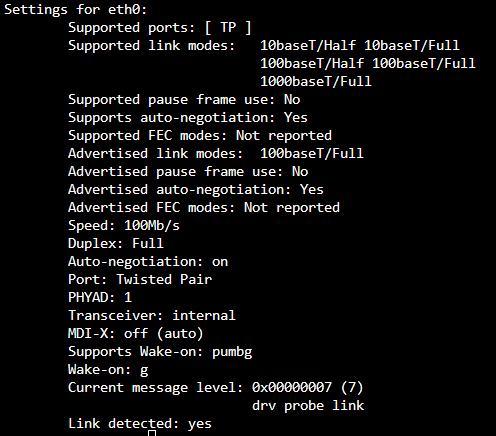
I'm new to Unraid and not the best with linux in general, but I've been searching for a while on a resolution and can't find one. Most posts I've found about this are solved by bad patch cables, switches, or faulty NIC. In my case I've ruled out the following: Tried multiple cables, both Cat5E and Cat6. Current network/port/cable reports 1000Mbps on other gear (Win11 desktop, steamdeck). This server used to be a Windows machine 1 week ago and was running 1000Mbps, so I'm assuming it hasn't corroded in the past 7 days. Pins look to be in place and fine. I have the e1000e driver: Tried manually setting the speed via ethtool at which point the interface is unknown and doesn't get an IP. In the end I always show an advertised link mode of 100baseT/Full even thought 1000baseT/Full is supported: Edit: logs of the NIC being plugged in: I did see a post from a year or two ago mentioning downloading and compiling the e1000e driver and manually installing it, but I've never done that before and in this case it appears to already be in place. Any thoughts?