





kazzaw
Members
-
Joined
-
Last visited
Everything posted by kazzaw
-
Excellent - so I can add disk 7 in now and then just pre-clear the new disk 1 when it rocks up, add it in then run a parity check?
-
Thanks, I've ordered another 16TB drive to replace Disk 1, it should be here shortly. Another question if I may, what would be the most efficient way forward now? I have Disk 7 pre-cleared, if I format it and mount it will it trigger a parity check? The new disk I have coming will need to do a pre-clear first, which will take ~ 1 day, and a parity check takes just under two days. I assume I can't (or shouldn't) run two disk operations (parity check and pre-clear) simultaneously. Can I leave Disk 7 unmounted at the moment, install the new disk, do pre-clear and then run a parity check? Or am I going to have to do two parity checks regardless?
-
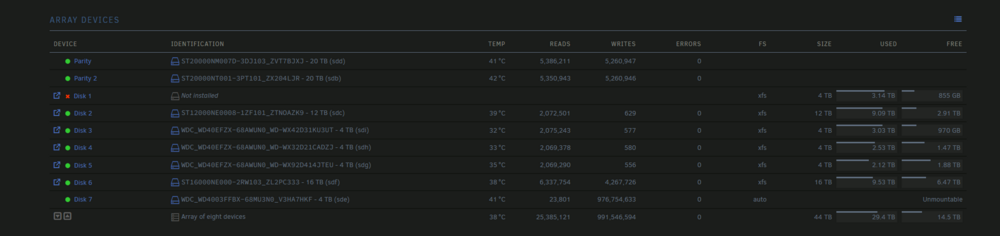
Hi all, Yes, I didn't RTFM. I was wondering my next steps to take. I had a disk go offline - I'm not sure why, but it happened when I ran a duplicacy backup with too many threads - Everything locked up for a good 15 minutes then came back online. While the system was locked up I got a message to tell me the disk was disabled. System came good, did a restart to see if the disk would come back online. It wouldn't. SMART data is fine. Thought that if I moved the disk (Disk 1) to a new drive slot (Disk 7), the disk would come back online and all would be good. Moved the disk, did a preclear and then (yes, wrong order) asked whether I was going down the right path. Since it was a new drive it completed a pre-clear, so now I have my old disk 1 sitting post pre-clear waiting to know what I should do next. I've since learned its not easy to just add/remove drives. I asked on discord and someone very helpful pointed me towards doco regarding deleting a disk - I could in theory do this with disk 7 and then replace the disk back to slot one, but mentioned the information to do the alternative method is outdated now in the new versions of unraid. So now - Is there something I can do to do this easily? I can get a new drive, so I'm contemplating just grabbing a new drive to replace disk 1 with and just mount disk 7 back into the array, but I would like to delay it as i don't 'really' need another 16TB yet. Unraid version 7.0.1. Main page attached
-
OK - I have been playing with this for a while. It appears that its related to the Quadro graphics card. I deleted the original VM (not the disk) and created a new VM without a GPU attached. Manually pointed to old Vdisk or whatever it is called. Booted up fine, able to access. Shut down VM, added GPU, restarted and issue. So the issue was not entirely related to RAM, however I do need to add more. For some reason, whenever the GPU is attached to the VM, it refuses to boot. I have the Quadro graphics card for the VM, and the Intel iGPU (12600) for plex. Never had to click the bind button on the system tool page, but have looked into that now. Still no success. I have left the GPU disconnected from the machine and will await further assistance Update again - Attached GPU, plugged monitor into GPU, for some reason no IP assigned to NIC, assigned IP to VM and all working... All from trying to change the ram from 8gb to 12gb. No idea where it went so wrong.
-
Hi, Updated from 6.11.5 to 6.12.4 and my VM (Windows Server 2019) ran out of memory and now refuses to boot. Manually stopping, restarting unraid, and restarting hasn't helped. When I am going to Start the VM, I get the following error internal error: qemu unexpectedly closed the monitor: 2023-11-30T00:45:39.389306Z qemu-system-x86_64: -device {"driver":"pcie-pci-bridge","id":"pci.7","bus":"pci.1","addr":"0x0"}: Bus 'pci.1' not found This system has a GPU passed through to it. Any assistance? Happy to attach further info - Just let me know what. Thanks flanders-diagnostics-20231130-1123.zip
-
Hi all, I'm attempting to pass through 5x USB Devices (Bus 001 Device 014 Port 1-6.3.3 ID 0bda:2838 Realtek Semiconductor Corp. RTL2838 DVB-T) through to a Windows Server 2019 machine. I've had a look, and I can see some posts about editing syntax etc but this is all very confusing for me and I'm not sure what needs to be edited where. I've looked into Spaceinvaderone's video for a whole controller passthrough, but unfortunately it looks as though my system isn't compatible with this option (does not have a reset flag and IOMMU group is the same for both USB busses). I'm happy to post anything that will assist in helping me get these devices passed through. I'll post an output of the system devices below Thanks IOMMU group 5: [8086:7ae0] 00:14.0 USB controller: Intel Corporation Alder Lake-S PCH USB 3.2 Gen 2x2 XHCI Controller (rev 11) Bus 001 Device 001 Port 1-0 ID 1d6b:0002 Linux Foundation 2.0 root hub Bus 001 Device 002 Port 1-2 ID 174c:2074 ASMedia Technology Inc. ASM1074 High-Speed hub Bus 001 Device 003 Port 1-8 ID 0781:5575 SanDisk Corp. Cruzer Glide Bus 001 Device 004 Port 1-13 ID 26ce:01a2 ASRock LED Controller Bus 001 Device 005 Port 1-4 ID 2109:2813 VIA Labs, Inc. VL813 Hub Bus 001 Device 006 Port 1-4.1 ID 0bda:2838 Realtek Semiconductor Corp. RTL2838 DVB-T Bus 001 Device 007 Port 1-4.3 ID 1d50:60a1 OpenMoko, Inc. Airspy Bus 001 Device 008 Port 1-6 ID 0bda:5411 Realtek Semiconductor Corp. RTS5411 Hub Bus 001 Device 009 Port 1-6.1 ID 2109:2813 VIA Labs, Inc. VL813 Hub Bus 001 Device 010 Port 1-6.3 ID 2109:2813 VIA Labs, Inc. VL813 Hub Bus 001 Device 011 Port 1-6.1.1 ID 0bda:2838 Realtek Semiconductor Corp. RTL2838 DVB-T Bus 001 Device 012 Port 1-6.3.1 ID 0bda:2838 Realtek Semiconductor Corp. RTL2838 DVB-T Bus 001 Device 013 Port 1-6.1.3 ID 0bda:2838 Realtek Semiconductor Corp. RTL2838 DVB-T Bus 001 Device 014 Port 1-6.3.3 ID 0bda:2838 Realtek Semiconductor Corp. RTL2838 DVB-T Bus 002 Device 001 Port 2-0 ID 1d6b:0003 Linux Foundation 3.0 root hub Bus 002 Device 002 Port 2-9 ID 174c:3074 ASMedia Technology Inc. ASM1074 SuperSpeed hub Bus 002 Device 003 Port 2-2 ID 0bda:0411 Realtek Semiconductor Corp. Hub Bus 002 Device 004 Port 2-2.1 ID 2109:0813 VIA Labs, Inc. VL813 Hub Bus 002 Device 005 Port 2-2.3 ID 2109:0813 VIA Labs, Inc. VL813 Hub
