




Skip to content
View in the app

A better way to browse. Learn more.

Unraid

A full-screen app on your home screen with push notifications, badges and more.

To install this app on iOS and iPadOS
  1. Tap the Share icon in Safari
  2. Scroll the menu and tap Add to Home Screen.
  3. Tap Add in the top-right corner.
To install this app on Android
  1. Tap the 3-dot menu (⋮) in the top-right corner of the browser.
  2. Tap Add to Home screen or Install app.
  3. Confirm by tapping Install.

oniisan

Members
  • Joined

  • Last visited

  1. I’m not sure I understand what you mean. Are you referring to the boot device? edit: do you mean i should not be using the tld800c? if so, would you mind making some recommendations? edit 2: i'm seeing that qnap makes a PCIe to SAS interface card. Is that what you're recommending to do? Trying to see if that's most cost effective way to proceed...
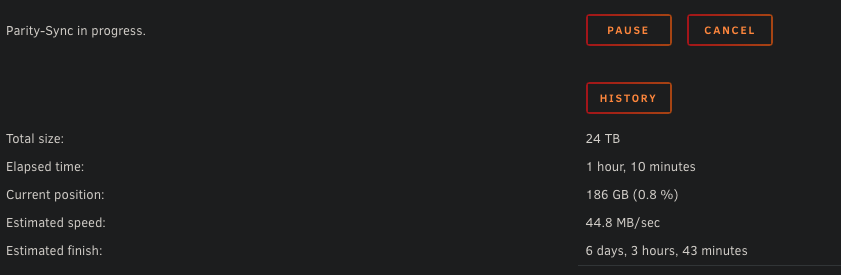
  2. I have 8 discs running in an array with one parity of 24tb. The other 7 discs are of size 14tb x 2, 12tb x 2, 4tb x 2, and 3tb. this is in a qnap tld800c enclosure, using beelink with 128gb cache running unraid. why would my parity sync be running at only <50mb/s? i do not have any docker containers running. tower-diagnostics-20251127-0152.zip
Account

Navigation

Search

Search

Configure browser push notifications

Chrome (Android)
  1. Tap the lock icon next to the address bar.
  2. Tap Permissions → Notifications.
  3. Adjust your preference.
Chrome (Desktop)
  1. Click the padlock icon in the address bar.
  2. Select Site settings.
  3. Find Notifications and adjust your preference.