





snoopsterj
Members
-
Joined
-
Last visited
-
I have used zpool clear and zpool scrub finished earlier this morning. zpool status returns this now: pool: zfs state: ONLINE status: Some supported and requested features are not enabled on the pool. The pool can still be used, but some features are unavailable. action: Enable all features using 'zpool upgrade'. Once this is done, the pool may no longer be accessible by software that does not support the features. See zpool-features(7) for details. scan: scrub repaired 0B in 05:11:00 with 0 errors on Fri Jul 4 00:04:56 2025 config: NAME STATE READ WRITE CKSUM zfs ONLINE 0 0 0 raidz1-0 ONLINE 0 0 0 sde1 ONLINE 0 0 0 sdb1 ONLINE 0 0 0 sdd1 ONLINE 0 0 0 errors: No known data errorsI found another thread where you suggested the user do zpool upgrade and it returns this: This system supports ZFS pool feature flags. All pools are formatted using feature flags. Some supported features are not enabled on the following pools. Once a feature is enabled the pool may become incompatible with software that does not support the feature. See zpool-features(7) for details. Note that the pool 'compatibility' feature can be used to inhibit feature upgrades. POOL FEATURE --------------- zfs zilsaxattr head_errlog blake3 block_cloning vdev_zaps_v2 redaction_list_spill raidz_expansion fast_dedup longname large_microzapI created this zpool with Unraid - do you have any advice on best practices for upgrading ZFS versions? I'm currently on 2.3.1-1 and I'm wary of new releases of any new software. Some of the features seem quite helpful for decreasing resource overhead but my main concern is uptime and data protection/integrity. Thanks!
-
Thank you @JorgeB again for your continuous help. Your diagnosis reminded me of a blog post I came across while in panic mode at the beginning of this saga and I will link it here in case anybody else is using a Jonsbo N1 case: https://ericswpark.com/blog/2025/2025-03-04-i-nearly-lost-my-entire-server/ The case in question has a backplane powered by 2 x molex connectors - which in turn powers 5 x HDDs. I am using a Corsair SF600 Platinum PSU which should give me plenty of overhead but, as the author of the blog theorizes, the one cable that's typically included which goes from the PSU to 4 x molex connectors likely is not high enough gauge for the initial spin-up of the disks and exceeds its rated wattage - albeit temporarily. This could explain why all of a sudden only one of my ZFS drives dropped despite working well for over a year: over-wattage --> heat --> loosening of the cable over time and at some point the contacts come loose - causing a voltage drop and hence dropping a drive. I grabbed the identical cable from a similar Corsair SFX PSU in my main PC and after attaching a total of 2 x PSU to molex connectors to the backplane (for clarity, one molex connector per cable is plugged into the backplane, leaving the respective leftover 3 x molex connectors vacant), all my disks are all green. New syslog.txt seems to show SATA links (with exception of the vacant ones) healthy. I am currently running a parity check with corrections writing unchecked. zpool status returns the following: pool: zfs state: ONLINE status: One or more devices has experienced an unrecoverable error. An attempt was made to correct the error. Applications are unaffected. action: Determine if the device needs to be replaced, and clear the errors using 'zpool clear' or replace the device with 'zpool replace'. see: https://openzfs.github.io/openzfs-docs/msg/ZFS-8000-9P scan: resilvered 8.87M in 00:00:01 with 0 errors on Wed Jul 2 21:01:26 2025 config: NAME STATE READ WRITE CKSUM zfs ONLINE 0 0 0 raidz1-0 ONLINE 0 0 0 sde1 ONLINE 0 0 2 sdb1 ONLINE 0 0 0 sdd1 ONLINE 0 0 2 errors: No known data errorsIn this case, is it safe to use the zpool clear command? Also, will it be safe to begin writing corrections to parity again? New diags attached. diagnostics-20250702-2104.zip
-
@JorgeB apologies for bothering you again. I have been using and monitoring my server for the last few days and it has been very stable. To decrease my odds of encountering the previous data loss scare again, I even put PL1 and PL2 limits of 65W and 125W respectively from the BIOS to ensure the CPU doesn't get too hot - I tested quite thoroughly with the array stopped using the CoreFreq plugin and it didn't skip a beat. Today, I noticed a couple of alerts in the GUI that was something along the lines of disk read error for one of my array disks and another disk that didn't seem to fully match any of my disk serials. They showed up under Unassigned Disks and as I still have the array autostart set to off, I proceeded to safely shutdown. As an additional precaution, I updated my BIOS to the latest version and started up again. This time, it showed that my Zfs disk sde was spundown, so I ran zpool status and got the following: pool: zfs state: ONLINE status: One or more devices are faulted in response to persistent errors. Sufficient replicas exist for the pool to continue functioning in a degraded state. action: Replace the faulted device, or use 'zpool clear' to mark the device repaired. scan: resilvered 2.88T in 06:42:02 with 0 errors on Wed Jun 25 17:22:00 2025 config: NAME STATE READ WRITE CKSUM zfs ONLINE 0 0 0 raidz1-0 ONLINE 0 0 0 sde1 FAULTED 18 124 1 too many errors sdb1 ONLINE 0 0 0 sdd1 ONLINE 0 0 0 errors: No known data errorsI tried zfs list and all the paths seem to show up fine. Could you please advise next steps? Last time it was sdb that had the txg mismatch. Diags attached. Thank you again so much - I've enabled signatures now and will be sending a thank you your way! diagnostics-20250630-2247.zip
-
Hi @JorgeB , I am pleased to report that everything seems to be back to where it was after the array rebuild and zfs resilvering. The only remaining questions I might have are 1) whether I should enable Write corrections to parity or run a check first with it disabled and 2) what you theorize may have led to both the array disk1 and zfs disk dropping and if there is anything else I can do to minimize chances of this happening again. Otherwise, I've marked this topic as solved. Thank you for your patience, concise instructions, and just your general prolific force in these forums. It boggles my mind how you're able to write the replies with such great speed, frequency, and clarity despite helping multiple users at once. Please let me know if there's any tangible way I can recognize your efforts - god knows you've alleviated a lot of stress for me and others before. I love this community and I'll do my best to give back with my limited knowledge!
-
Perfect - I used Midnight Commander and it looks good. I have removed the pool, unassigned disk1, and started the array. New diags attached. diagnostics-20250625-0942.zip
-
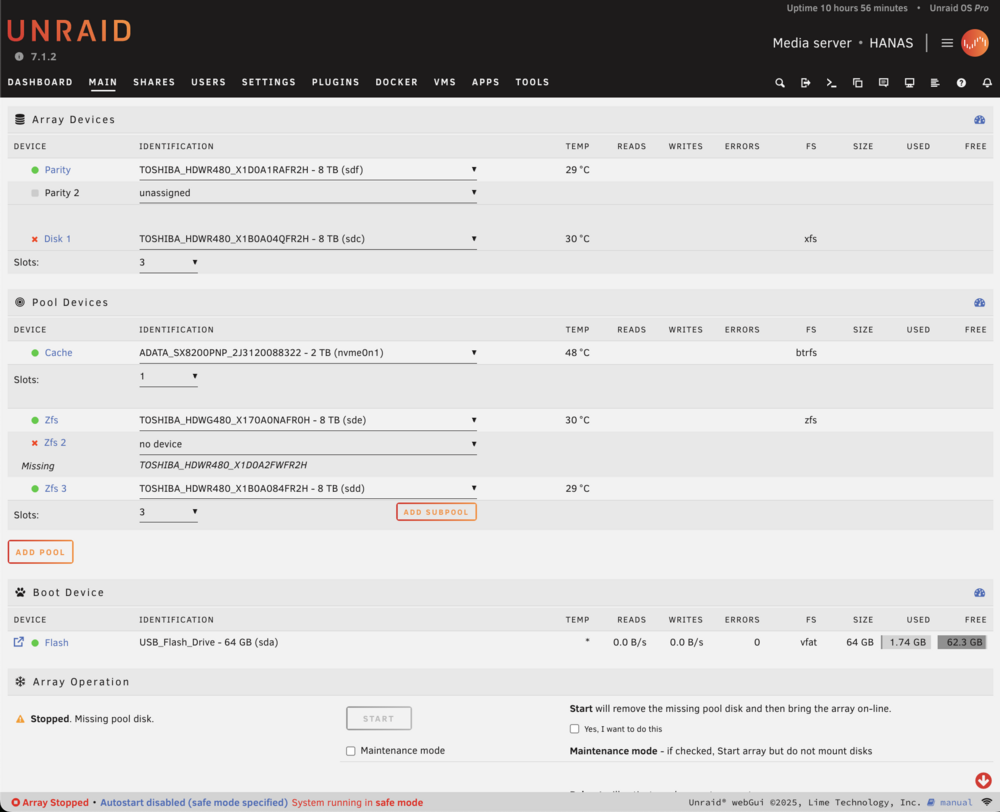
Is there any way to view ZFS shares/directory/structure without mounting the array? I ask because I am a beginner to ZFS datasets and my most important files is the Pictures share, of which I want to be fully certain I can recover before wiping anything. Looking at the list below, I am uncertain now how the Pictures share was setup, though I am sure it was on the ZFS pool as confirmed in my diagnostics files. I used the command zfs list and it returned the following: zfs 5.76T 8.65T 3.76T /mnt/zfs zfs/Documents 2.35G 8.65T 2.35G /mnt/zfs/Documents zfs/Immich 457G 8.65T 457G /mnt/zfs/Immich zfs/Paperless 54.2M 8.65T 54.2M /mnt/zfs/Paperless zfs/Projects 471G 8.65T 471G /mnt/zfs/Projects zfs/Receipts 6.18M 8.65T 6.18M /mnt/zfs/Receipts zfs/Time Machine 1016G 8.65T 1016G /mnt/zfs/Time Machine zfs/Unraid Backup 101G 8.65T 101G /mnt/zfs/Unraid Backup zfs/appdata 128K 8.65T 128K /mnt/zfs/appdata zfs/domains 128K 8.65T 128K /mnt/zfs/domains zfs/iCloud 128K 8.65T 128K /mnt/zfs/iCloud zfs/nextcloud 9.63M 8.65T 9.63M /mnt/zfs/nextcloud zfs/nextcloud-backup 128K 8.65T 128K /mnt/zfs/nextcloud-backup zfs/system 128K 8.65T 128K /mnt/zfs/systemThe above appears to match my diagnostics /system/df.txt file - is this what you mean by verifying pool contents or is there more I can do to verify? I have attached a screenshot of the current GUI. I will remain in safe mode until explicitly advised to do otherwise - but is it correct to say that my screenshot indicates to having followed your instructions correctly and that the next step will be to bring the array online? Note that Disk 1 in the array is still disabled - this was the one showing millions of errors. If I need to bring the array online to begin resilvering the ZFS pool, please advise on how best to approach fixing Disk 1 as I imagine the parity check will be launched as soon as the array is started. Thank you again.
-
Thank you for the caution and commands - looks like it worked and zpool status returns the following: pool: zfs state: DEGRADED status: One or more devices could not be used because the label is missing or invalid. Sufficient replicas exist for the pool to continue functioning in a degraded state. action: Replace the device using 'zpool replace'. see: https://openzfs.github.io/openzfs-docs/msg/ZFS-8000-4J config: NAME STATE READ WRITE CKSUM zfs DEGRADED 0 0 0 raidz1-0 DEGRADED 0 0 0 sde1 ONLINE 0 0 0 13346540553548002612 UNAVAIL 0 0 0 was /dev/sdc1 sdd1 ONLINE 0 0 0 errors: No known data errorsPlease advise on the proper procedure to re-online and replace - I read the linked doc but lack the confidence due to the risk of further data loss. Your ongoing help is much appreciated @JorgeB!
-
pool: zfs id: 7309137661249448615 state: FAULTED status: One or more devices contains corrupted data. action: The pool cannot be imported due to damaged devices or data. The pool may be active on another system, but can be imported using the '-f' flag. see: https://openzfs.github.io/openzfs-docs/msg/ZFS-8000-5E config: zfs FAULTED corrupted data raidz1-0 DEGRADED sde1 ONLINE sdc1 UNAVAIL sdd1 ONLINE
-
------------------------------------ LABEL 0 ------------------------------------ version: 5000 name: 'zfs' state: 0 txg: 12890430 pool_guid: 7309137661249448615 errata: 0 hostname: 'HANAS' top_guid: 14933383044364559588 guid: 14735230153452969955 vdev_children: 1 vdev_tree: type: 'raidz' id: 0 guid: 14933383044364559588 nparity: 1 metaslab_array: 256 metaslab_shift: 34 ashift: 12 asize: 24004675239936 is_log: 0 create_txg: 4 children[0]: type: 'disk' id: 0 guid: 3043909946775875430 path: '/dev/sdf1' whole_disk: 0 create_txg: 4 children[1]: type: 'disk' id: 1 guid: 13346540553548002612 path: '/dev/sdc1' whole_disk: 0 create_txg: 4 children[2]: type: 'disk' id: 2 guid: 14735230153452969955 path: '/dev/sdd1' whole_disk: 0 create_txg: 4 features_for_read: com.delphix:hole_birth com.delphix:embedded_data labels = 0 1 2 3 ------------------------------------ LABEL 0 ------------------------------------ version: 5000 name: 'zfs' state: 0 txg: 12890430 pool_guid: 7309137661249448615 errata: 0 hostname: 'HANAS' top_guid: 14933383044364559588 guid: 3043909946775875430 vdev_children: 1 vdev_tree: type: 'raidz' id: 0 guid: 14933383044364559588 nparity: 1 metaslab_array: 256 metaslab_shift: 34 ashift: 12 asize: 24004675239936 is_log: 0 create_txg: 4 children[0]: type: 'disk' id: 0 guid: 3043909946775875430 path: '/dev/sdf1' whole_disk: 0 create_txg: 4 children[1]: type: 'disk' id: 1 guid: 13346540553548002612 path: '/dev/sdc1' whole_disk: 0 create_txg: 4 children[2]: type: 'disk' id: 2 guid: 14735230153452969955 path: '/dev/sdd1' whole_disk: 0 create_txg: 4 features_for_read: com.delphix:hole_birth com.delphix:embedded_data labels = 0 1 2 3 ------------------------------------ LABEL 0 ------------------------------------ version: 5000 name: 'zfs' state: 1 txg: 12891656 pool_guid: 7309137661249448615 errata: 0 hostname: 'HANAS' top_guid: 14933383044364559588 guid: 13346540553548002612 vdev_children: 1 vdev_tree: type: 'raidz' id: 0 guid: 14933383044364559588 nparity: 1 metaslab_array: 256 metaslab_shift: 34 ashift: 12 asize: 24004675239936 is_log: 0 create_txg: 4 children[0]: type: 'disk' id: 0 guid: 3043909946775875430 path: '/dev/sdf1' whole_disk: 0 create_txg: 4 children[1]: type: 'disk' id: 1 guid: 13346540553548002612 path: '/dev/sdc1' whole_disk: 0 create_txg: 4 children[2]: type: 'disk' id: 2 guid: 14735230153452969955 path: '/dev/sdd1' whole_disk: 0 DTL: 1152 create_txg: 4 features_for_read: com.delphix:hole_birth com.delphix:embedded_data labels = 0 1 2 3
-
pool: zfs id: 7309137661249448615 state: FAULTED status: The pool metadata is corrupted. action: The pool cannot be imported due to damaged devices or data. see: https://openzfs.github.io/openzfs-docs/msg/ZFS-8000-72 config: zfs FAULTED corrupted data raidz1-0 ONLINE sdd1 ONLINE sde1 ONLINE sdb1 ONLINEI've read in some of the other topics you've helped people with that this isn't a good sign... Thank you @JorgeB for your tireless efforts and appreciate your advice on any and all possible solutions to recover the data.
-
Backstory: I have used Unraid for over a year now and have loved every second of it. I have a 1 parity 1 disk array for media and non-essential files as well as a raidz1 ZFS pool of 3 disks for essential, non-replaceable files. I began building a secondary server to do a full ZFS backup and recently upgraded mobo/CPU/RAM to a 13600K 64GB build and put the older parts into the new build. It definitely runs hotter than the 11700K that was in it originally and I had been trying settings in the BIOS to decrease the thermals a little bit. After leaving for a trip I came back to my server's HDMI output frozen on the CLI. Summer temperatures had increased quite a bit and without me present to turn on the AC, I think it may have temperature throttled and frozen - with no other way to clean shutdown, I had to do an unclean one. Upon boot, I noticed that the array's disk 1 had the "disk disabled, contents emulated" warning. Reading the docs, as my parity drive was green I followed the instructions to stop the array, unassign disk 1, start the array, stop the array, reassign disk 1, and allow the rebuild. As the rebuild occurred, I noticed that there were hundreds of thousands of errors detected - regardless, I allowed that to finish. At this stage, my ZFS pool still appeared accessible. After completion, I clean shutdown the server. I had read that when an anomalous amount of errors show up, it could be a power/cable issue. So, I tried a different power supply and swapped around the same SATA cables. On boot, disk 1 still had the red x next to it with "disk disabled, contents emulated". As the parity check began, it was now throwing millions of errors - on top of that the ZFS pool was now showing "unmountable filesystem". Worried that continuing on would make the situation worse, I stopped the parity check. I did short SMART tests on every drive and all of them show no errors present. I have also tried to reset the BIOS settings to default and start Unraid in safe mode. The errors are still present, so for fear of making things worse, I have had the server off ever since. Summary: After what I assume was a temperature-related freeze that forced me to do an unclean shutdown, my array disk began to throw an unfathomable amount of errors and my ZFS pool now has the "unmountable filesystem" error. Aside from the attempted rebuild of the array disk, no disks were added or removed at any point. I have read some topics in the forums about the ZFS "unmountable filesystem" message and I am preparing for the worst as I was not able to make a complete backup. I am willing to try anything to recover those files, particularly in the ZFS pool. The only things I have not tried yet are new SATA cables, new PSU cables, or to try the drives in a completely different system - afraid to make matters worse, I ask for your guidance on what to attempt. Attached are the only diagnostics I have from the incident until now - 1) before and 2) after the ZFS pool error. Thank you so much. diagnostics-20250618-1914.zip diagnostics-20250619-2241.zip
