





FarmerPete
Members
-
Joined
-
Last visited
Everything posted by FarmerPete
-
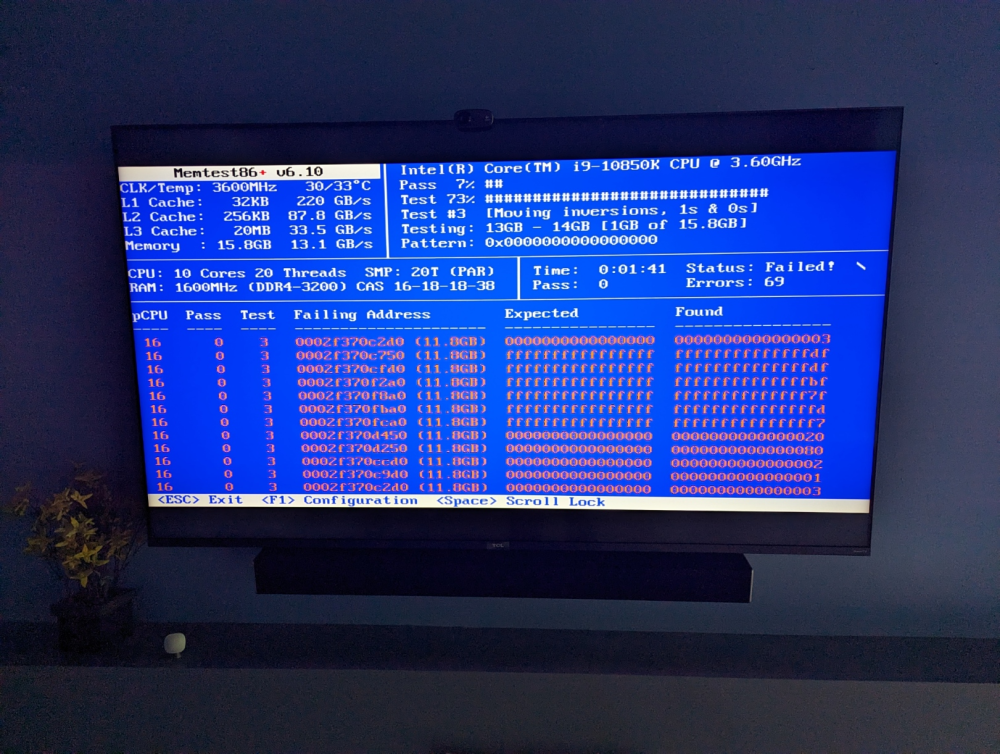
Memtest86+ lit up like a christmas tree. Moved the two sticks around and tried scanning each stick individually and I seem to have narrowed it down to one of the specific sticks of memory. Currently running the server on 16GB (shut down my windows VM to give some breathing room). I have a feeling GSkill is going to want me to send in both sticks for RMA/Warranty, but I don't think I can survive having no server for that long. I hate to throw more money at GSkill till I find out how the warranty work goes, but the best option is probably to buy an identical pair ($65) and then once I get the RMA stuff back, I can up the server to 64GB. Hopefully this is fully caused by faulty memory. It's been a LONG time since I've had a stick of memory go bad on me this far into it's life without some kind of outside influence. This PC was built in August of 21, and other than a corrupted cache drive, it was pretty much flawless the first year. Issues seem to be accelerating, but that might be because I've been putting more demand on the RAM as of late.
-
I rebooted and left it running for a little while. Came back and it appeared that it broke quickly. I rebooted a second time and it's been running a few hours and so far hasn't broken. I took two grabs, the 1054 is the one where the shares were gone. The 1320 is the ones where it appears to be working, but like I said, it often would go for hours/days between failures. farmerraid-diagnostics-20230428-1054.zip farmerraid-diagnostics-20230428-1320.zip
-
Not sure if this did anything. Ran it with just -v and it still went pretty quickly through. Phase 1 - find and verify superblock... - block cache size set to 1470472 entries Phase 2 - using internal log - zero log... zero_log: head block 771040 tail block 771040 - scan filesystem freespace and inode maps... - found root inode chunk Phase 3 - for each AG... - scan and clear agi unlinked lists... - process known inodes and perform inode discovery... - agno = 0 - agno = 1 - agno = 2 - agno = 3 - agno = 4 - agno = 5 - agno = 6 - agno = 7 - agno = 8 - agno = 9 - agno = 10 - agno = 11 - agno = 12 - agno = 13 - agno = 14 - agno = 15 - process newly discovered inodes... Phase 4 - check for duplicate blocks... - setting up duplicate extent list... - check for inodes claiming duplicate blocks... - agno = 2 - agno = 3 - agno = 7 - agno = 1 - agno = 10 - agno = 6 - agno = 9 - agno = 8 - agno = 11 - agno = 12 - agno = 13 - agno = 14 - agno = 15 - agno = 4 - agno = 5 - agno = 0 Phase 5 - rebuild AG headers and trees... - agno = 0 - agno = 1 - agno = 2 - agno = 3 - agno = 4 - agno = 5 - agno = 6 - agno = 7 - agno = 8 - agno = 9 - agno = 10 - agno = 11 - agno = 12 - agno = 13 - agno = 14 - agno = 15 - reset superblock... Phase 6 - check inode connectivity... - resetting contents of realtime bitmap and summary inodes - traversing filesystem ... - agno = 0 - agno = 1 - agno = 2 - agno = 3 - agno = 4 - agno = 5 - agno = 6 - agno = 7 - agno = 8 - agno = 9 - agno = 10 - agno = 11 - agno = 12 - agno = 13 - agno = 14 - agno = 15 - traversal finished ... - moving disconnected inodes to lost+found ... Phase 7 - verify and correct link counts... XFS_REPAIR Summary Fri Apr 28 07:46:53 2023 Phase Start End Duration Phase 1: 04/28 07:45:53 04/28 07:45:53 Phase 2: 04/28 07:45:53 04/28 07:45:55 2 seconds Phase 3: 04/28 07:45:55 04/28 07:46:24 29 seconds Phase 4: 04/28 07:46:24 04/28 07:46:24 Phase 5: 04/28 07:46:24 04/28 07:46:29 5 seconds Phase 6: 04/28 07:46:29 04/28 07:46:52 23 seconds Phase 7: 04/28 07:46:52 04/28 07:46:52 Total run time: 59 seconds done
-
Ran xfs_repair -vn and came back with no errors on disk 4. (or any of the other disks) Phase 1 - find and verify superblock... - block cache size set to 1470472 entries Phase 2 - using internal log - zero log... zero_log: head block 771015 tail block 771015 - scan filesystem freespace and inode maps... - found root inode chunk Phase 3 - for each AG... - scan (but don't clear) agi unlinked lists... - process known inodes and perform inode discovery... - agno = 0 - agno = 1 - agno = 2 - agno = 3 - agno = 4 - agno = 5 - agno = 6 - agno = 7 - agno = 8 - agno = 9 - agno = 10 - agno = 11 - agno = 12 - agno = 13 - agno = 14 - agno = 15 - process newly discovered inodes... Phase 4 - check for duplicate blocks... - setting up duplicate extent list... - check for inodes claiming duplicate blocks... - agno = 0 - agno = 2 - agno = 5 - agno = 3 - agno = 6 - agno = 13 - agno = 1 - agno = 8 - agno = 10 - agno = 7 - agno = 11 - agno = 12 - agno = 15 - agno = 9 - agno = 14 - agno = 4 No modify flag set, skipping phase 5 Phase 6 - check inode connectivity... - traversing filesystem ... - agno = 0 - agno = 1 - agno = 2 - agno = 3 - agno = 4 - agno = 5 - agno = 6 - agno = 7 - agno = 8 - agno = 9 - agno = 10 - agno = 11 - agno = 12 - agno = 13 - agno = 14 - agno = 15 - traversal finished ... - moving disconnected inodes to lost+found ... Phase 7 - verify link counts... No modify flag set, skipping filesystem flush and exiting. XFS_REPAIR Summary Thu Apr 27 09:19:40 2023 Phase Start End Duration Phase 1: 04/27 09:18:47 04/27 09:18:47 Phase 2: 04/27 09:18:47 04/27 09:18:50 3 seconds Phase 3: 04/27 09:18:50 04/27 09:19:17 27 seconds Phase 4: 04/27 09:19:17 04/27 09:19:17 Phase 5: Skipped Phase 6: 04/27 09:19:17 04/27 09:19:40 23 seconds Phase 7: 04/27 09:19:40 04/27 09:19:40 Total run time: 53 seconds
-
I've been having pretty frustrating experience with unRaid recently. It was working incredibly solid for a long time, but recently it keeps crashing. My experience is that all of a sudden, all of my shares go POOF, then dockers can't work because they cannot get to the shares. My VMs will typically work a little longer, but eventually they fail. If I don't get to the server, before too long I cannot connect to it remotely at all and have to power cycle it. Things I've tried: I've recreated my docker.img fairly recently, after this has started. My plex database got corrupted so I had to wipe it and start fresh with Plex. I've tried keeping any of my more complex VMs or dockers shut down to see if I can track the issues to one in particular, but no luck. Sometimes it will run perfect for a week, and then other times (like today) I rebooted this morning around 7am and my shares went poof around 3:20pm. I've run extended smart checks on all the drives and everything came back happy. I'm just about at my wits end. I really don't want to rebuild unRAID but I feel like I'm getting to that point. I grabbed the logs from when it broke today, so you should see exactly when it happened. I had upgraded a couple docker images and then maybe 5-10 minutes later my PC said that my backup share was offline and I connected and my "Shares" tab was blank. I know a reboot will "fix" things, but I'd really rather not do that. farmerraid-diagnostics-20230425-1519.zip

