





Gimletho
Members
-
Joined
-
Last visited
-
I don´t know how but now mount button is active and can mount the disk. I think that I solved the problem when stop and start again the array. Perhaps was casuality, I don't know but now works. Thanks!
-
Done but continue greyOther problem now... Mount button is grey. I have remove pre clear log and clear the disk (XFS filesystem).
 BINGO! Solved clearing disk. Thank you much for your great help.Thank you. I'm going to try learn how I must do thisI tried formatting in UD at first but the filesystem did not change and linux_raid_member continued to be the filesystem. The disk was not possible to mount. My only option was pass through to a VM and this is the reason for formatting from VM. I hope that my bad English can be enough to make me understandIt's mounted in the VM for testing purpose. The VM is stopped now. I don't know if is important but the reason I did format the disk is because the filesystem was linux_raid_member. I used this disk in a Synology NAS (caché).Thank you for your help. I did format with xfs (sudo mkfs.xfs /dev/vdb)
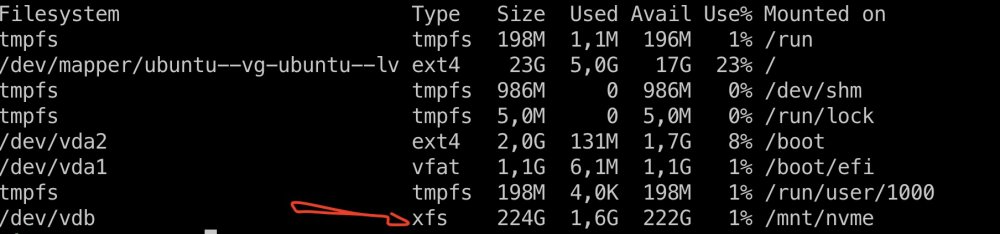 My settings icon is missing. After format the disk from an VM the settings icon is not show. I wish turn off "passed through" and mount the disk. Someone can help me please?


