nmur
Members
-
Joined
-
Last visited
Everything posted by nmur
-
Thanks for the quick reply. I do not have a heatsink (yet). I didn't think that even while idle it would overheat, but seems like I should take a look into it. I have seen that a few of the PCI modules have had replacement issues, so I may reach out to the maker to see what they think
-
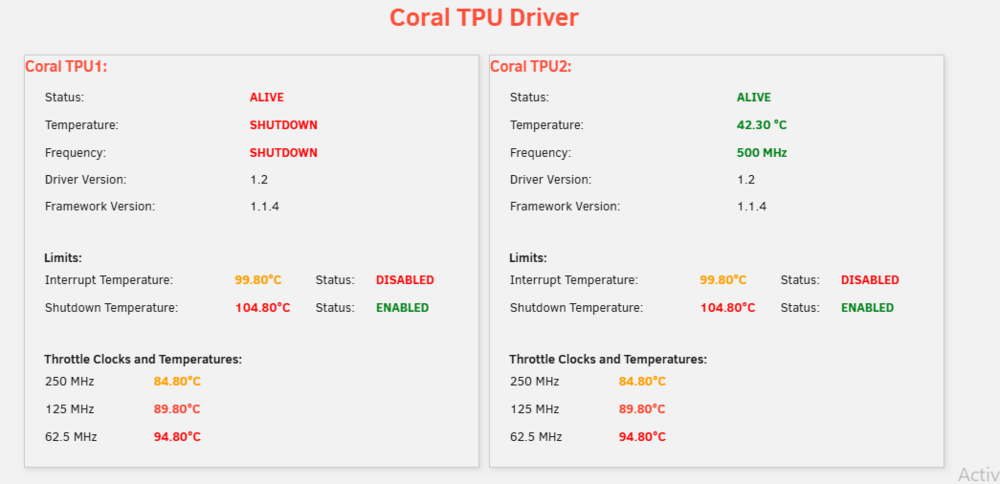
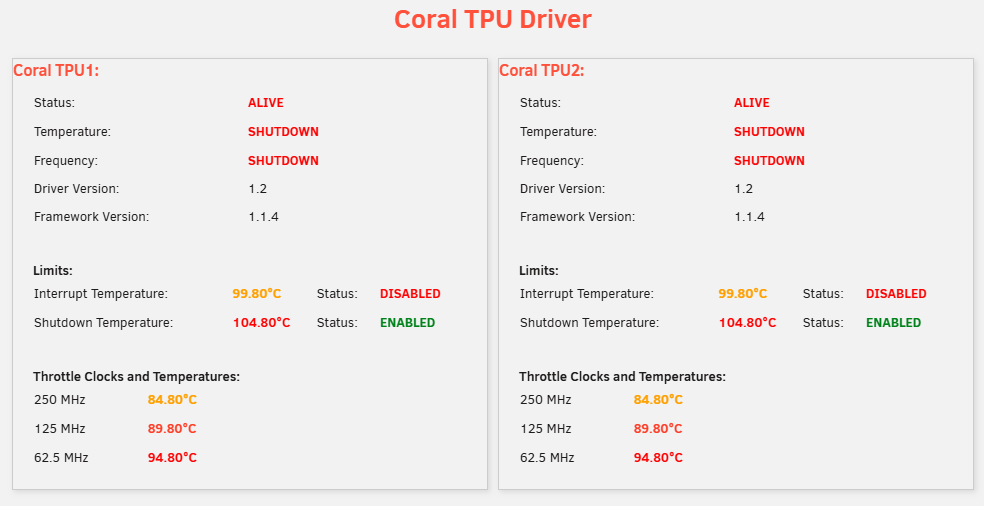
Tried installing a Coral M.2 with the Dual Edge TPU PCIe x1 Adapter, and have been finding that it crashes my entire system in under a minute or so after installing the Coral plugin. Looking at the plugin page shows that it's overheating pretty fiercely, despite nothing being configured to utilise it. Immediately after the machine is shutdown, the Coral TPU feels barely warm. Does this look like it could be a faulty Coral unit? Plugin page after installing plugin: Plugin page after around 30 seconds and immediately before system crashes: Jul 30 00:51:58 Tower plugin-manager: running: 'anonymous' Jul 30 00:51:58 Tower plugin-manager: creating: /boot/config/plugins/coral-driver/coral-driver-2025.03.25.txz - downloading from URL https://github.com/unraid/unraid-coral-driver/raw/master/packages/coral-driver-2025.03.25.txz Jul 30 00:51:58 Tower plugin-manager: checking: /boot/config/plugins/coral-driver/coral-driver-2025.03.25.txz - MD5 Jul 30 00:51:58 Tower plugin-manager: running: upgradepkg --install-new /boot/config/plugins/coral-driver/coral-driver-2025.03.25.txz Jul 30 00:51:59 Tower plugin-manager: creating: /usr/local/emhttp/plugins/coral-driver/README.md - from INLINE content Jul 30 00:51:59 Tower plugin-manager: running: 'anonymous' Jul 30 00:52:02 Tower kernel: apex 0000:08:00.0: enabling device (0000 -> 0002) Jul 30 00:52:03 Tower kernel: apex 0000:09:00.0: enabling device (0000 -> 0002) Jul 30 00:52:04 Tower plugin-manager: coral-driver.plg installed Jul 30 00:52:09 Tower kernel: apex 0000:09:00.0: Apex performance not throttled due to temperature Jul 30 00:52:09 Tower kernel: apex 0000:08:00.0: Apex performance not throttled due to temperature Jul 30 00:52:14 Tower kernel: apex 0000:08:00.0: Apex performance not throttled due to temperature Jul 30 00:52:19 Tower kernel: apex 0000:08:00.0: Apex performance not throttled due to temperature Jul 30 00:52:24 Tower kernel: apex 0000:08:00.0: Apex performance not throttled due to temperature Jul 30 00:52:29 Tower kernel: apex 0000:08:00.0: Apex performance not throttled due to temperature Jul 30 00:52:34 Tower kernel: apex 0000:08:00.0: Apex performance not throttled due to temperature Jul 30 00:52:40 Tower kernel: apex 0000:08:00.0: Apex performance not throttled due to temperature Jul 30 00:52:45 Tower kernel: apex 0000:08:00.0: Apex performance not throttled due to temperature Jul 30 00:52:45 Tower kernel: apex 0000:09:00.0: Apex performance not throttled due to temperature