





Dustin22
Members
-
Joined
-
Last visited
-
Ich habe mich dazu entschieden den PIN abzukleben. War die einfachste Variante, hatte auch noch die passende "Folie" parat. Wie gesagt danke nochmal für deine Hilfe. Und wünsche euch ein schönes Rest Wochenende!
-
Ich habe den Fehler gefunden... Aufgrund der Tatsache das es sich um eine White gelabelte Variante handelte musste man die 3.3V deaktivieren welche die Festplatte deaktiviert sobald die anliegt. Habe mich an das folgende Tutorial gehalten und die Festplatte wurde sofort erkannt: @Ford Prefect Vielen Dank für deine Hilfe! Sehr interessant dass das bei mein QNAP NAS nicht benötigt wurde aber jetzt bei dem Unraid Rechner. Gruß Dustin
-
Das SATA-Daten Kabel ist das selbe wo die WD Green im Test funktionierte. Woher genau die Festplatte ist weiß ich nicht ganz genau, glaub war aus einen WD Book oder WD Home... Aber ja war aus ein USB Gehäuse von WD. Und ja ich höre beim Starten wie die HDD hochfährt und man fühlt ein leichtes "vibrieren" im Betrieb. Gruß Dustin
-
Sorry Begrifflichkeiten durcheinander gebracht: Ich habe jetzt aber den Molex = SATA Strom Adapter entfernt. Die Festplatte ist nun am direkten SATA-Stromanschluss aus dem NT angeschlossen. Das Netzteil ist nagelneu und es handelt sich um ein VeroL3 500W, ist kein Markenmodell aber auch kein China Böller meines Wissens. Ich habe jetzt auch mal eine alte 2 TB WD Green ausgegraben angeschlossen und die wird sofort erkannt. Also direkt wieder abgeklemmt und an den selben Steckern die WD WD80EZAZ angeschlossen, leider ohne Erfolg. Also irgendwas hat mein System was gegen die WD WD80EZAZ Gruß Dustin
-
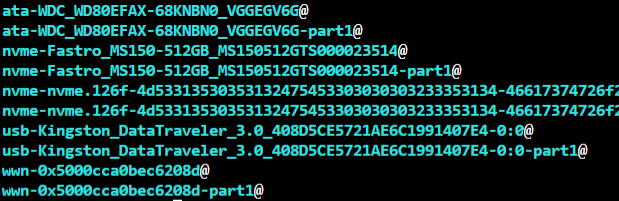
Leider wird sie dort ebenfalls nicht aufgeführt. Bei den ersten beiden Einträgen handelt es sich um meine Disk 1. Die nächsten 4 Einträge sind meine SSD Cache, danach die zwei der USB Datenträger. Die letzten beiden kann ich mir ehrlich gesagt nicht erklären. Es handelt sich um eine Western Digital WD80EZAZ. Es wird ein Molex zu SATA Adapter verwendet aber übers selbe SATA Kabel läuft auch die erste Festplatte einwandfrei. Gibts da eine Begrenzung wie viele Festplatten man maximal anschließen sollte? Gruß Dustin
-
Guten Abend, ich bin seit dieser Woche stolzer Besitzer eines Unraid Systems. Ich bin bis jetzt super begeistert aber ich habe leider jetzt schon das erste Problem: Ich habe zu Beginn mit einer einzigen HDD und eine SSD fürs Cache gestartet weil ich erst die alten Platten leer machen musste. Nun wollte ich die zweite HDD ins Array einbinden aber egal was ich mache sie taucht nicht in UnRaid unten den Array Devices auf. Auch über das Terminal mit /lsblk finde ich die Festplatte nicht. Habs mit exFat, NTFS oder komplett ohne Dateisystem versucht, bei allen kein Erfolg. Schließe ich aber z.B. die Festplatte an mein Windows Rechner an wird sie in der Computerverwaltung gefunden. Ebenfalls an meinen Laptop per USB nur nicht bei meinen Unraid System.Auch in meinen alten QNAP NAS lief die Festplatte einwandfrei. Auch mit dem Plugin Unassigned Devices (Plus) finde ich die Festplatte nicht. Habt ihr vielleicht Ideen woran das liegen könnte? PS: Ich hoffe nicht das die Frage net tagtäglich kommt und ich es übersehen habe Danke! Gruß Dustin


