





doug-kasper
Members
-
Joined
-
Last visited
-
I have a line in the vm's `/etc/fstab/` file 192.168.50.117:/mnt/user/Linux-Share /home/user nfs defaults 0 0 There issue I've been having is the permissions on the NFS share through unraid is the `all_squash` line in the `/etc/exports` on the Unraid server. This squashes the owner id's to 100, 99 on the `/home/user` directory of the VM. A temporary fix is to manually change the Unraid's settings to `no_root_squash`, but this isn't persistent across rebooting, even ignoring the bad practice of manually editing like that. All files and folders in the `/mnt/user/Linux-Share` folder on the Unraid machine have the proper owner id's as the VM files. Is it possible to change the NFS mount through the Unraid interface to make this persistent or allow the VM nfs mount to remap the id's?
-
In the folder, there are two log folders, one php and the other is nginx. The one in php has its only entries from before the issue I'm having. The other folder, nginx, has the error log file which has its only entry as a network timeout and the access file is attached. I was not sure which logs would contain more information. Other info is the mariadb is on port 3307 and the nextcloud is on port 440. unraid_log.txt
-
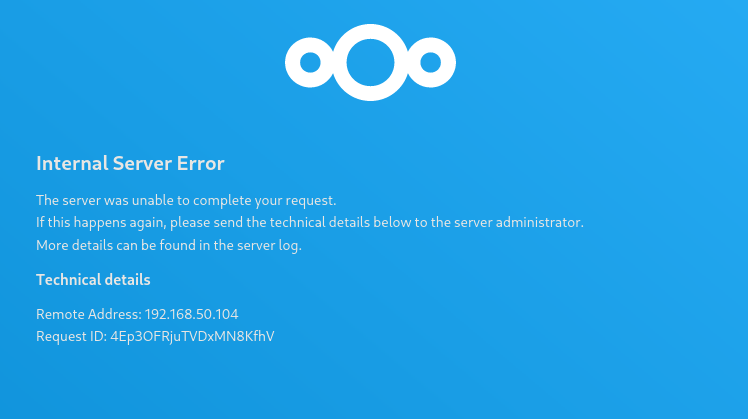
I was following the spaceinvaderone video with the linuxserver repositories for mariadb and nextcloud. I get past the first step of the webui where I specify the database user and password with mysql but then when it attempts to log in, it cuts to the attached image of the screen I looked in the maraidb logs, and didn't see anything that stood out to me, ``` cp: not replacing '/config/custom.cnf' UMASK must be a 3-digit mode with an additional leading 0 to indicate octal. The first digit will be corrected to 6, the others may be 0, 2, 4, or 6. [migrations] started [migrations] no migrations found ─────────────────────────────────────── ██╗ ███████╗██╗ ██████╗ ██║ ██╔════╝██║██╔═══██╗ ██║ ███████╗██║██║ ██║ ██║ ╚════██║██║██║ ██║ ███████╗███████║██║╚██████╔╝ ╚══════╝╚══════╝╚═╝ ╚═════╝ Brought to you by linuxserver.io ─────────────────────────────────────── To support LSIO projects visit: https://www.linuxserver.io/donate/ ─────────────────────────────────────── GID/UID ─────────────────────────────────────── User UID: 99 User GID: 100 ─────────────────────────────────────── [custom-init] No custom files found, skipping... UMASK corrected from 022 to 0640 ... 230827 22:55:40 mysqld_safe Logging to '/config/databases/e1f77a92a2e7.err'. 230827 22:55:40 mysqld_safe Starting mariadbd daemon with databases from /config/databases [ls.io-init] done.``` I checked the nextcloud logs as well and saw similar content ``` ─────────────────────────────────────── ██╗ ███████╗██╗ ██████╗ ██║ ██╔════╝██║██╔═══██╗ ██║ ███████╗██║██║ ██║ ██║ ╚════██║██║██║ ██║ ███████╗███████║██║╚██████╔╝ ╚══════╝╚══════╝╚═╝ ╚═════╝ Brought to you by linuxserver.io ─────────────────────────────────────── To support LSIO projects visit: https://www.linuxserver.io/donate/ ─────────────────────────────────────── GID/UID ─────────────────────────────────────── User UID: 99 User GID: 100 ─────────────────────────────────────── using keys found in /config/keys System config value memcache.local set to string \OC\Memcache\APCu System config value filelocking.enabled set to string true System config value memcache.locking set to string \OC\Memcache\APCu [custom-init] No custom files found, skipping... [ls.io-init] done.``` In the server log, I do not see anything with a timestamp around when I installed the dockers; they are all from several hours earlier. I'm a bit at a loss for how to approach this since I did not have this issue the last time I installed nextcloud using the same tutorial. unraid_log.txt
-
I recently changed internet providers and this was working prior to the change. I could access the gui by putting in the servers ip address as well as using unraid connect for remote service. Now, I can't access either. The server appears on my network as tower and I am able to access it through a command line but I am stuck at why the webgui and all the dockers associated with it are inaccessible. I've attached the latest diagnostics for the server and would appreciate some help. I am fairly new to to networking and servers but couldn't find anything specific to my issue. tower-diagnostics-20230612-2351.zip
-
I had to shutdown my server temporarily for some power repairs in my apartment, but when I started it back up there is no internet access. Errors with ping entailed I first tested the cable itself, and the ethernet cord works when plugged into a different computer. I then tried the same cord into all ports of the server, and there wasn't any connection. I saw some other threads say to remove the network.cfg and network-rules.cfg to regenerate them, but that didn't change anything. I also tried setting the use_dhcp to no. I'm currently at a loss for how to approach this. Here is my latest diagnostic file tower-diagnostics-20230607-2331.zip
