





jotube
Members
-
Joined
-
Last visited
-
Now it works again, thanks for the quick support!
-
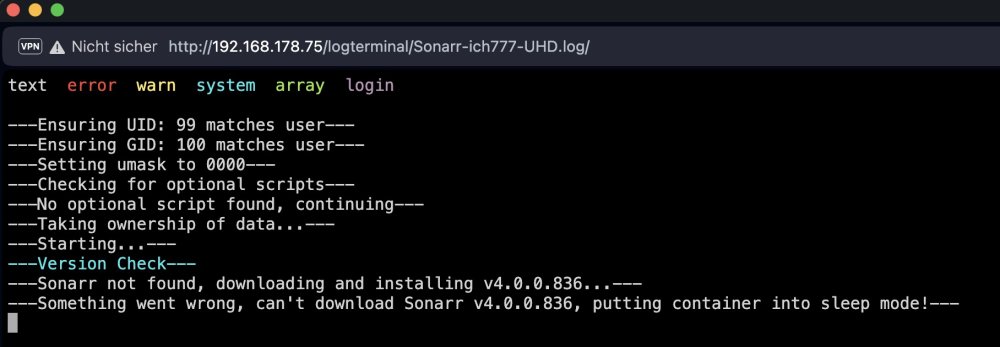
Does anyone else have the problem that no new versions of Sonarr can be loaded? I noticed this when I wanted to set up a second instance. Even if I enter a specific version, I get the same message.
-
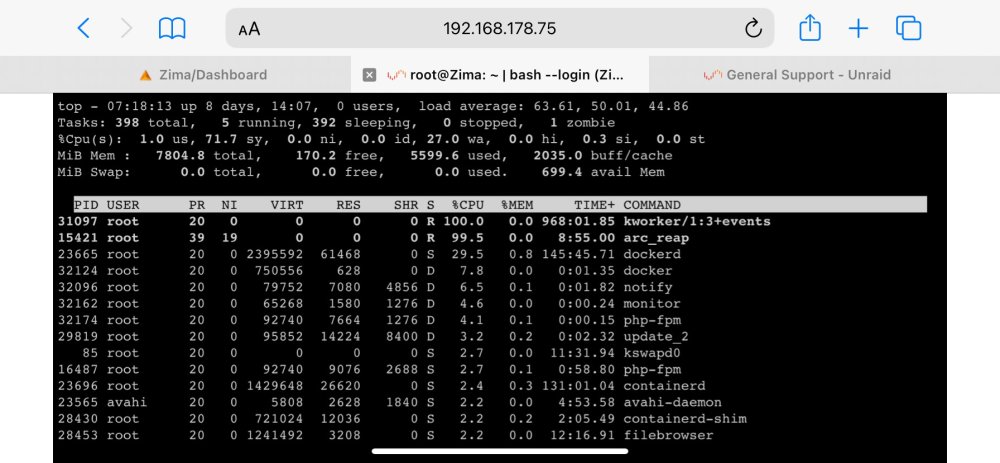
Hello all, I have a recurring problem with my Unraid. My system runs for different lengths of time, sometimes a week or two, but at some point my Docker services are no longer accessible. I can still access the Unraid Webgui, but it no longer shows the load, for example. Also, I can no longer do anything via the webgui, e.g. a reboot. Last time, I saw via Top that the processes "kworker/1:3tevents" and "arc_reap" are using 100% CPU load. But I can't restart my system by command. And so I have to pull the plug to force a restart. Does anyone have an idea what I can do? many thanks in advance. zima-diagnostics-20231031-0836.zip
-
Ok thanks. I have already imported an old backup but will be a lesson to me. I will run backups more often. Thanks for the quick answers!
-
I am currently creating backups of the cache, using the mover. However, it has already been more than 10 hours for 30 GB. Before that, I set all folders in the share to "yes". As a test, I tried copying a folder from the cache to an unassigned device using "sudo MC". At the same time, I checked the logs and received the following message: Jun 27 21:35:26 Zima kernel: BTRFS error (device dm-1: state EA): parent transid verify failed on 1471459033088 wanted 96486 found 95971 Jun 27 21:35:26 Zima kernel: BTRFS error (device dm-1: state EA): parent transid verify failed on 1471459033088 wanted 96486 found 95971 Jun 27 21:35:31 Zima kernel: verify_parent_transid: 11671 callbacks suppressed Jun 27 21:35:31 Zima kernel: BTRFS error (device dm-1: state EA): parent transid verify failed on 1471459033088 wanted 96486 found 95971 Jun 27 21:35:31 Zima kernel: BTRFS error (device dm-1: state EA): parent transid verify failed on 1471459033088 wanted 96486 found 95971 Jun 27 21:35:31 Zima kernel: BTRFS error (device dm-1: state EA): parent transid verify failed on 1471459033088 wanted 96486 found 95971 Jun 27 21:35:31 Zima kernel: BTRFS error (device dm-1: state EA): parent transid verify failed on 1471459033088 wanted 96486 found 95971 Jun 27 21:35:31 Zima kernel: BTRFS error (device dm-1: state EA): parent transid verify failed on 1471459033088 wanted 96486 found 95971 Jun 27 21:35:31 Zima kernel: BTRFS error (device dm-1: state EA): parent transid verify failed on 1471459033088 wanted 96486 found 95971 Jun 27 21:35:31 Zima kernel: BTRFS error (device dm-1: state EA): parent transid verify failed on 1471459033088 wanted 96486 found 95971 Jun 27 21:35:31 Zima kernel: BTRFS error (device dm-1: state EA): parent transid verify failed on 1471459033088 wanted 96486 found 95971 Jun 27 21:35:31 Zima kernel: BTRFS error (device dm-1: state EA): parent transid verify failed on 1471459033088 wanted 96486 found 95971 Jun 27 21:35:31 Zima kernel: BTRFS error (device dm-1: state EA): parent transid verify failed on 1471459033088 wanted 96486 found 95971 Jun 27 21:35:36 Zima kernel: verify_parent_transid: 11810 callbacks suppressed Jun 27 21:35:36 Zima kernel: BTRFS error (device dm-1: state EA): parent transid verify failed on 1471459033088 wanted 96486 found 95971 Jun 27 21:35:36 Zima kernel: BTRFS error (device dm-1: state EA): parent transid verify failed on 1471459033088 wanted 96486 found 95971 Does this mean that my hard drive is broken or just the format? thanks in advance. zima-diagnostics-20230627-2133.zip
-
lösung zum Problem wurde hier gefunden
-
you are the best! it is running again. but here are the diag again. zima-diagnostics-20230626-1939.zip
-
hi community, this is my first post here so bear with me if I do anything wrong after updating to 6.12, I noticed that some of my Docker containers that were running on my cache (SSD) stopped working. After rebooting the server and starting the array, the cache now shows as "Unmountable: Unsupported or no file system". I have also backed up the flash but still get the message. It should be noted that I had set the setting for "appdata" to "Prefer", so of course the affected containers are not started. Now I'm wondering what happened here and how I can recover my data. zima-diagnostics-20230626-0702.zip
-
Moin moin community, das ist hier mein erster Post also sieht es mir nach, falls ich irgendwas falsch mache Kürzlich habe ich festgestellt, dass einige meiner Docker-Container, die auf meinem Cache (SSD) liefen, nicht mehr funktionierten. Nach einem Neustart des Servers und dem Starten des Arrays wird der Cache nun als "Unmountable: Unsupported or no file system" angezeigt. Zu beachten ist, dass ich die Einstellung für "appdata" auf "Prefer" gesetzt hatte, weshalb die betroffenen Container natürlich nicht gestartet werden. Nun frage ich mich, was hier passiert ist und wie ich meine Daten wiederherstellen kann. zima-diagnostics-20230626-0702.zip


