





tlk888
Members
-
Joined
-
Last visited
-
Both Unraid and clients are on 10Gbps network but transfer speed is only 220MB/s (~1.6Gbps) so look like it's limited by storage speed. How do I fasten it? I'm using 500Gb SSD as a cache drive, and Share settings already used `cache=yes`. Setup - Unraid server & Windows clients are on 10Gbps network card with 10Gbps switch. - Unraid server has an array of 7 drives SATA3, and 500GB SSD as cache drive. All connected to a HBA card which connect to PCI-e 2.0 X16 wst-diagnostics-20230618-2217.zip
-
I re-run it and all drives are green now, parity enabled Will replace current SATA3 controller with the HBA card .
-
Is there a recommended controller? I'm looking to add something like this : https://www.amazon.com/Original-9211-8i-FreeNAS-unRAID-6Gbps/dp/B082HKNCVD
-
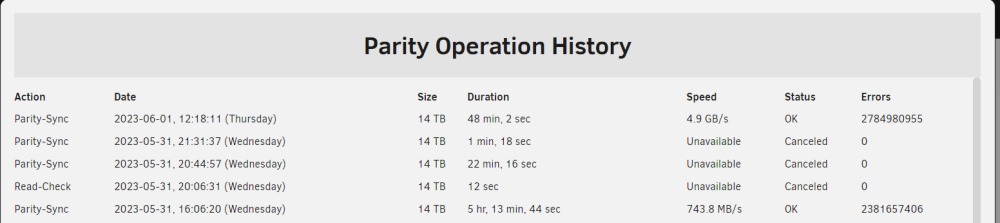
Background: I had an array with 1 parity disk (14TB) and several data disks (mix of 12TB, 3TB etc). I ran Parity Sync, it ran for a day and completed with some read errors, and the partity device is disabled. I found this thread about how to re-enable it which basically is re-running Parity Sync (which I did several times). My question: any idea on why is it disabled? How do I ensure parity will be enabled (replacing bad disk / rerunning sync / re-creating array)? More info: What I have done: - Rebuild Parity (several times) - Rebuild the array with new config (Tools > New Config) - Read Check (several times). And the latest Read Check result: Parity-Sync 2023-06-01, 12:18:11 (Thursday) 14 TB 48 min, 2 sec 4.9 GB/s OK 2784980955 wst-diagnostics-20230601-1651.zip
-
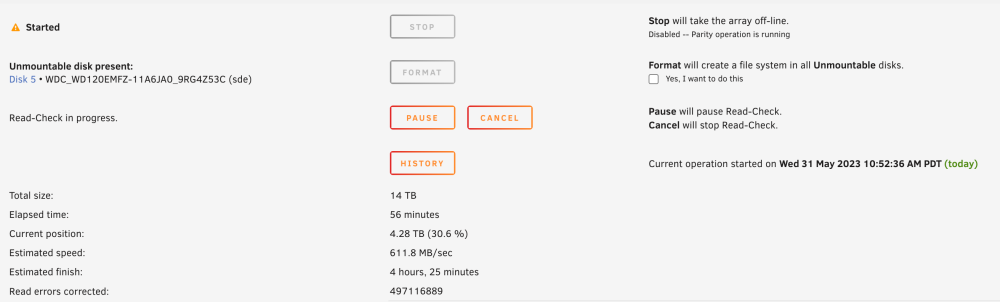
The good news: I moved USB2.0 disks to SATA3 and speed boosted. I saw 125MB/s on average and some time boosted to 611.8MB/s (!!!). Current position:4.17 TB (29.8 %) Estimated speed:605.6 MB/sec Estimated finish:4 hours, 31 minutes The bad news: It also introduced read errors and the drive (Disk 5, used to on USB.20) appeared as unmountable - it has data on it so I don't want to format. So my question: how do I get the drive into the array without losing data? Thanks for being patient with me
-
Got it. I'll wait for the HBA board to shuck all USB drives to SATA-III ports. Curious: USB2.0 specs is 480Mbps so I'd expect ~50-55MB/s in reality. Why was it only 25MB/s?
-
Here is what's going on with my array while parity-sync: ----------------- Total size:14 TB Elapsed time:7 hours, 6 minutes Current position:315 GB (2.3 %) Estimated speed:12.4 MB/sec Estimated finish: 12 days, 17 hours, 12 minutes ----------------- My use case is backing up photos (~1.5M files) and running PLEXSERVER. I had a mixed array of HDD on USB2.0 and SATA-II ports. They are SATA-III drives but pluggin in SATA-II on my HP Z800 workstation. I had two questions (First time UNRAID user here so please bare with me): 1. What did I do wrong and why was the parity sync speed so slow? I did search in the forum, found some posts suggesting update CPU-C state to Always, but it didn't help either. 2. This HP Z800 board only SATA2 (3Gbps) and USB2.0, but it also had PCI-E 2.0 x16, should I get an HBA-i8 for these SATA-III drives and will it speed up the parity-sync? wst-diagnostics-20230529-2222.zip


