





Deryg
Members
-
Joined
-
Last visited
-
Just the cache (pool is a glorified term as it's a single drive :)). Thanks. Going shopping for the replacement as we speak. Good time to break myself of the habit of using the cache as a slush drive for in transit files and downloads and then keeping them languishing there for various reasons (none of which are valid). Will give it a spin this week and thank you. Converted the array forever ago butI figured I'd lose something or shoot myelf in thefoot on the cache drive. Of course, when I get this fixed I'll be jonesing for a new CPU and Mobo so I can move plex off my workstation...but that's next month's problem Thnaks for the quick pointer and apologies for resurecting a kind of dead topic (ReiserFS conversion). I jsut wanted to make sure that there wasn't a weird got you for the Cache
-
Hi all, I am sure it'b been asked and answered here before but I need to get my cache off Reiser FSpronto before they drop support for it. If someone can point me to instructions on flipping my cache drive around, I would be most gratefulI also will take the opportunity to move from the old 2 TB spinner to 2 SSDs. If it's something as simple as format your SSDs as unassigned devices, , move the data over, yank the cache and make the SSDs the cache drive it would be awesome but not sosure it's that cut and dried. Running latest version of Unraid BTW. Thanks in advance. Guillaume
-
Thanks gents. I was aware of files not on the array. I was just curious as I had some shares that are array shares and I invoked the mover manually but it still shows. Not a biggy. Also, thanks for the heads-up on the Parity. I'll be reducing the heat stress on my drives and moving that to monthly now. It may be something I'd picked up in the forums somewhere. Now that my main issue is closed, I guess I need to figure out how to mark it solved. I'll probably bug you guys to move my cache from ReiserFS spinner to an SSD that's a supported filesystem but that'll be in a different thread if I can't figure it out from resources available
-
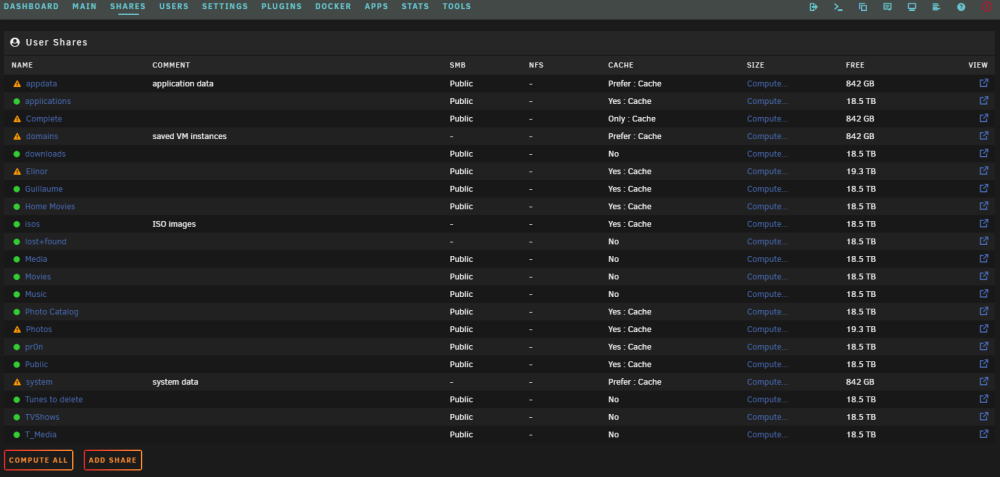
I think that was the recommendation many moons ago, before dual parity. I set it then forgot it. I recued the majority of the files from the lost&found although most were unneeeded. only a few thousand left to go through. array seems rock solid now. Heres a side question somewhat related. Why do some user shares show as having some or all files unprotected. I invoked mover and it didn't change a thing. this understandably makes me nervous after this week's adventures in the land of data loss
-
All good. Files finished moving and the parity check now shows a sane 13 hours to finish. I had it scheduled to do a weekly parity check so It just kicked in Kinda gun-shy to cancel anything after what I've been through Jsut a matter of swapping out the spinner cache drive that's reiser-FS to SSD in appropriate file format once it's done and we will consider this unfortunate saga closed. All the help has been truly appreciated, specially trurl with the timely replies and painstakingly walking me through everything. Not sure how much data if any I will have lost between the old drives and the lost and found but it will be minimal
-
shoot. They're running now. Also the damn parity check is running on schedule as I was moving files from the mounted unassigned devices drives. ETA for parity check... 12 days. I assume that will speedup somewhat after the files move over. i kind of figure Ill let all of that finish up, then I can disable those again as I put in an SSD drive to take over as cache drive? At the moment, its running on the old Reiser FS spinner that it was originally. Will have to stop and shut down the array to put in the SSD anyways and I will have the room in the system to have them both the SSD and existing cache in as I will pull the old drives 5 and 6. Can't really stop the docker now as I am using Krusader to move the files
-
Moving files now. Next step is swapping out the cache drive then system will be good as new
-
check filesystem with repair? (no -n)
-
Now at what point do I try to move files over from the old drives or fix filesystem on existing drives and redo parity? More importantly, in what order?
-
well, that was way quicker than previous rebuilds. all done, no errors mediawhore-diagnostics-20230224-0703.zip
-
Started. Will talk in 16 hours or more
-
stop array, assign drives, start array, rebuild (do both at same time) and we talk tomorrow cause that rebuild will take a good while?
-
sounds like we are kinda looking at the same thing from different perspectives. You are the guru so I bow to your superior knowledge and experience. Let's do it your way. Where do we start?
-
so here comes another newbie question. Can we: - move the lost and found data from the emulated drive 5 and 6 somewhere to sort later and hunt for missed data and screw-ups on my part (like the third spare disk) - copy the old drive 5 and ancient 6 (since the aborted rebuild is trashed) to 2 of the new drives. - assign those drives as 5 and 6 - do a new config, rebuild parity - fix the odds and sods issues on the other drive filesystems (not sure of appropriate order for last 2 steps)
-
sdk = drive 5 sdh = ancient drive 6 sdp = drive 6 that trashed during rebuild mediawhore-diagnostics-20230223-1505.zip
