jarredh
Members
-
Joined
-
Last visited
Everything posted by jarredh
-
Hey, I have Tailscale installed and its working well as an exit node. I want to also install my Mullvad VPN for some docker containers I use. When I import the tunnel into Unraids built in VPN manager and activate it, having it set using VPN tunneled access for docker, my Tailscale exit node will not work. Is there any way to get these to work simultaneously? Thanks
-
After doing some more diagnostics I'm pretty sure this isn't an unraid problem and that the issue is the port on my router is negotiating to gigabit...
-
Correct. Figuring out why has been a problem.
-
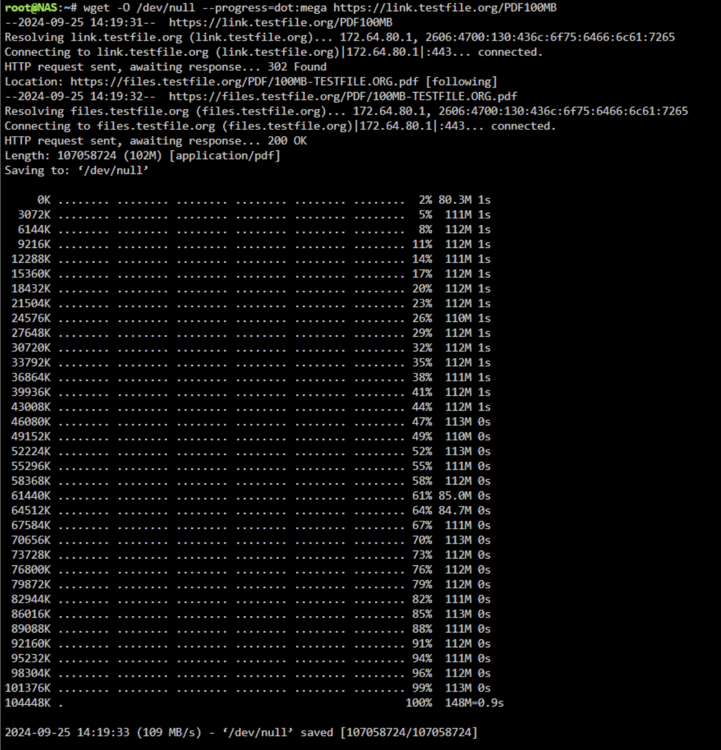
I found another random test file.
-
Don't know what to tell you. Ive run that command many times and Im getting the same output. I seem to be getting that Length: unspecified [text/html] error that is not in your output.
-
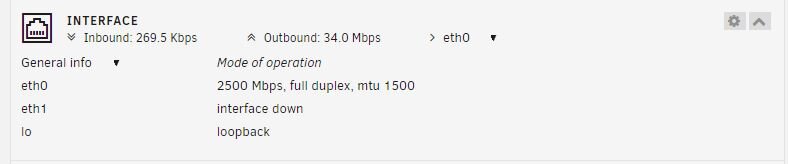
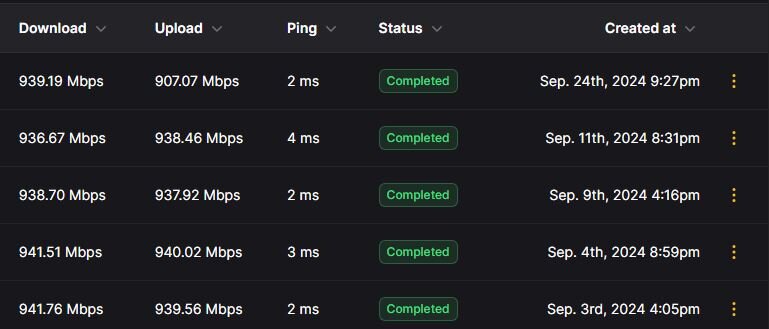
I have 1 10g port on the router which I have set in the settings at 10g so I’m not sure it’s that. It could be though because I don’t remember the switch lighting up showing a 10g connection was made. if I login directly to the router I see the port I’m plugged into set at 10g.Hey all, Just had a fiber line installed (3g internet symmetrical) and I put in a new 10g switch and had a new ethernet cable ran from my router to the switch. It is plugged into the 10g port in the router. I installed a 2.5g card in my unraid server (originally purchased a 10g card but did not have a pcie port left in my server for it) and the unraid gui says I am running at 2500 Mbps. The problem is I am only getting gigabit speeds on my docker. I am using the speedtest tracker docker to test my speeds. Before anyone asks, this server is remote from me and I do not have access to a device on this network to run pfsense. If that is absolutely required to diagnose this I will only be able to do it in a few months. Can anyone see anything in my posted log files that could be causing me not getting maximum speeds? Thank you for the help as this is driving me insane. nas-diagnostics-20240924-1731.zip