





ZVeguillaCotto
Members
-
Joined
-
Last visited
-
1 week update. The issue has not returned... yet. Will mark as solved. Will keep updating if relevant. I read about connector issues being the leading cause for this issue and thought I tried everything to rule it out. I had missed removing the backplane from the equation. Thanks to @JorgeB for the help.
-
I have been running the drives directly to the HBA and PSU, bypassing the backplane for about a day and a half. I haven't seen any errors yet. Will keep updating as the days go on. Thanks.
-
The disks that produce the errors are different each time. I've changed disk bays also. I have a couple of additional theories: Files got corrupted once upon a time, each time that file is read the errors starts (no idea if possible). Backplane is damaged and thermal expansion causes errors. It hadn't occurred to me to connect drives directly to HBA to bypass backplane. I will attach disks directly to HBA today and report back.
-
I've been struggling with my system for a couple of months now. The issue is the array reports drive errors that bogs down the system until a reboot. The errors disappear and come back after a non-consistent number of hours or tasks. I've looked at the disks reports and don't see anything wrong (permanent). I have re-seated all my components to include RAM, PSU, HBA, cables, drives. I've changed HBAs, RAM, and cables. I have 2 diagnostics I will attach, they were done within second of the errors occurring and with the system up for a short time. The system has gone weeks without issues in the past but I tough diags for those times would be harder to parse. Some things that come to mind to mention: The behavior has occurred even when running in safe mode, GUI, no GUI and any other combination. I methodically deleted and reinstalled each docker container to avoid runaway issues. The system ran flawlessly for around 4 months and I had 5 drives total then, I THINK the issue appeared when the array grew to 6+ drives. I managed to come back down to 6. Finally managed to update BIOS a couple of days ago (seemed complicated on this MB). I'm starting to feel a little insane about this and have been glued at my computer for weeks but evidently this is beyond my knowledge and ability to google. TIA to anybody that can help. *HBA current 9600-24i *drive cables current 2x (SFF-8654 8i to 2x (4x SFF-8643)) hl15-diagnostics-20240828-2034.zip hl15-diagnostics-20240830-2050.zip
-
Power via 1 PSU port to 4 molex (backplane) , HBA 9300-16i 1 cable per 4drive group (0-3, 4-7, 8-11 , 12-14).
-
As per the title. I have a new build that has started having errors and crashes recently. I'm currently remote and suspect a bad HBA or connection as per googling. Thankfully I can still access the glitchy GUI and can remote reboot via a smart plug. Can anybody help me pinpoint and correct the issue? Thanks. root@HL15:~# df -h /var/log Filesystem Size Used Avail Use% Mounted on tmpfs 128M 128M 0 100% /var/log root@HL15:~# du -sm /var/log/* 1 /var/log/Xorg.0.log 1 /var/log/apcupsd.events 0 /var/log/btmp 0 /var/log/cron 0 /var/log/debug 1 /var/log/dmesg 0 /var/log/faillog 0 /var/log/lastlog 0 /var/log/libvirt 0 /var/log/maillog 0 /var/log/mcelog 0 /var/log/messages 0 /var/log/nfsd 1 /var/log/nginx 0 /var/log/packages 1 /var/log/pkgtools 0 /var/log/plugins 0 /var/log/preclear 0 /var/log/pwfail 0 /var/log/removed_packages 0 /var/log/removed_scripts 0 /var/log/removed_uninstall_scripts 0 /var/log/sa 1 /var/log/samba 0 /var/log/scripts 0 /var/log/secure 0 /var/log/setup 0 /var/log/spooler 0 /var/log/swtpm 128 /var/log/syslog 1 /var/log/tailscale-utils.log 1 /var/log/tailscale.log 0 /var/log/vfio-pci 0 /var/log/vfio-pci-errors 1 /var/log/wtmp hl15-syslog-20240303-0145.zip
-
Unraid Connnect is the possible culprit. Once reinstalled the behavior returned, both the lag of the GUI and the CPU spikes. Removed for now. Thoughts?
-
Update. Deleted all plugins. Browser is now perfectly responsive. CPU cores now peak at 15% wile overall load is <3% Saw a spike at 100% that I'll note down but dismiss as background processes still running. Reinstalling plugins.
-
Sorry, failed to follow topic. Following now. Rebooted in safe mode GUI. Unit is muuuuch more responsive both locally and trough LAN. CPU usage is now 0-1% with no spikes. No "this webpage is using significant memory. closing it may improve the responsiveness" message in 10 mins. I'l delete all plugins and reinstall one-by-one to see behavior change. I'll report back. Unless you know that x plugin on ymotherboard/cpu/6.14.4 is known to have issues or anything like that.
-
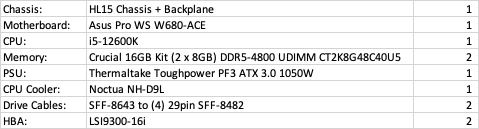
Motherboard: Asus Pro WS W680-ACE CPU: i5-12600K Memory: Crucial 16GB Kit (2 x 8GB) DDR5-4800 UDIMM CT2K8G48C40U5 PSU: Thermaltake Toughpower PF3 ATX 3.0 1050W CPU Cooler: Noctua NH-D9L USB: SAMSUNG BAR Plus 3.1 64GB Previous support ticket for creating USB drive. Managed to get it booted and accessing trough LAN results in an extremely laggy experience of the GUI. Safari, firefox, and chrome browsers all report similar "this webpage is using significant memory. closing it may improve the responsiveness" message. Booting into GUI on monitor show sporadic CPU spikes of various cores while idle. Some extensions were installed in an attempt to see temps. Extensions: Appdata Backup CA Mover Tunning Community Applications Dynamix System Temperature Folder View unBALANCE Unraid Connnect Suspicion, either BIOS setting, or poor thermal paste job (GUI temp shows around 50°C in a 25°(ish) room. BIOS are default for now. Paste was a 5 dot pattern small pea in middle, 4 smaller peas 75% center to edge. Some drives plugged, not assigned yet. Notes: None of the efficiency cores (12-15) have gone above 5%, the HT cores (1-9 odds) remain at 0-1%. Only the performance cores (0-10 even) spike. TIA! IMG_0366.MOV
-
This was as suspected my fault for plugging an ethernet cable in a VLAN port. Fixed. Marked as solved. Seems my issue was the usb creator NOT creating a bootable drive, maybe because it was improperly formatted but doing the manual worked when followed instructions. Instructions no not clarify the files on the USB should not be the single folder (this may happen with how OSX extracts or how Archive Utility works in my computer). Thanks to @JonathanM for the help. /close /solved
-
This was the fix. Instead of moving the entire "unRAIDServer-6.12.4-x86_64" unzipped folder. I moved all the second level files and folders (19 of them). When running the "make_bootable_mac" it prompted me for "Permit UEFI boot mode [Y/N]: y" and it self-edited the "EFI-" folder by itself but gave an "syslinux" permission/safety error. Went to System Preferences -> Security & Privacy -> General -> "Open anyway", and ran the "make_bootable_mac" again. This time no syslinux" permission/safety error. Bootable USB made successfully. Right now I have booted and browsing other topics for no IP address.
-
The single, entire folder. The EFI- folder and others are INSIDE the folder I move.
-
Reformatted drive, now it says "USB External Physical Disk • Master Boot Record" for the Samsung Flash Drive Media 64.16GB "USB External Physical Volume • MS-DOS (FAT32)" for the UNRAID 62.16 partition Downloaded "unRAIDServer-6.12.4-x86_64.zip" from the website. I opened the zip in my download folder and copied the "unRAIDServer-6.12.4-x86_64" folder to USB drive. Removed "-" from EFI- folder. Ran the executable "make_bootable_mac" Terminal output: Transferred USB to machine, turn on straight to BIOS, switched some settings as mention in OP and still batting in BIOS. Awaiting specific settings guidance or further instructions.
-
That's the guide I followed before. Will do it again from scratch and report back. You don't think the USB's 64GB size is an issue? It wasn't on a previous install but I still ask.

