LemmingO
Members
-
Joined
-
Last visited
-
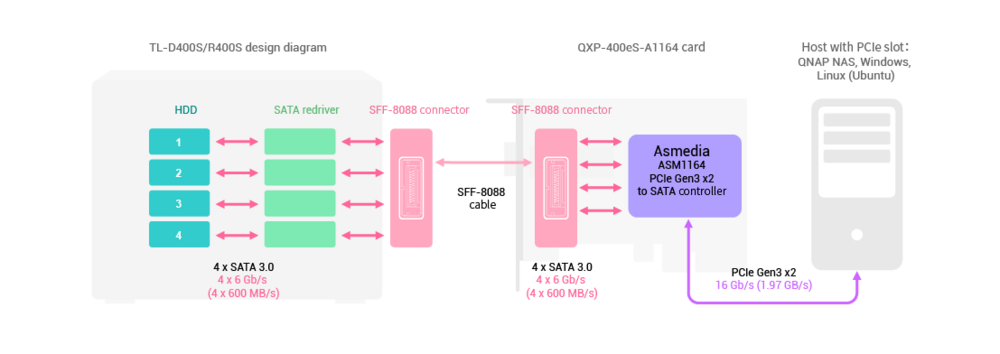
@Unexploded About 9 months ago I bought the TL-R400S (basically the same principle as the D1600S, but for rackmounts and it's 1U with only 4x 3.5" drives). The Qnap kit comes with its own PCIe 3.0 HBA (QXP-400eS-A1164) which connects to the DAS through a single SFF-8088 cable. I have my Unraid running off a SFF 1L PC (Lenovo). I bought 4x 16TB Seagate Exos 16 drives, put them in the TL-R400S and Unraid recognised them straight away. On the TL-R400S the included PCIe card has just one SFF-8088 connector. For the 8x and 16x units, there are other PCIe cards (which I believe are not included in the box): QXP-3X8PES has 4 connectors for up to 16 drives QXP-3X4PES has 2 connectors for up to 8 drives The downside of using QNAP is that it is, fundamentally, optimised for Windows. Their own software makes it easy to manage drives on Windows, but you get none of that on Linux, much less Unraid. For example, to do a Firmware update, you'll need to SSH into the machine and then use the command line to manually update it. Works a wonder, but I would reiterate the importance of a UPS in a setup that contains that many drives. I've had Unraid freeze up on me a couple of times, and the parity check for a 16TBx4 setup takes 24 whole hours.
-
Hi! Really appreciate your work @ich777! I've installed the QNAP-EC Plugin in the hopes it works with the TL-R400S. The TL-R400S is an expansion enclosure, powered by a QNAP HBA (QXP-400eS-A1164 Asmedia-powered PCIe 3.0 x2 card). I can't seem to get it to work, following the instructions on your Git repo. Any suggestions? Fixes? Thanks in advance! P.