knownothing
Members
-
Joined
-
Last visited
Everything posted by knownothing
-
Win11 virtual machine reports an error after adding a sound card, if i do not select a sound card can start normally, how to modify or set,thank you The system devices are as follows: IOMMU group 13: [8086:7a06] 00:1f.0 ISA bridge: Intel Corporation Device 7a06 (rev 11) [8086:7a50] 00:1f.3 Audio device: Intel Corporation Device 7a50 (rev 11) [8086:7a23] 00:1f.4 SMBus: Intel Corporation Device 7a23 (rev 11) [8086:7a24] 00:1f.5 Serial bus controller: Intel Corporation Device 7a24 (rev 11) The virtual machine configuration is as follows: Sound Card: Intel Device (00:1f.3) There is such a paragraph in XML <sound model='ich9'> <address type='pci' domain='0x0000' bus='0x00' slot='0x09' function='0x0'/> </sound> <audio id='1' type='none'/> The error message is as follows: internal error: qemu unexpectedly closed the monitor: qxl_send_events: spice-server bug: guest stopped, ignoring 2023-06-10T09:35:35.243269Z qemu-system-x86_64: -device {"driver":"vfio-pci","host":"0000:00:1f.3","id":"hostdev1","bus":"pci.0","addr":"0x8"}: vfio 0000:00:1f.3: group 13 is not viable Please ensure all devices within the iommu_group are bound to their vfio bus driver.
-
win11 虚拟机 添加声卡后报错, 如果不选择声卡 可以正常启动,请问怎么修改或者设置 系统设备如下: IOMMU group 13: [8086:7a06] 00:1f.0 ISA bridge: Intel Corporation Device 7a06 (rev 11) [8086:7a50] 00:1f.3 Audio device: Intel Corporation Device 7a50 (rev 11) [8086:7a23] 00:1f.4 SMBus: Intel Corporation Device 7a23 (rev 11) [8086:7a24] 00:1f.5 Serial bus controller: Intel Corporation Device 7a24 (rev 11) 虚拟机配置如下: 声卡: Intel Device (00:1f.3) 在xml中有这样一段 <sound model='ich9'> <address type='pci' domain='0x0000' bus='0x00' slot='0x09' function='0x0'/> </sound> <audio id='1' type='none'/> 报错信息如下 internal error: qemu unexpectedly closed the monitor: qxl_send_events: spice-server bug: guest stopped, ignoring 2023-06-10T09:35:35.243269Z qemu-system-x86_64: -device {"driver":"vfio-pci","host":"0000:00:1f.3","id":"hostdev1","bus":"pci.0","addr":"0x8"}: vfio 0000:00:1f.3: group 13 is not viable Please ensure all devices within the iommu_group are bound to their vfio bus driver.
-
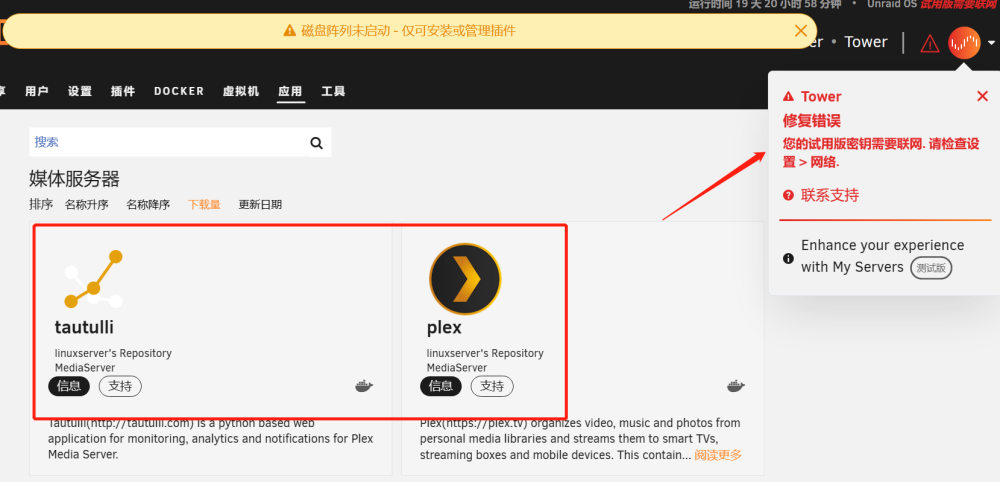
右上角一直提示 您的试用版密钥需要联网.请检查设置 > 网络 ,这个也需要魔法吗