





colinmansfield
Members
-
Joined
-
Last visited
-
I think I solved the problem. Tried mounting the parity drive onto another computer to run diagnostics...discovered that it makes clicking sounds while starting and will not mount. I think I just experienced my first failed drive (hurray?). New 8TB on order.
-
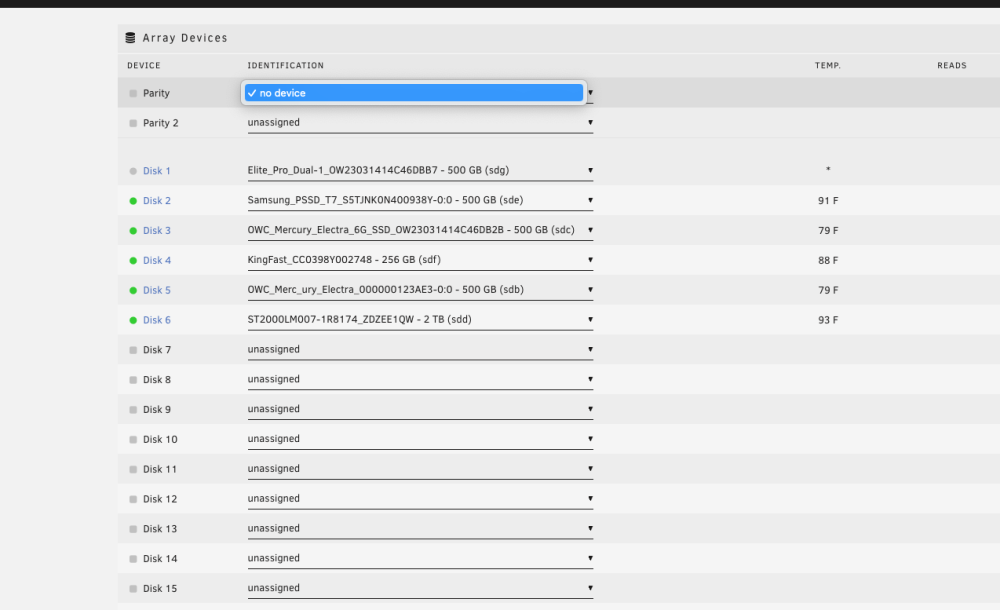
As a note, sometimes I can get 1 of the drives within the enclose to appear on the Array devices selection screen. It appears as "spun down", but the parity drive which is also in the enclosure does not appear. See attached screenshot. Parity selection list is empty, and Disk 1 shows but is spun down.
-
Hello, I just ended my 30 day trail with Unraid and purchased my license with no issues over the last month. Today I received alerts that there was an error with my parity drive. I was having issues with the web GUI (buttons not working), but I finally was able to get my system to reboot via GUI. When it came back online, it was missing two drives (both of which are enclosed in a OWC Elite Pro Dual enclosure and connected via USB). One of those drives is unfortunately my parity drive. I have tried unplugging/replugging the device, rebooting multiple times, and plugging into different ports. I took apart the enclosure and ensured all cables are properly connected and seated well. No matter what the drives are not showing up as available in the web GUI. Please see attached for diagnostics. Any help someone can provide would be very welcome! mansfieldserver-diagnostics-20230713-1933.zip
