




Skip to content
View in the app

A better way to browse. Learn more.

Unraid

A full-screen app on your home screen with push notifications, badges and more.

To install this app on iOS and iPadOS
  1. Tap the Share icon in Safari
  2. Scroll the menu and tap Add to Home Screen.
  3. Tap Add in the top-right corner.
To install this app on Android
  1. Tap the 3-dot menu (⋮) in the top-right corner of the browser.
  2. Tap Add to Home screen or Install app.
  3. Confirm by tapping Install.

Eskis

Members
  • Joined

  • Last visited

Everything posted by Eskis

  1. Thanks for your help. I've tried to create a subFolder with smb extras. Problably failed my config or the brutal shutdown not help. I've deleted the smb-extra.cfg in the usb disk. Everything seems good. This topic can be closed. Thanks
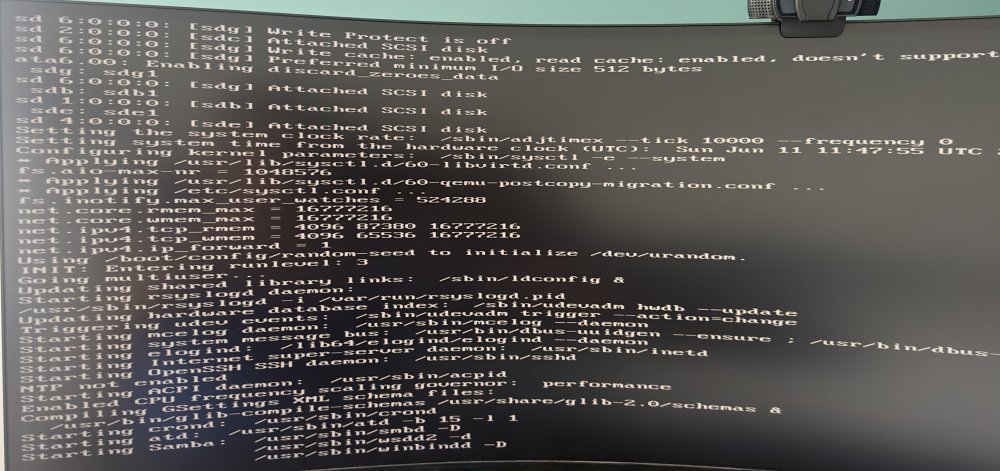
  2. Hey, I don't if it's same as i can find on the forum, but i had a power failure during the reboot. And now i'm stuck on Starting Samba : /usr/sbin/smbd -D /usr/sbin/wsdd2 -d /usr/sbin/windbindd -D I already tried to delete every plugin in folder of usb disk. Nothing happn. I've already tried to boot on every modes: safe mode, safe mode gui. I don't know what happn. I'm affraid it on my parity disk disk because i've tried with an old back up of my unraid os, it's same ... Thanks for your help guys
Account

Navigation

Search

Search

Configure browser push notifications

Chrome (Android)
  1. Tap the lock icon next to the address bar.
  2. Tap Permissions → Notifications.
  3. Adjust your preference.
Chrome (Desktop)
  1. Click the padlock icon in the address bar.
  2. Select Site settings.
  3. Find Notifications and adjust your preference.