






futureshocked
Members
-
Joined
-
Last visited
-
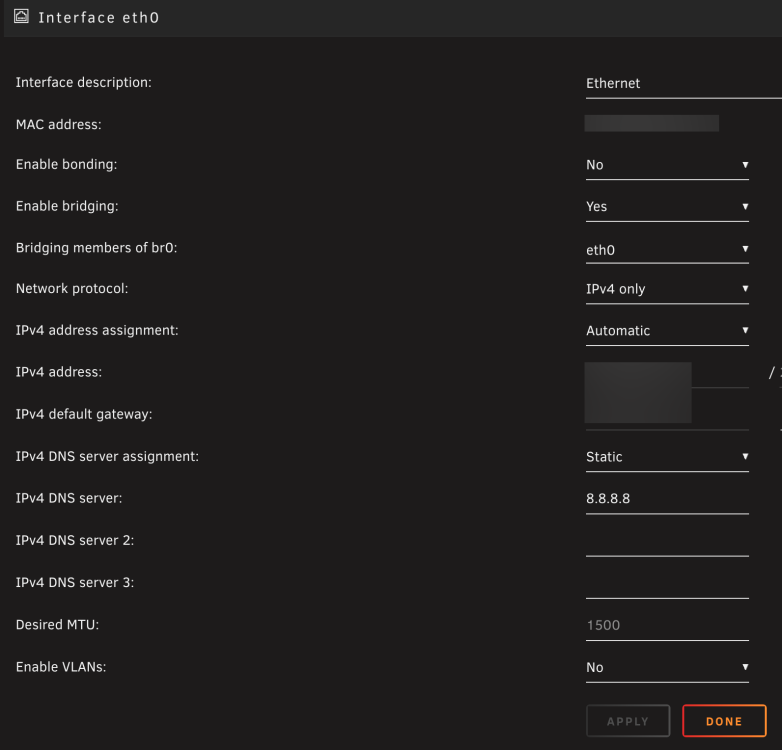
Success!! I had previously tried 8.8.8.8, but as DNS server 2, not primary. With the setting in the screenshot attached, problem seems solved. I'll do some more test, but looking good. Thank you ! 👏
-
futureshocked changed their profile photo
-
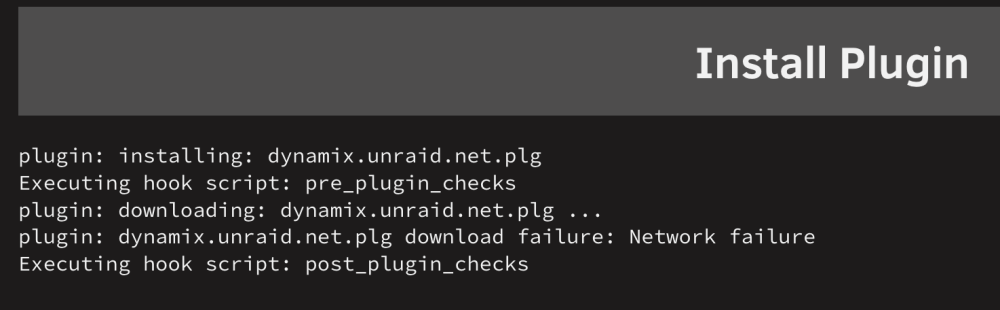
I had tried with and without IPv6, but it made no difference. I tried again as per your suggestion, rebooted, and tested with a plugin install, but again no luck (see screenshot attached). I have attached a new diagnostics file. unraid-diagnostics-20230719-1444.zip
-
Sure, please see my unRaid server diagnostics (attached). unraid-diagnostics-20230719-1353.zip
-
Quick update: I upgraded my unRaid server to v6.12.3, using the manual method described here. Again, no luck in resolving the issue "download failure: Network failure". Any suggestions are welcome!
-
Unfortunately this fix did not work for me. I did: downgraded to v6.11.5, deleted plugins, Stopped Docker Stopped VMs Stopped SMB Stopped NFS Restarted a few times after each change Changed router and Ethernet ports Nothing worked. I am also unable to upgrade from v6.11.5. When trying to update (or install) plugins, I am getting: "Checking connectivity ... No response, aborting!" When trying to update the OS, I am getting (when checking for updates): "plugin: checking unRAIDServer.plg ... plugin: checking finished." I am out of ideas!
-
I am getting the exact same problem. I can still use Unraid as a file server, and my VMs are working. But I am unable to install or update plugins and dockers. I have reviewed network settings, all look ok. Any ideas as to what I can try to fix this?



