unclenino69
Members
-
Joined
-
Last visited
Everything posted by unclenino69
-
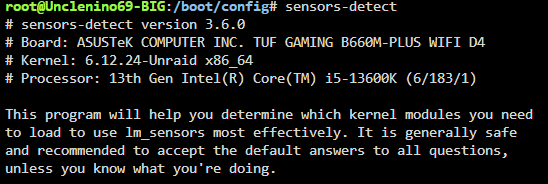
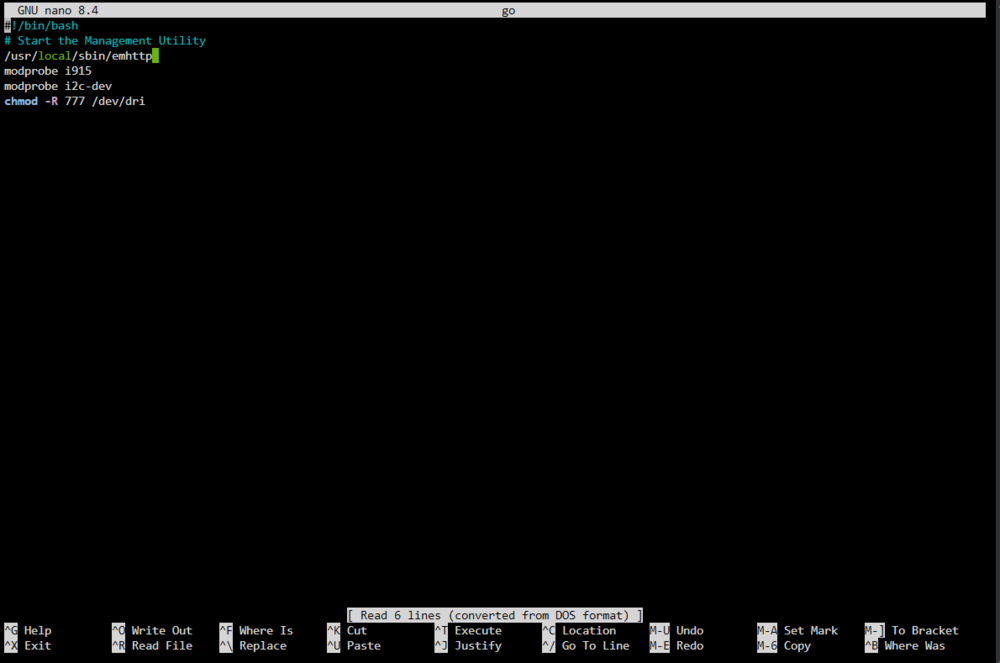
I have the exact guide for anyone facing this issue with missing i2c devices on UNRAID 7.1.2. Run sensors-detect. Press y to probe i2c and then y to probe i2c-0. All of my sensors were detected here. Then press y or n to the remainder of the i2c-x devices, I didn't have any on these only i2c-0. Then y at the end to write. "cd /boot/config" "sudo nano go" (edit the boot go file) Add line "modprobe i2c-dev" Press ctrl+x, then y to write Reboot UNRAID to load command, i2c devices should now appear in openrgb after every reboot

-
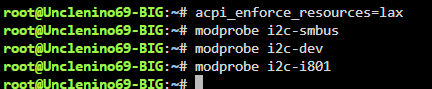
Found the solution! Not sure which worked, tried them all, but I am seeing my missing i2c devices now. Solution from here: https://bbs.archlinux.org/viewtopic.php?id=227443
-
Sounds good I will keep reaching out until I find a solution and report back here in case somebody has the same issue as me. One thing I noticed was your patch is still available on github. GitHubGitHub - ich777/unraid-openrgb-patchContribute to ich777/unraid-openrgb-patch development by creating an account on GitHub.I tried installing this from the UNRAID plugins menu, but the file formats don’t match up. It’s looking for a .plg file, but the release is .txz. I couldn’t find any guides on how to install a plugin, if this is worth doing could you point me in the right direction? Or would installing this mess up something with the newest kernel version? Thanks!
-
Just updated to 7.1.2 and now my openrgb i2c is broken. I am getting the following error message: <h2>WARNING:</h2><p>One or more I2C/SMBus interfaces failed to initialize.</p><p>RGB DRAM modules and some motherboards' onboard RGB lighting will not be available without I2C/SMBus.</p><p>On Linux, this is usually because the i2c-dev module is not loaded. You must load the i2c-dev module along with the correct i2c driver for your motherboard. This is usually i2c-piix4 for AMD systems and i2c-i801 for Intel systems.</p><p>See <a href='https://help.openrgb.org/'>help.openrgb.org</a> for additional troubleshooting steps if you keep seeing this message.<br></p> Prior to updating, I installed the ich777 openrgb patch and this solved the issue. I now see the patch is pulled from the community applications and above I see a post claiming this patch is depreciated and should be functional with the new kernel. As well, USER_ID and GROUP_ID look like they've been corrected in the most recent version of the openrgb docker. This shouldn't be it. Anyone have a solution?