




Skip to content
View in the app

A better way to browse. Learn more.

Unraid

A full-screen app on your home screen with push notifications, badges and more.

To install this app on iOS and iPadOS
  1. Tap the Share icon in Safari
  2. Scroll the menu and tap Add to Home Screen.
  3. Tap Add in the top-right corner.
To install this app on Android
  1. Tap the 3-dot menu (⋮) in the top-right corner of the browser.
  2. Tap Add to Home screen or Install app.
  3. Confirm by tapping Install.

Matt85

Members
  • Joined

  • Last visited

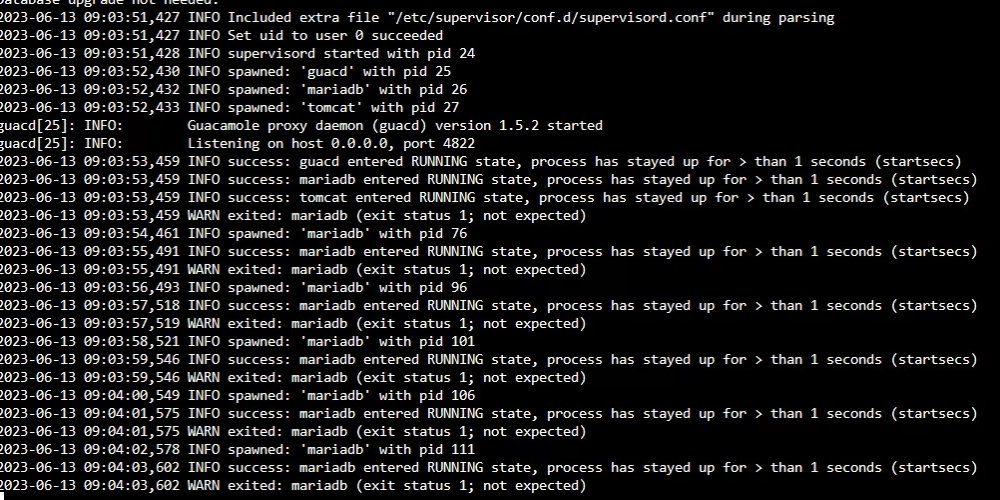
  1. Hey Taddeusz - first off I wanted to say how much I appreciate you maintaining this Docker image for Unraid. It's been a big help! I am running 1.5.2 and having a snag - it looks like mariadb just starts and stops nonstop. I did experience the issue with 1.5.0 and downgraded as necessary and then moved my install back to the current release. I know it worked successfully since then, but today when trying it (first time in several weeks, FWIW), I can't log in. Here are my logs. Any suggestions would be greatly appreciated!
Account

Navigation

Search

Search

Configure browser push notifications

Chrome (Android)
  1. Tap the lock icon next to the address bar.
  2. Tap Permissions → Notifications.
  3. Adjust your preference.
Chrome (Desktop)
  1. Click the padlock icon in the address bar.
  2. Select Site settings.
  3. Find Notifications and adjust your preference.