




Skip to content
View in the app

A better way to browse. Learn more.

Unraid

A full-screen app on your home screen with push notifications, badges and more.

To install this app on iOS and iPadOS
  1. Tap the Share icon in Safari
  2. Scroll the menu and tap Add to Home Screen.
  3. Tap Add in the top-right corner.
To install this app on Android
  1. Tap the 3-dot menu (⋮) in the top-right corner of the browser.
  2. Tap Add to Home screen or Install app.
  3. Confirm by tapping Install.

RonnieDobbs2112

Members
  • Joined

  • Last visited

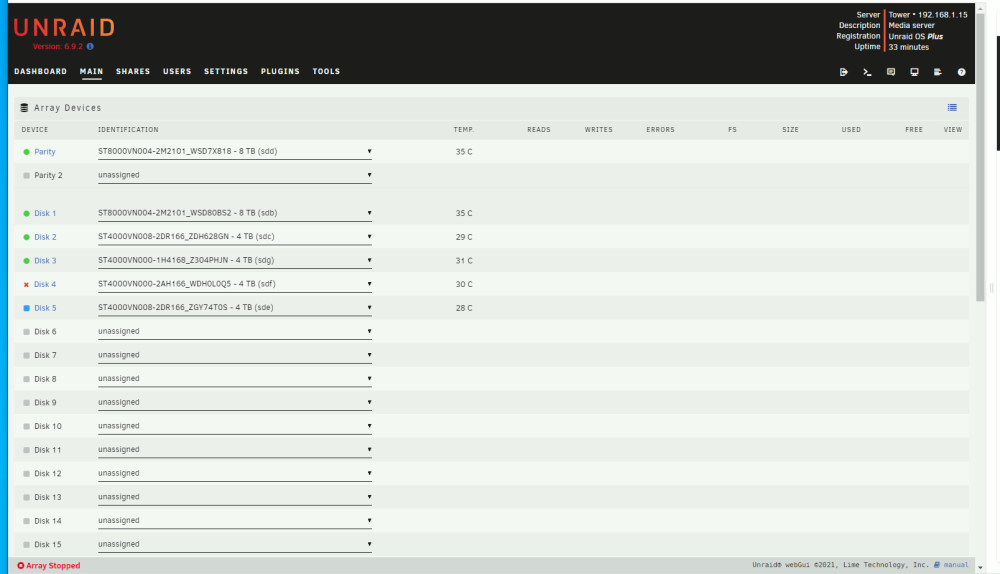
  1. I attempted to upgrade a disk last weekend. I replace Disk 5 with a 8TB drive and restarted the array. After the rebuild started, I noticed that Disk 4 was showing up as valid (green) but also as 'unmounted'. I panicked and cancelled the rebuild, powered down, then re-installed the old Disk 5. Both drives showed up as unmountable. I ran xfs_repair on both drives. Drive 4 doesn't get past phase 1, but I managed to 'fix' Drive 5. I was hoping to rebuild Drive 4, but Drive 5 now shows up a a "New Device" and I'm unable to start the array. Is there any way to force Unraid to accept Disk 5 as being valid? I've attached a screen shot of the array configuration and the diagnostic zip file. tower-diagnostics-20230614-1744.zip
Account

Navigation

Search

Search

Configure browser push notifications

Chrome (Android)
  1. Tap the lock icon next to the address bar.
  2. Tap Permissions → Notifications.
  3. Adjust your preference.
Chrome (Desktop)
  1. Click the padlock icon in the address bar.
  2. Select Site settings.
  3. Find Notifications and adjust your preference.