





012315
Members
-
Joined
-
Last visited
Everything posted by 012315
-
Alright, thanks. Would there be duplicate files if the move/copy fails mid program, as it did on my end?
-
sure, are there any duplicate files now? pressing the "rmsrc" or similar would be a bad idea right? If this wipes the only copy of the files there should be a little warning or so.
-
How should I proceed here?
-
I've moved a 8TB btrfs disk to a 8TB encrypted zfs disk. The original disk was at 95% with about 500GB left I left the plugin to its thing. I come back to a completely full zfs drive and the old drive with still ~2TB on it. Logs show: I: 2025/02/09 14:24:20 core.go:817: monitor:transfer:(/mnt/disk1/hmedia/bits/movie.mkv) I: 2025/02/09 14:34:21 core.go:817: monitor:transfer:(/mnt/disk1/hmedia/bits/movie.mkv) W: 2025/02/09 14:35:26 shell.go:50: flag:(rsync: [receiver] write failed on "/mnt/disk4/hmedia/bits/movie.mkv": No space left on device (28) ) W: 2025/02/09 14:35:26 shell.go:50: flag:(rsync: [receiver] chown "/mnt/disk4/hmedia/bits/moviename/.moviename.mkv.uIE0if" failed: No space left on device (28) ) W: 2025/02/09 14:35:26 shell.go:50: flag:(rsync: [receiver] rename "/mnt/disk4/hmedia/bits/movienameH265-SiGMA/.movienameH265-SiGMA.mkv.uIE0if" -> "hmedia/bits/moviename.mkv": No space left on device (28) ) W: 2025/02/09 14:35:26 shell.go:50: flag:(rsync error: error in file IO (code 11) at receiver.c(380) [receiver=3.3.0] ) W: 2025/02/09 14:35:26 core.go:748: command:end:error(exit status 13) I: 2025/02/09 14:35:26 core.go:752: command:retcode(0):exitcode(13) I: 2025/02/09 14:35:26 core.go:1009: Command Finished I: 2025/02/09 14:35:26 core.go:1022: Current progress: 90.41% done ~ 3h48m7s left (50.82 MB/s) W: 2025/02/09 14:35:26 core.go:941: skipping:deletion:(rsync command was flagged):(/mnt/disk4/hmedia/bits) I: 2025/02/09 14:35:26 core.go:695: Command Started: (src: /mnt/disk1) rsync -avPR -X "hdata-a/DriveE" "/mnt/disk4/" W: 2025/02/09 14:35:26 shell.go:50: flag:(rsync: [generator] failed to set times on "/mnt/disk4/hdata-a": No space left on device (28) ) W: 2025/02/09 14:35:27 core.go:748: command:end:error(exit status 13) I: 2025/02/09 14:35:27 core.go:752: command:retcode(0):exitcode(13) I: 2025/02/09 14:35:27 core.go:1009: Command Finished I: 2025/02/09 14:35:27 core.go:1022: Current progress: 93.02% done ~ 2h41m18s left (52.29 MB/s) W: 2025/02/09 14:35:27 core.go:941: skipping:deletion:(rsync command was flagged):(/mnt/disk4/hdata-a/DriveE) I: 2025/02/09 14:35:27 core.go:695: Command Started: (src: /mnt/disk1) rsync -avPR -X "hmedia/PLEX" "/mnt/disk4/" W: 2025/02/09 14:35:27 shell.go:50: flag:(rsync: [generator] recv_generator: mkdir "/mnt/disk4/hmedia/PLEX" failed: No space left on device (28) ) W: 2025/02/09 14:35:27 shell.go:50: flag:(*** Skipping any contents from this failed directory *** and it goes on for the other folders like that since it ran out before. -> So I guess there is some zfs overhead or so and I should've set 2 disks as the copy target. I thought it would certaily fit. Anyways, what the best way to start over / continue where i left off to ensure no data loss?
-
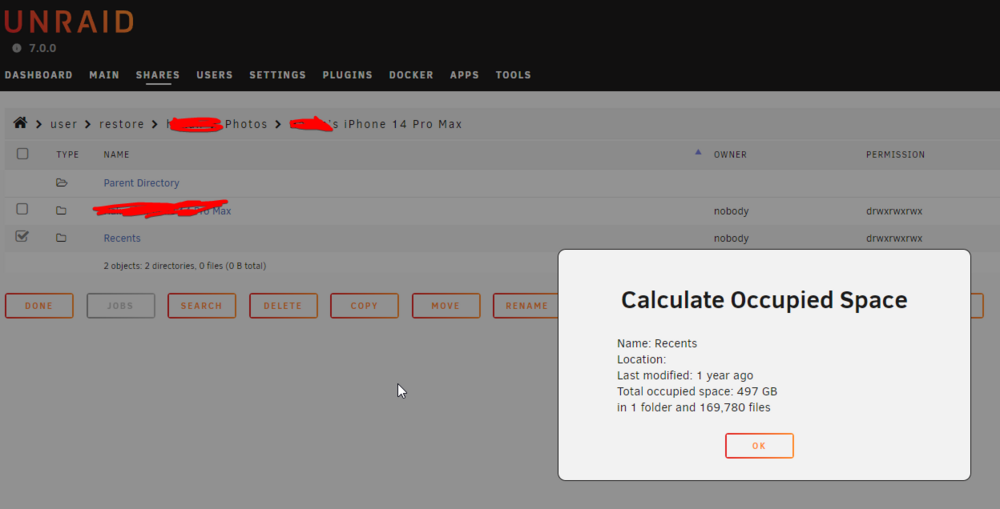
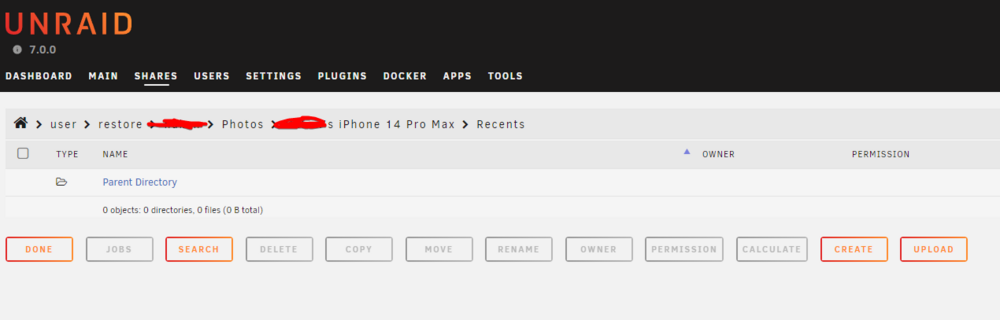
So after my server had data loss due to bad Nvme drives I restored from backup. I Installed new SSDs and transferred the files back to the SSD Cache. The cache is an encrypted ZFS mirror - I had to try it out with Unraid 7 😀 Anyways, now the files dont show up on the file explorer. The files are there: But they dont show up: The files do show up when browsing via Windows/SMB. So I either misconfigured something or this is a bug? diagnostics-20250124-2229.zip
-
Backup exists, so I will create a new pool and move the data there. I've already restored the backup to the array to reintroduce redundancy. The question remains why unraid did not mirror the RAID1 to the new nvme drive though
-
Alright, but what would be the best course of action? Also judging by Device Info, the new SSD is still completely blank and only had like 20mb written to it. Why is it not doing raid1?
-
For others: What seemed to fix the issue was adding more storage to the system, as drives and cache was at 95%+. Havent had a problem for months now.
-
So on another Unraid Server I have a cache in btrfs RAID1 with 2 Nvme Disks. Lets call them A & B. Disk B failed really hard, with sectors not being read at all. The system really degraded, the webinterface took 20s+ to load and the scrub/check was in the kbit/s speed. So I bought a new nvme and removed drive B and replaced it with the new Disk C. I then started the full btrfs balance thing. Now while doing the balance i am still getting some nvme 0x0 aborts, which chatgpt says is due to disk A also being on life-support. So here's the question: How do I get Unraid to mirror the Data to the other disk again? The full balance is running, yet the dashboard (and disk log) is showing 0 activity for disk C. Therefore, is it not copying the files? Edit: System is still really slow for some reasons, it took about 15s to generate the diags. But thats not the primary concern now.
-
Sure. Ill report back how the server does.
-
So how can I tell whats normal and whats too much?
-
Alright disabling SMB did not fix the issue. This time the server went down even quicker! So now I guess its time to find out why there are so many docker processes. Help or guidance would be appreciated!
-
I have made a discovery: In the appdata folder/share there are a LOT of files, as the 2 photoprism instances among others save all their thumbnails and there. qdirstat crashes when trying to visualize the folder, and so does the Duplicacy process. The last OOM occurred about 2.5h after 6AM, when the daily backup takes place. After rebooting the server today I see that duplicacy is stuck trying to index the appdata folder and RAM usage is creeping up again. So, what might there be in the appdata that causes all processes to not handle it? Its about 300K files I believe. Can this really be this bad? Can this be the actual culprit?
-
Oh sure, I have that enabled. I was able to reach the panel locally, server is still up. Reading the logs, it seems I got OOM'd again. However my log comprehension isnt enough to tell me what caused the OOM. Ive added logs and diags. Also, as you told me last time it was qbittorent, I had edited the docker compose to add a memory limit Edit: Consulting on how to read the longs with Chatgpt, it seems shfs and awk are using vast amounts of RAM. Is this normal? I have 32GB ECC Ram. For now I've upped the Folder Caching Plugins Pressure from 10 to 25 if this might be the culprit?
-
Alright, and the server is unreachable again. Ill try server.local once home, for now all dockers and control panel via tailscale are down. Before rebooting, is there any way to get the logs, or should i do that after the reboot?
-
After rebooting i am getting "bzfirmware checksum error - Press enter to reboot". Mind you that this is a new USB stick, I transferred the old backup onto it. Upon plugging into Windows it detected the drive as faulty, after clicking it "repaired" it and is readable. I will now replace the bz files as instructed in an older forum thread I found I've replaced the files, the server is now booting again. Lets see how long this lasts. Ill update to the latest unraid OS aswell.
-
And the server is now completely offline. Im currently not there physically so no rebooting or getting the logs If someone could help me that would be greatly appreciated!
-
Another update: Apprarently as I upgraded to 6.12 or something removed the "tailscale" listening interface. I've now added tailscale back as a listening interface and connection to the GUI seems to work again. This does not explain though connecting via TS would work upon reboot anyways and why the shares would dissapear or the server & dockers suddenly stop working
-
And it gets better! So a few hours ago the server wasnt responding via the Web UI again. I left it. Now apparently it responds again and works. The preclear is done on both new disks. Perhaps this was it? But some docker containers arent reachable, AND THE SHARES ARE GONE???? After rebooting the shares are back. Other services such as docker work again. I cant connect to the Windows Filesystem but this is another issue probably. This has been resolved. I was connecting to server and not server.local making it go over tailscale. I've attached logs for both before and after reboot.
-
Some other wierd behavior I noticed: The preclear disks plugin seems to go back in time after i hard reset. But for the 2 disks it goes back at different rates. So When it crashed yesterday Disk A had been prereading for 5h and the other one 8h, when it worked today we were at roughly A - 20h and disk B 25. Now after the 2nd reset we are back at ~20h and 18h??
-
So it started with the server going offline a few months ago randomly. When booting it showed errors and sticking the boot stick into the Windows PC also showed it as corrupted or so. Meanwhile I enabled syslog and went about my day. Today the server wasnt responsive again. It showed up as online on the Tailscale dashboard, but it would not respond via the Web Interface and Apps didnt work either. So I downloaded the stick backup and transferred the license to a new stick. I also added 2x 8TB the day before as the server was almost full (they were from another NAS so I know they were working fine). Now the server was with its new USB stick, currently rechecking parity and preclearing the drives. And it happened again! -Server isn't reachable from the Web but shows up as online -The Display attached to the server just shows the login page(?) -Pressing the power off button initiates the shutdown, however graceful shutdown doesnt work. It forces shutdown but after a few minutes it is still stuck on "Starting diagnostics collection..." -Today also qDirStat would keep freezing up. Perhaps related? I don't know whats wrong with the server. Im currently testing the old USB stick with H2testw, but it actually seems OK?? Also, I just saw "dirty bit is set, might be corrupt" in the boot screen again, even with the new drive.... Might it be due to the SATA cables? I googled around and saw this mentionned sometimes - it is kind of crammed in the case. I have to have to reboot-button the server to get it to "work" and download the syslog/diagnostics. Lets see how long it will last this time.


