





zeekay
Members
-
Joined
-
Last visited
-
I found that the port on the switch was yellow. I put the cable in another port and green light came on. And now I get 1000 Mbps.
-
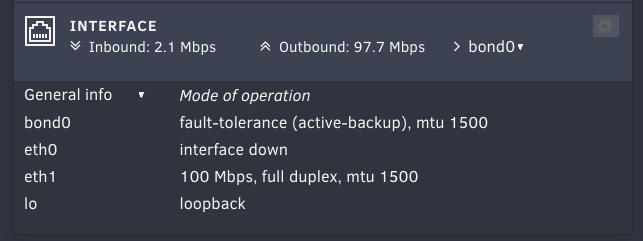
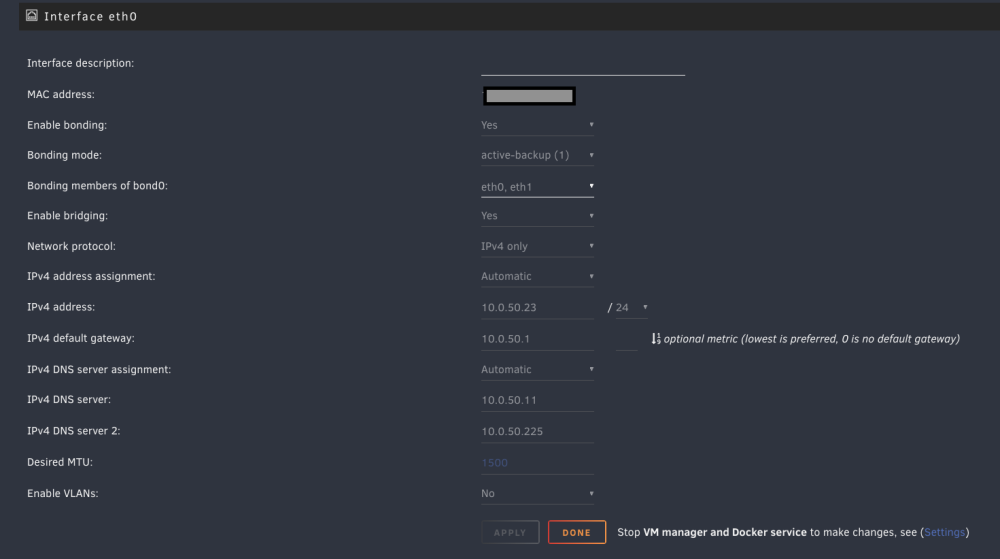
Hello, I'm running latest unRAID version (6.12.1). The hardware has two 2.5GbE nics, one of which is connected to a switch on a 1GbE port. I ran Windows 11 on this server prior to installing unRAID and I got full 1000Mbps on it. However, in unRAID, I see that my ethernet port is tied to a bridge (br0) and br0 is running on 100Mbps only, instead of 1000Mbps. I did not fiddle with network settings, everything is default. Here are the screenshots of my setup. NOTE: I'm also running a docker container, but no VMs. NOTE: I've checked the cable and the switch port. They report 1000Mbps on my Macbook and windows properly. How can I get br0 / eth1 to run on full 1000Mbps connection? Thanks in advance!
-
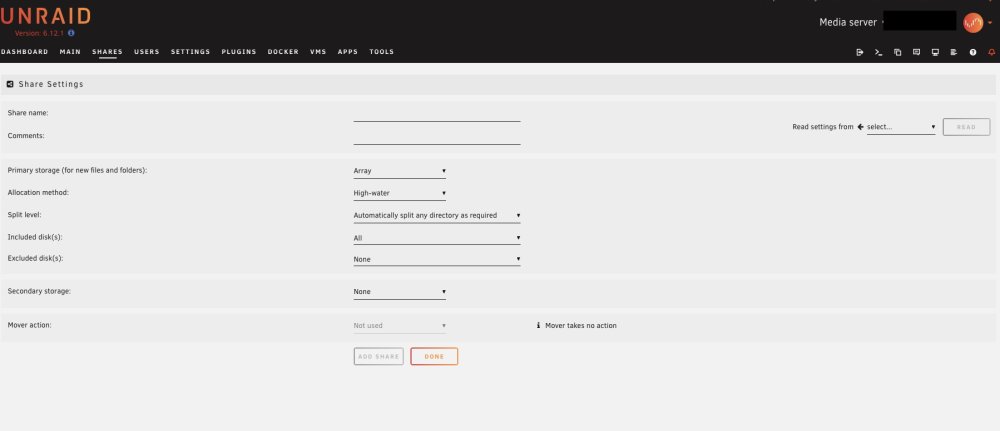
Hi Folks, I just finished configuring my unRAID. I have two 3.5" HDDs in the array (1 parity and the other as data drive). I also have two NVMe SSDs, each in its own pool. When I try to create a new share or modify and existing one, I do not get an option to "Use cache pool" and use the NVMe (see the screeshot). Perhaps I did something wrong. How do I get to use the cache pools for my shares? Thanks in advance! ZeeKay
-
Ok so If i add both the 3.5 HDDs to the array and then select BTRFS as filesyatem, there is no option to select one drive to mirror the other. However, I can add one 3.5 HDD to the parity while use the other in the array. Does that accomplish RAID1 config in unRAID with two drives? What am i doing wrong?
-
So how does it work? Should I not add the two 3.5 HDDs to the array then? If not, then use the pool option below that? Will I be able to create shares and everything on the BTRFS?
-
The case I have only takes two 3.5 HDDs, so I wont be adding any more drives to it. So this will be my final configuration. Since there will only be two 3.5 HDDs, there wont be a parity drive. So how will failure of one drive look like? Copying task? Can't I just replace the failed drive and let the BTRFS rebuild itself?
-
Hi Folks, I am building my first unRaid server. This will be a backup storage. I have a Synology DS918+ as my main NAS. I'll use this new unRaid to: Create a complete backup of Synology NAS Run containers, VMs and some other tools My Synology NAS has 14TB of complete space, about 1/3 is full right now, growing steadily. The unRAID is built with 2 x 18TB HDDs and 2 x 4TB NVMe SSDs. I am thinking of setting up unRAID HDDs in RAID1 config with a total capacity of 18TB available. This will easily backup my Synology and will still have room. NVMe SSDs with JBOD config (RAID0 ?). This will be my high speed storage and will be fully backed up on the 18 TB HDDs. I might run a little over capacity on HDDs, but I'll monitor to make sure that I'm not maxing out my pools. Also note that NVMes will host non-critical data so loss is not a problem. Having said that, I was thinking of setting up unRAID without the parity drive, because this is mainly backup. Several articles say this is not an issue. Can you guys opine on this setup, given my requirements. Also, if one of the HDD fails completely, how will I recover my data? I'm thinking that unRAID will continue to run with only one HDD until the faulty one is replaced and then it'll rebuild the RAID1 mirroring. But I could be wrong. Thanks in advance! ZeeKay


