





NewGuyEddie
Members
-
Joined
-
Last visited
-
Just finished with the balance and the btrfs device remove missing /mnt/cache ran without issue. Just to make sure I understand your instructions: Then stop the array and import the pool with the remaining device: I should shut down my server, remove the old SSD, and replace it. on main click on the first device for that pool and then "remove pool" Once the array is started remove the cache pool entirely back on main, create a new pool with the same name and 1 slot Create a new pool with one slot, using the old good SSD. assign the good pool device (cache2), leave the filesystem set to auto take array offline, change cache pool size to 2, set newly added SSD as second drive start the array to import the pool Start array again and parity will build itself Am i understanding all that correctly? Again really appreciate your help here.
-
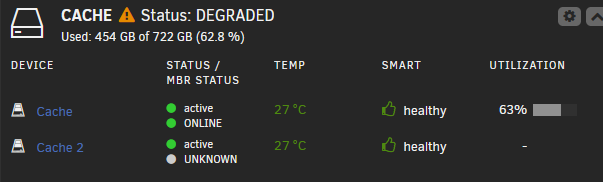
got it, running now, I think i inadvertently canceled it when trying to ctr copy out the warning message. Also to loop back to the beginning you said "assign the good pool device (cache2)" but if I'm understanding the GUI right it's cache 1 that is healthy, do the diagnostic indicate otherwise?
-
tower-diagnostics-20261023-0927.zip
-
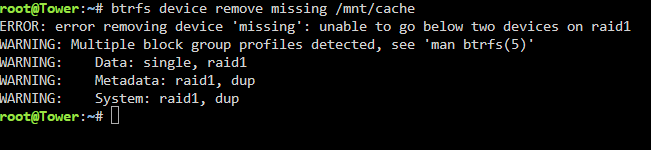
Next error/warning:
-
Sorry linux and unraid noob, does that mean i need to type "--force" then the "btrfs balance start -f -dconvert=single,soft -mconvert=dup,soft /mnt/cache" string? or there there are command to confirm and continue? Very much appreciate your help here!
-
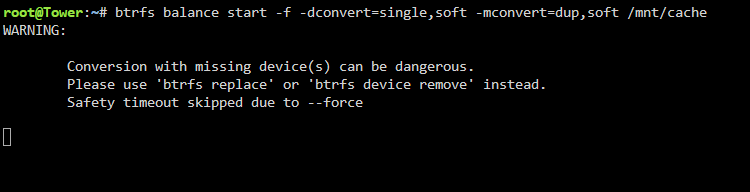
When attempting to run "btrfs balance start -f -dconvert=single,soft -mconvert=dup,soft /mnt/cache" im getting: "Conversion with missing device(s) can be dangerous. Please use 'btrfs replace' or 'btrfs device remove' instead. Safety timeout skipped due to --force" Also above you mention removing the first device, and leaving cache2, but the GUI seems to show cache2 being offline:
-
tower-diagnostics-20261023-0753.zip Replace the old drive to get the array to boot, this is with the DEGRADED drive online, replacement drive has been removed ATM.
-
Bumping - would be more than willing to tip/pay if anyone can help me get this figured out!
-
Hello Unraid community, I'm a long time user but generally not super tech savvy. After updating my unraid version because of the recent exploits, one of my two cache drives failed (Listed as DEGRADED). I had a replacement drive on hand so I shut down my machine, pulled the old drive and replaced it. After booting back up I selected the newly identified drive for device #2, expecting unraid to then rebuild the parity, but when trying to start the array I'm getting "Wrong Pool State Cache - too many or wrong drives missing". Drives are set up as btfrs. Am I doing something wrong or missing a step here? Any help would be greatly appreciated! Tried following the unraid guide here:https://docs.unraid.net/unraid-os/using-unraid-to/manage-storage/cache-pools/ but it simply says: In the Main tab, stop the array (Array Operation → Stop). (Optional) If you don’t have hot-swap, physically remove the old disk. Install the replacement disk and ensure proper connection. Refresh the Main tab to detect the new disk. Assign the new disk to the previous slot. Start the array. Monitor the rebuild progress in the WebGUI. I'm failing at step #6 somehow =(
-
Sent - thank you sir!
-
Amazing! After restating the array the cache drive showed up as before! Thank you so much! 2 insularity questions if you can help: It looks like the plex instance is partially back up and running but is saying that *Plex name* is currently unavailable. Shows as started in the docker tab, and I have no issues accessing the content on the array. Anytips on getting this back online? Now that the old cache is back up, what would be the easiest say to migrate the the new SSD w/o causing additional issues? I do have the SATA connections to connect both drives at the same time. P.S. any way I can make a donation to the forums/youself as a thanks?
-
Do you know how it might have been wiped w/o a reformatting?
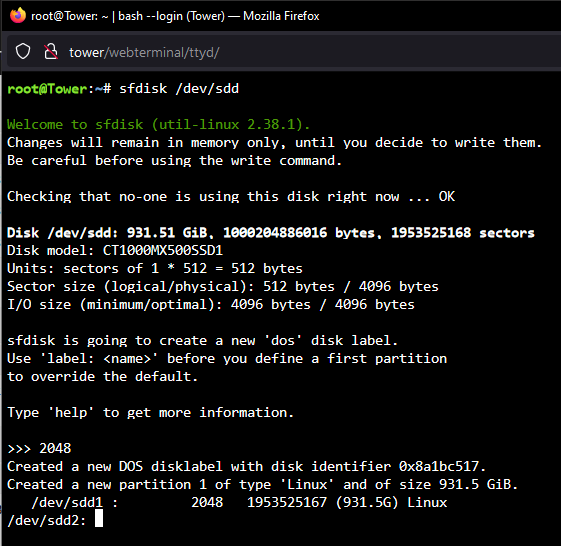 Disk /dev/sdd: 931.51 GiB, 1000204886016 bytes, 1953525168 sectors Disk model: CT1000MX500SSD1 Units: sectors of 1 * 512 = 512 bytes Sector size (logical/physical): 512 bytes / 4096 bytes I/O size (minimum/optimal): 4096 bytes / 4096 bytesHello All, I am a unraid and Linux novice, I have been using unraid for about a year now as a NAS/Plex server. Recently I've been getting some SMART errors on my cache drive. While attempting to swap in a new drive I seem to have inadvertently locked my existing cache drive (with data still on it) in an "Unmountable: Unsupported or no file system" state (Haven't re-formatted or anything). I had already set the shares to cache (after disabling docker, don't use VM's) and invoked mover. ~40 gb of data was moved to my array, but ~400gb of data still showed on my cache drive. I am 99% sure I had manually set my plex server to save the metadata onto the cache drive, and this is the data in question. I was struggling to get this copied off, and decided (in hindsight poorly) to start the array with my new SSD as the cache drive, leaving the old cache drive as an "unassigned device". Basically as expected Plex was broken. When I took the array off line and swapped the cache back to the old drive. It showed as "Unmountable: Unsupported or no file system". I attempted to copy the data onto my windows PC directly (shut server down, connected a SATA->USB cable directly to the SSD) but windows didn't seem to recognize the drive as-is. I'm sure I made a bunch of newbie mistake and would be eternally grateful if some of you folks could help me out of this pickle. Log attached (I think?) tower-syslog-20230626-1609.zip


