





slemens
Members
-
Joined
-
Last visited
-
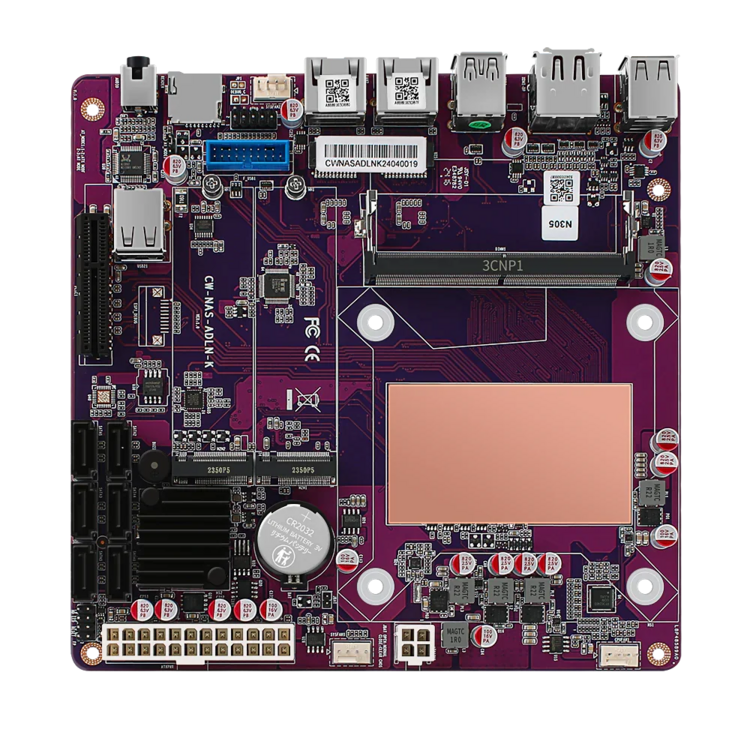
Hi everyone, I’m currently building a new Unraid server and could use some advice. Right now, I’m still in the process of migrating my data from 14x 8TB drives to new 20TB ones, so I have a bit of time to figure things out. For the new build, I’m using the CWWK N305 purple version (https://cwwk.net/products/cwwk-12th-gen-i3-n305-n100-2-intel-i226-v-2-5g-nas-motherboard-6-sata3-0-6-bay-soft-rout-1-ddr5-4800mhz-firewall-itx-mainboard), and the motherboard works great overall. However, I’ve run into an issue with the PCIe slot. Here’s my current setup: The board is fully loaded: 2x 2TB NVMe drives and all 6 SATA ports are in use (1x parity, 5x datastore). I also want to use the PCIe x4 slot for a GTX 1660 Super to handle transcoding with Tdarr or Fileflow. I’m aware the GPU will only run on 4 lanes, but that’s sufficient for my needs. The problem? The GPU doesn’t fit in the PCIe slot because the SATA ports are in the way. The SATA ports are so tightly packed together that even the long x16 PCIe slot edge of the GPU can’t fit between the SATA ports. There’s just not enough clearance to make it work, even with 90-degree connectors. My original plan was to build everything into a Fractal Node 304, but it looks like I’ll need a PCIe x4 riser cable to give the GPU enough clearance from the SATA ports. This creates another issue: The Node 304 only has two PCIe slot covers on the back. The first slot aligns with the motherboard’s (inaccessible) PCIe port, so if I use a riser, I’ll need a third slot cover, which the case doesn’t have. Here’s the kicker: I’d prefer to stick with a compact case. We’re moving from our house to a smaller apartment in the city soon, and I won’t have a dedicated tech room anymore. The server will need to fit somewhere in our living space and be wife-compatible. Does anyone have ideas for how I can solve this? Maybe a different compact case that allows for a riser and GPU? Or an alternative setup I haven’t considered? Thanks in advance for your help!
-
Vielen Dank für die Ratschläge ich schaue mir das Asrock Board in der Konstellation definitiv mal genauer an. Was mit an dem HP und Supermicro Server reizt, ist die Tatsache das es sich hierbei um Hardware handelt die für den 24/7 Betrieb ausgelegt ist und auch ein iLO/IPMI mitbringt, was es mir ermöglichen würde auch mal korrektiv einzugreifen wenn ich beruflich unterwegs bin.
-
Hallo zusammen, ich habe aktuell ein Unraid System basierend auf meiner "alten" Workstation. Hier werkelt ein AMD Threadripper 2950X, mit 64GB RAM, 14x 8TB HDDs (13x Data + 1x Parity), 256GB SATA SSDs (in einem Pool für VMs), angebunden über 2 LSI SAS3008 und noch 2x NVMe's als Docker Ablage und Cache. Das System hosted aktuell knapp 100TB im Hauptarray wovon 60TB belegt sind, sowie rund 20 Docker Container und 1 VM (homeassistant). Eigentlich war ich mit dem System immer Happy, aber irgendwas auf dem Mainboard will nicht mehr so richtig und produziert immer mal wieder Kernel Panics oder sonstige Hickups. Da meine gesamte Hausautomatisierung daran hängt und der Wife Acceptance Faktor deutlich schrumpft wenn man morgen kein Licht anschalten kann, soll ne solidere Hardware her. Prinzipiell sehe ich da 3 Optionen: 1. HP DL380 Gen9 mit nem angeschlossenen HP D3600 Disk Array 2. Supermicro Storage Server 847 mit 36Bays 3. Neuer Eigenbau Herausforderung daran - Das ganze soll natürlich nochmal so kostengünstig wie Möglich funktionieren, mehr wie 2000€, maximal 2500€ möchte ich eigentlich nicht ausgeben. Gibt es vielleicht noch andere Ideen oder Vorschläge wie man das ganze Umsetzen kann? Was ich parallel Überlege, ist die Daten aus dem "normalen" unraid Array in einen ZFS Pool zu migrieren. Ich habe immer öfter Probleme mit den Read Speeds ohne Striping. Da würde mir ein ZFS Pool gelegen kommen. Viele Grüße
