zhanglixing
Members
-
Joined
-
Last visited
Everything posted by zhanglixing
-
https://hub.docker.com/r/manictime/manictimeserver/ ``` docker run -v /var/lib/manictimeserver/Data:/app/Data -p 8080:8080 --rm --entrypoint dotnet manictime/manictimeserver Setup.dll -publicurl ``` To complete the installation of manictime docker, you can do the following: 1. run the official docker command from the unraid terminal, including the “entrypoint dotnet parameter” 2. check the logs for the initialization url 3. visit the url to complete the initialization configuration 4. Re-add the docker to the unraid webui.
-
Thank you very much for your answer, it does solve the problem!😀 I want to cancel the proxy now, so can I delete the lines if I can't comment out the code?
-
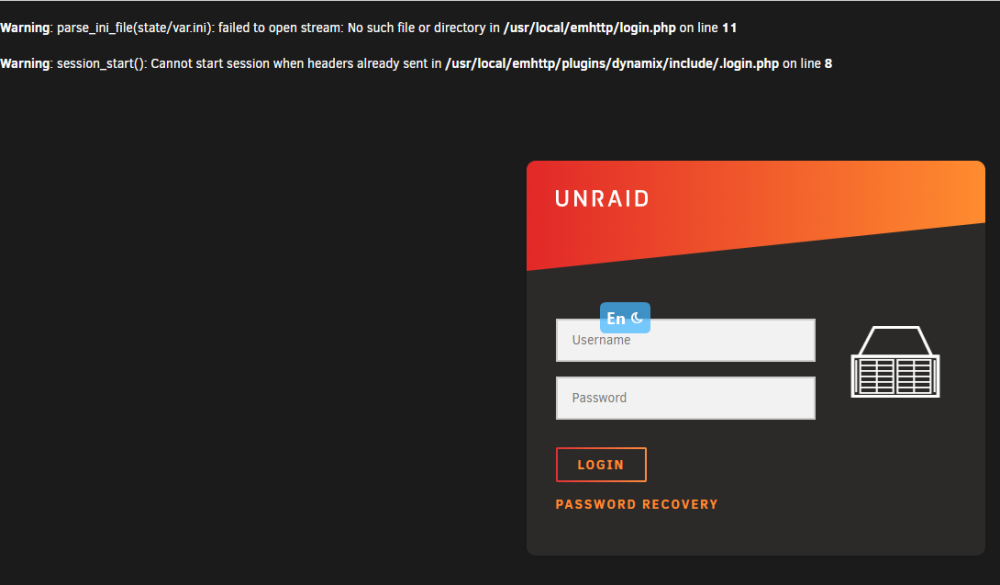
My Problem I upgraded unraid from 6.8.2 to 6.12.0 on 20230629 and I'm having problems with the webUI not opening. Then I rolled back the version to 6.11.5 and the webUI was accessible. After a week or so of stable operation, I restarted unraid today and found that the webUI of unraid could not be opened again. What I have try Searched the forum for this problem and made these attempts below, but it didn't solve the problem 01 Try to start nginx & php-fpm Linux 5.19.17-Unraid. root@LixingTower:~# /etc/rc.d/rc.nginx status Nginx is not running root@LixingTower:~# /etc/rc.d/rc.php-fpm status php-fpm is stopped root@LixingTower:~# /etc/rc.d/rc.php-fpm start Starting php-fpm done root@LixingTower:~# /etc/rc.d/rc.nginx start Starting Nginx server daemon... The login screen of webUI is displayed, but after entering the password to log in, it says: Warning: parse_ini_file(state/var.ini): failed to open stream: No such file or directory in /usr/local/emhttp/login.php on line 11 Warning: session_start(): Cannot start session when headers already sent in /usr/local/emhttp/plugins/dynamix/include/.login.php on line 8 Warning: session_start(): Cannot start session when headers already sent in /usr/local/emhttp/plugins/dynamix/include/.login.php on line 214 Warning: session_regenerate_id(): Cannot regenerate session id - session is not active in /usr/local/emhttp/plugins/dynamix/include/.login.php on line 217 Warning: Cannot modify header information - headers already sent by (output started at /usr/local/emhttp/login.php:11) in /usr/local/emhttp/plugins/dynamix/include/.login.php on line 222 02 Boot in Safe Mode(no plugin,no GUI) The problem persists, webui does not connect properly, but ssh is accessible. ------------------------------------------------------------------------ This is the first time I've ever asked for help, so let me know in the comments section if the information I've provided is incomplete, your help is greatly appreciated! tower-diagnostics-20230714-2136.zip