





MadMan204
Members
-
Joined
-
Last visited
Everything posted by MadMan204
-
Phew! Not just me, currently running my OG A770 LE but was eying up the B70 for my Local AI/Security features. guess I'll stop tinkering with settings and just hold out for the internal Ollama kernal update to 0.23.0.
-
Do you have any suggestions for an "alternative"? I say "Alternative" loosely as I'm sure there is nothing quite as easy as this!
-
I know this plugin is abandoned, but it worked up until February 8th 2025. Now it will not start, any ideas from the community?
-
How would you recommend getting Crafty installed initially since it needs the same port as my existing Bedrock server and won't install due to Port conflicts?
-
Everything appears to be working, just started the Array and EVERYTHING just works! :). Emby right away is mapped and reads all media just by pressing "Start Array". Unraid is crazy user friendly really. Thank you so much for your time.
-
Perfect! About to give it a shot :). I can't find a "Docker User Template" Folder, but found a docker.cfg file, is that the one?
-
Would it be the basic.keyfile (as I have the Basic license?)
-
So I dragged some stuff over. Not sure where to find the Key file/folder though.
-
So, that appears to get me to GUI access. That being said, I am OK with redoing my configs if this is a easy solution (just use the new boot). I guess I just need my key/license attached to the system somehow correct? Also, I would not lose any data during migration? I only have 1 HDD and 1 SSD Cache to reconfigure (No parity...I'm a bad boy lol).
-
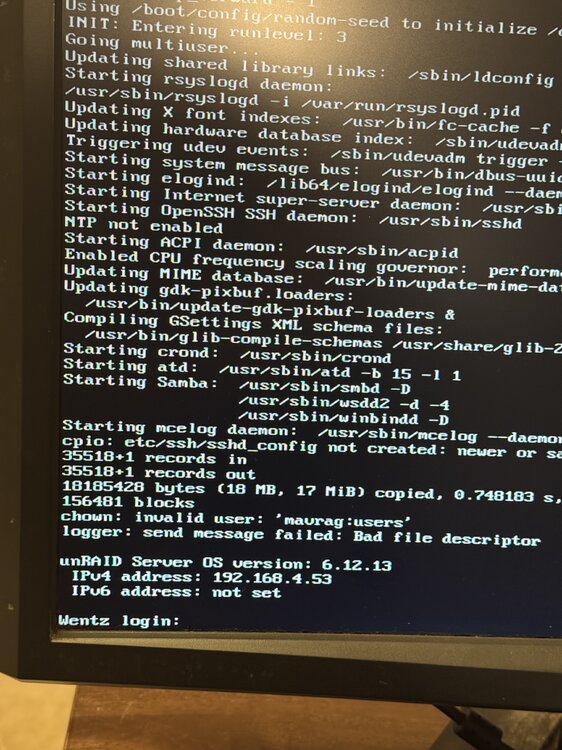
I am unable to access my WebGUI. The apps/dockers that are set to auto start do perform as expected still, just can't access Unraid itself. Prior I was messing with the "Theme Engine" plugin, so thought maybe Safe Mode would work (to rule out any plugins) same outcome. I do notice this Error on the screen "Logger: Send Message Failed". *invalid user: xxx *is a user account I removed a few months back*, don't think it's related. wentz-diagnostics-20241203-1740.zip
-
Is there a way to control what is considered "Idle"...Due to containers running 24/7 (even when CPU is barely working) the Only When Idle seems to never actually start FOLDING. Runs when I select While I'm Working, but would rather more of an Overnight or when I leave type of thing?
-
I completely uninstalled it (removed the Data folder as well) and it still won't login with the default....How do I get it working to even set a non default password??
-
Invalid User or Password (even though I changed nothing overnight). Is there a way to recover (or change) the password within Unraid/Maybe a txt file?

