





SensibleSalmon
Members
-
Joined
-
Last visited
-
Hmm, that didn't work, so I gave up and "reinstalled" the container, which (eventually, after sorting some permissions issues) _did_ work! Again, I don't know why: the configs all look the same, network-wise. Oh well! Thanks for the consult!
-
I've installed the tailscale plugin and am working to integrate it on various docker containers I'm running. I'm finding it works fine on some containers, but not others, and I can't determine why. There's no errors in the logs, it just seems like tailscaled silently stops running within the container after a perfectly normal startup. I have another container where tailscale works fine and I can access the container's webUI from another device on the tailnet. Here's the logs for a container that doesn't work, Archivebox: Executing Unraid Docker Hook for Tailscale Detecting Package Manager... Detected Advanced Package Tool! Tailscale Troubleshooting enabled! Installing additional packages: curl, dnsutils, iputils-ping, speedtest-cli Installing packages... Please wait... Packages installed! Tailscale not found, downloading... Please wait... /tmp/tailscale/tail 100%[===================>] 28.57M 79.4MB/s in 0.4s Download from Tailscale version 1.78.1 successful! Installation Done! Settings Tailscale state dir to: /data/.tailscale_state Setting host name to "archivebox" Starting tailscaled with log file location: /var/log/tailscaled Starting tailscale Some peers are advertising routes but --accept-routes is false WARNING: Tailscale Key will expire in 179 days. Navigate to https://login.tailscale.com/admin/machines and 'Disable Key Expiry' for archivebox See: https://tailscale.com/kb/1028/key-expiry Enabling Serve! See https://tailscale.com/kb/1312/serve Available within your tailnet: https://archivebox.nebulosa-arcturus.ts.net/ |-- proxy http://localhost:8000 Serve started and running in the background. Starting container... ======================= [i] [2025-01-19 21:18:43] ArchiveBox v0.7.2: archivebox server --quick-init 0.0.0.0:8000 > /data [^] Verifying and updating existing ArchiveBox collection to v0.7.2... ---------------------------------------------------------------------- [*] Verifying archive folder structure... + ./archive, ./sources, ./logs... + ./ArchiveBox.conf... [*] Verifying main SQL index and running any migrations needed... Operations to perform: Apply all migrations: admin, auth, contenttypes, core, sessions Running migrations: No migrations to apply. √ ./index.sqlite3 [*] Checking links from indexes and archive folders (safe to Ctrl+C)... √ Loaded 7164 links from existing main index. > Skipping full snapshot directory check (quick mode) ---------------------------------------------------------------------- [√] Done. Verified and updated the existing ArchiveBox collection. [+] Starting ArchiveBox webserver... > Logging errors to ./logs/errors.log Performing system checks... System check identified no issues (0 silenced). January 19, 2025 - 21:18:47 Django version 3.1.14, using settings 'core.settings' Starting development server at http://0.0.0.0:8000/ Quit the server with CONTROL-C. Note the tailscale download and normal startup with no login prompt. In my Tailscale console I see a timestamped connection from the container that correlates with container startup, but it's not an active connection. If I drop into console on the container and run any tailscale commands, I get this error: root@7d3e85237b97:/data# tailscale status failed to connect to local tailscaled; it doesn't appear to be running root@7d3e85237b97:/data# ps -e PID TTY TIME CMD 1 ? 00:00:00 dumb-init 608 pts/0 00:00:05 archivebox 790 pts/1 00:00:00 bash 824 pts/1 00:00:00 ps root@7d3e85237b97:/data# The container mappings for tailscale look normal: And there's nothing helpful in the logs for tailscaled itself: 2025/01/19 16:30:59 logtail started 2025/01/19 16:30:59 Program starting: v1.78.1-t8903926f7-gc4163954e, Go 1.23.3: []string{"tailscaled", "-statedir=/data/.tailscale_state"} 2025/01/19 16:30:59 LogID: [base64 here] 2025/01/19 16:30:59 logpolicy: using system state directory "/var/lib/tailscale" logpolicy.ConfigFromFile /var/lib/tailscale/tailscaled.log.conf: open /var/lib/tailscale/tailscaled.log.conf: no such file or directory logpolicy.Config.Validate for /var/lib/tailscale/tailscaled.log.conf: config is nil 2025/01/19 16:30:59 dns: [rc=unknown ret=direct] 2025/01/19 16:30:59 dns: using "direct" mode 2025/01/19 16:30:59 dns: using *dns.directManager 2025/01/19 16:30:59 dns: inotify addwatch: context canceled 2025/01/19 16:30:59 linuxfw: clear iptables: exec: "iptables": executable file not found in $PATH 2025/01/19 16:30:59 linuxfw: clear ip6tables: exec: "ip6tables": executable file not found in $PATH 2025/01/19 16:30:59 wgengine.NewUserspaceEngine(tun "tailscale0") ... 2025/01/19 16:30:59 dns: [rc=unknown ret=direct] 2025/01/19 16:30:59 dns: using "direct" mode 2025/01/19 16:30:59 dns: using *dns.directManager 2025/01/19 16:30:59 link state: interfaces.State{defaultRoute=eth0 ifs={eth0:[172.19.0.10/16]} v4=true v6=false} 2025/01/19 16:30:59 onPortUpdate(port=37802, network=udp6) 2025/01/19 16:30:59 router: using firewall mode pref 2025/01/19 16:30:59 router: iptables not found: firewall mode "iptables" not supported: iptables command run fail: multiple errors: exec: "iptables": executable file not found in $PATH exec: "ip6tables": executable file not found in $PATH; falling back to nftables 2025/01/19 16:30:59 router: netfilter running in nftables mode, v6 = true 2025/01/19 16:30:59 onPortUpdate(port=33236, network=udp4) 2025/01/19 16:30:59 magicsock: disco key = d:[base64 here] 2025/01/19 16:30:59 Creating WireGuard device... 2025/01/19 16:30:59 Bringing WireGuard device up... 2025/01/19 16:30:59 external route: up 2025/01/19 16:30:59 Bringing router up... 2025/01/19 16:30:59 Clearing router settings... 2025/01/19 16:30:59 Starting network monitor... 2025/01/19 16:30:59 Engine created. 2025/01/19 16:30:59 monitor: [unexpected] network state changed, but stringification didn't: interfaces.State{defaultRoute=eth0 ifs={eth0:[172.19.0.10/16]} v4=true v6=false} 2025/01/19 16:30:59 monitor: [unexpected] old: {"InterfaceIPs":{"eth0":["172.19.0.10/16"],"lo":["127.0.0.1/8","::1/128"],"tunl0":null},"Interface":{"eth0":{"Index":83,"MTU":1500,"Name":"eth0","HardwareAddr":"AkKsEwAK","Flags":51,"AltAddrs":null,"Desc":""},"lo":{"Index":1,"MTU":65536,"Name":"lo","HardwareAddr":null,"Flags":37,"AltAddrs":null,"Desc":""},"tunl0":{"Index":2,"MTU":1480,"Name":"tunl0","HardwareAddr":null,"Flags":0,"AltAddrs":null,"Desc":""}},"HaveV6":false,"HaveV4":true,"IsExpensive":false,"DefaultRouteInterface":"eth0","HTTPProxy":"","PAC":""} 2025/01/19 16:30:59 monitor: [unexpected] new: {"InterfaceIPs":{"eth0":["172.19.0.10/16"],"lo":["127.0.0.1/8","::1/128"],"tailscale0":["fe80::15b2:b292:a5e6:3116/64"],"tunl0":null},"Interface":{"eth0":{"Index":83,"MTU":1500,"Name":"eth0","HardwareAddr":"AkKsEwAK","Flags":51,"AltAddrs":null,"Desc":""},"lo":{"Index":1,"MTU":65536,"Name":"lo","HardwareAddr":null,"Flags":37,"AltAddrs":null,"Desc":""},"tailscale0":{"Index":3,"MTU":1280,"Name":"tailscale0","HardwareAddr":null,"Flags":57,"AltAddrs":null,"Desc":""},"tunl0":{"Index":2,"MTU":1480,"Name":"tunl0","HardwareAddr":null,"Flags":0,"AltAddrs":null,"Desc":""}},"HaveV6":false,"HaveV4":true,"IsExpensive":false,"DefaultRouteInterface":"eth0","HTTPProxy":"","PAC":""} 2025/01/19 16:30:59 LinkChange: major, rebinding. New state: interfaces.State{defaultRoute=eth0 ifs={eth0:[172.19.0.10/16]} v4=true v6=false} 2025/01/19 16:30:59 onPortUpdate(port=37802, network=udp6) 2025/01/19 16:30:59 onPortUpdate(port=33236, network=udp4) 2025/01/19 16:30:59 Rebind; defIf="eth0", ips=[172.19.0.10/16] 2025/01/19 16:30:59 magicsock: 0 active derp conns 2025/01/19 16:30:59 pm: using backend prefs for "profile-8495": Prefs{ra=false dns=true want=true routes=[] statefulFiltering=false nf=on host="archivebox" update=check Persist{lm=, o=, n=[gq9gI] u="SensibleSalmon@github"}} 2025/01/19 16:30:59 logpolicy: using system state directory "/var/lib/tailscale" 2025/01/19 16:30:59 monitor: gateway and self IP changed: gw=172.19.0.1 self=172.19.0.10 2025/01/19 16:30:59 got LocalBackend in 15ms 2025/01/19 16:30:59 Start 2025/01/19 16:30:59 Backend: logs: be:[base64 here] fe: 2025/01/19 16:30:59 control: client.Login(0) 2025/01/19 16:30:59 control: doLogin(regen=false, hasUrl=false) 2025/01/19 16:30:59 health(warnable=warming-up): error: Tailscale is starting. Please wait. 2025/01/19 16:30:59 Start 2025/01/19 16:30:59 Backend: logs: be:[base64 here] fe: 2025/01/19 16:30:59 control: client.Login(0) 2025/01/19 16:30:59 control: client.Shutdown ... 2025/01/19 16:30:59 control: updateRoutine: exiting 2025/01/19 16:30:59 control: mapRoutine: exiting 2025/01/19 16:30:59 health(warnable=login-state): error: You are logged out. The last login error was: fetch control key: Get "https://controlplane.tailscale.com/key?v=109": context canceled 2025/01/19 16:30:59 control: authRoutine: exiting 2025/01/19 16:30:59 control: Client.Shutdown done. 2025/01/19 16:30:59 control: doLogin(regen=false, hasUrl=false) 2025/01/19 16:31:03 control: control server key from https://controlplane.tailscale.com: ts2021=[fSeS+], legacy=[nlFWp] 2025/01/19 16:31:03 control: RegisterReq: onode= node=[gq9gI] fup=false nks=false 2025/01/19 16:31:04 health(warnable=warming-up): ok 2025/01/19 16:31:04 control: RegisterReq: got response; nodeKeyExpired=false, machineAuthorized=true; authURL=false 2025/01/19 16:31:04 health(warnable=login-state): ok 2025/01/19 16:31:05 control: netmap: got new dial plan from control 2025/01/19 16:31:05 health(warnable=not-in-map-poll): ok 2025/01/19 16:31:05 active login: SensibleSalmon@github 2025/01/19 16:31:05 serve: creating a new proxy handler for http://localhost:8000 2025/01/19 16:31:05 Switching ipn state NoState -> Starting (WantRunning=true, nm=true) 2025/01/19 16:31:05 magicsock: SetPrivateKey called (init) 2025/01/19 16:31:05 wgengine: Reconfig: configuring userspace WireGuard config (with 0/4 peers) 2025/01/19 16:31:05 wgengine: Reconfig: configuring router 2025/01/19 16:31:05 wgengine: Reconfig: configuring DNS 2025/01/19 16:31:05 dns: Set: {DefaultResolvers:[] Routes:{[my tailnet].ts.net.:[] ts.net.:[some IPs here]}+65arpa SearchDomains:[my tailnet.] Hosts:5} 2025/01/19 16:31:05 dns: Resolvercfg: {Routes:{.:[127.0.0.11] ts.net.:[[some IPs here]} Hosts:5 LocalDomains:[my tailnet]+65arpa} 2025/01/19 16:31:05 dns: OScfg: {Nameservers:[100.100.100.100] SearchDomains:[my tailnet] } 2025/01/19 16:31:05 rename of "/etc/resolv.conf" to "/etc/resolv.pre-tailscale-backup.conf" failed (rename /etc/resolv.conf /etc/resolv.pre-tailscale-backup.conf: device or resource busy), falling back to copy+delete 2025/01/19 16:31:05 peerapi: serving on http://100.100.87.94:36238 2025/01/19 16:31:05 peerapi: serving on http://[fd7a:115c:a1e0::8501:575f]:46291 2025/01/19 16:31:05 listening on [fd7a:115c:a1e0::8501:575f]:443 2025/01/19 16:31:05 listening on 100.100.87.94:443 2025/01/19 16:31:05 magicsock: home DERP changing from derp-0 [0ms] to derp-21 [7ms] 2025/01/19 16:31:05 health(warnable=no-derp-home): ok 2025/01/19 16:31:05 magicsock: home is now derp-21 (tor) 2025/01/19 16:31:05 magicsock: adding connection to derp-21 for home-keep-alive 2025/01/19 16:31:05 magicsock: 1 active derp conns: derp-21=cr0s,wr0s 2025/01/19 16:31:05 control: NetInfo: NetInfo{varies=false hairpin= ipv6=false ipv6os=true udp=true icmpv4=false derp=#21 portmap= link="" firewallmode="nft-forced"} 2025/01/19 16:31:05 derphttp.Client.Connect: connecting to derp-21 (tor) 2025/01/19 16:31:05 Switching ipn state Starting -> Running (WantRunning=true, nm=true) 2025/01/19 16:31:05 magicsock: endpoints changed: [my public IP]:33236 (stun), 172.19.0.10:33236 (local) 2025/01/19 16:31:05 magicsock: derp-21 connected; connGen=1 2025/01/19 16:31:05 health(warnable=no-derp-connection): ok 2025/01/19 16:31:05 [RATELIMIT] format("health(warnable=%s): ok") Here's the output from a container with working tailscale: sh-5.2# tailscale status 100.93.228.51 alexandria-syncthing MyUsername@ linux - 100.100.87.94 archivebox MyUsername@ linux offline 100.64.141.34 gsv-alexandria MyUsername@ linux - # this is the unraid server itself sh-5.2# ps -e PID TTY TIME CMD 1 ? 00:00:00 dumb-init 37 ? 00:00:00 tailscale 38 ? 00:00:23 tailscaled 201 ? 00:00:00 supervisord 255 ? 00:00:00 start.sh 256 ? 00:00:00 bash 258 ? 00:00:00 syncthing 271 ? 00:01:17 syncthing 427 pts/0 00:00:00 sh 438 pts/1 00:00:00 sh 520 pts/2 00:00:00 sh 532 pts/2 00:00:00 ps I've tried fiddling with the container networking mode, with the tailscale networking mode, with forwarding ports or not, and am at a loss. I don't understand why tailscaled appears to crash after startup. I've attached the tailscale plugin diagnostics file if there's any clues in it. GSV-Alexandria-tailscale-diag-20250119-162331.zip

-
Setting "Enable NetBIOS" to "No" also fixed my issue, coming from a Linux client to an Unraid 6.12.3 server over the Tailscale plugin.
-
On the internal network, I think Tailscale will always assign both an ipv4 and ipv6 address. I haven't found a configuration option to only issue one or the other yet, anyway. You can request a specific one for a given host via the command line though: https://tailscale.com/kb/1080/cli/#ip Note also ip allocations are static per device enrollment, so they'll be stable so long as you don't remove and re-add the device to your network.
-
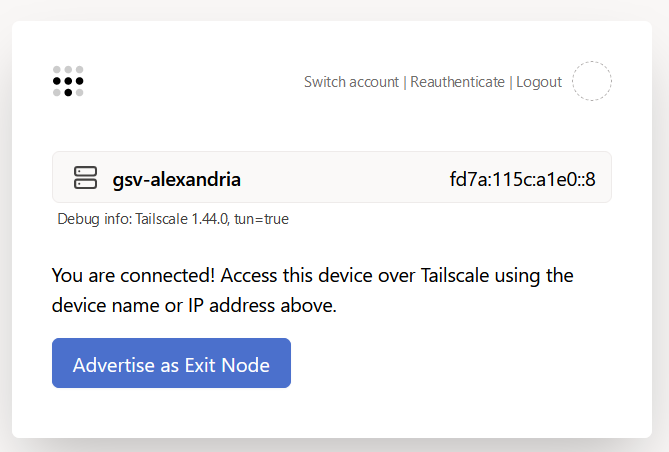
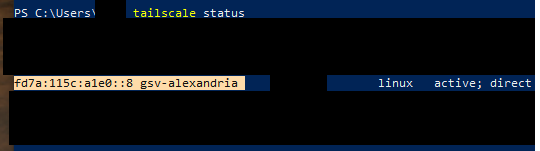
That isn't how Tailscale specifically works. Tailscale is designed as a point-to-point overlay network VPN. To access shares on Unraid via Tailscale, you have to use the IP address Unraid has on the Tailscale network. There's a couple ways to find that IP: first is in the Tailscale settings page on Unraid, it'll show you the IP address there, like this: Or, in a console on any other machine connected to the tailnet, you can ask Tailscale what IPs it knows about with `tailscale status`: Then on the machine you want to connect to the share from (e.g., laptop), you'd point it at the tailscale address of (in my case) fd7a:115c:a1e0::8 You may have ipv4 addresses--Tailscale uses both ipv6 and ipv4 interchangeably.
-
For anyone else trying to figure out how to set up Tailscale using this plugin: turns out, you can just invoke "tailscale up" from the command line directly and pass all the usual arguments. Thanks @EDACerton for pointing that out to me!
-
Reaching out now!
-
Is there any way to pass a login_server param to the underlying tailscale daemon? I'm trying to link my unraid host to my headscale instance. (Docs here). I didn't see anything in the plugin settings.



