




Skip to content
View in the app

A better way to browse. Learn more.

Unraid

A full-screen app on your home screen with push notifications, badges and more.

To install this app on iOS and iPadOS
  1. Tap the Share icon in Safari
  2. Scroll the menu and tap Add to Home Screen.
  3. Tap Add in the top-right corner.
To install this app on Android
  1. Tap the 3-dot menu (⋮) in the top-right corner of the browser.
  2. Tap Add to Home screen or Install app.
  3. Confirm by tapping Install.

wy586

Members
  • Joined

  • Last visited

  1. Thank you very much for your response. Thank you for your work on The LXC plugin, The LXC plugin is excellent.
  2. Thank you for your prompt response. I have already uploaded it. tower-diagnostics-20240608-1902.zip
  3. Hello, plugin author. May I ask why CentOS 7 cannot retrieve the IPv4 address while CentOS 8 can? I need CentOS 7 to use certain applications.
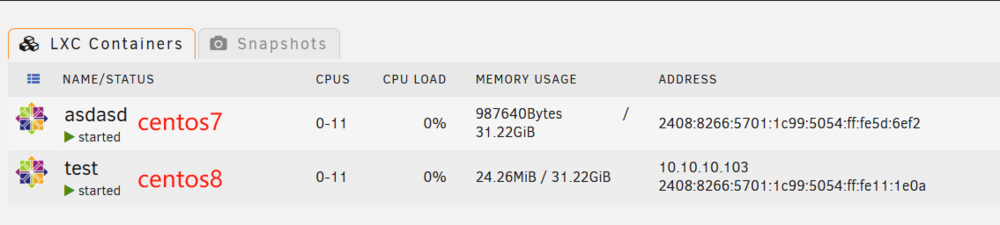
  4. Thank you, the problem has been resolved. I have successfully started now. My Unraid version is 6.12.4 and I have installed LXC plugin freshly. The path for LXC setup is /mnt/cache/lxc
  5. wy586 started following [Plugin] LXC Plugin
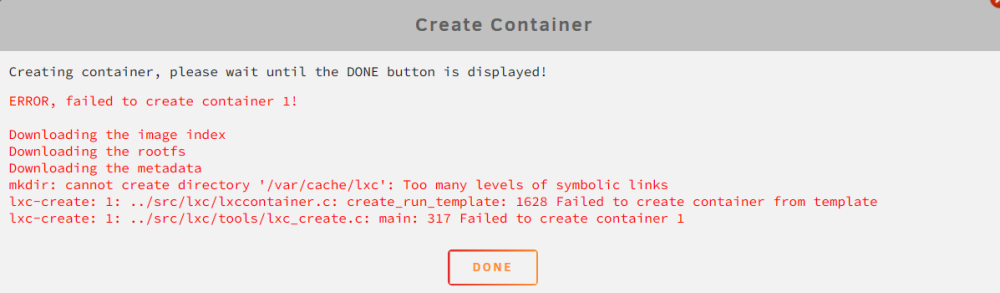
  6. 我正在就我在尝试创建容器时遇到的问题寻求您的帮助。 尝试创建容器时,我收到以下错误消息: 如果您对如何解决此问题有任何建议,建议或进一步说明,我将不胜感激。 非常感谢您的时间和关注。我期待你的回复。

Account

Navigation

Search

Search

Configure browser push notifications

Chrome (Android)
  1. Tap the lock icon next to the address bar.
  2. Tap Permissions → Notifications.
  3. Adjust your preference.
Chrome (Desktop)
  1. Click the padlock icon in the address bar.
  2. Select Site settings.
  3. Find Notifications and adjust your preference.