





Botafoguense1965
Members
-
Joined
-
Last visited
-
I tried TB on Unrais with no success. I’m using it with no problems in True Nas. It’s great using it as both DAS and NAS, specially for media editing. Most new commercial NAS systems now come with TB…
-
And in the name of fairness, in Unraid, virtual machines were a breeze to setup and use. In TrueNAS, I can´t make them work properly, can´t even install Ubuntu. In OMV Thunderbolt worked, but when the machine went to sleep it would not wake up unless I rebooted the machine...so, every system will have its quirks, its a matter of finding out the best one for a specific scenario, unless you're a Linux wizard, which I´m definitely not...
-
Can’t speak for others. For me it worked right away. Connected the cables, configured a separate subnet and voila, appears as a SMB connection, with speed over 2gigs/sec…
-
Thats the main reason I went to TrueNas in my main server and kept the Unraid as backup. Thunderbolt just works, and I get excellent speed for video/photo editing…now I wonder if I setup Ubuntu as virtual machine inside Unraid, I’ll be able to use the TB inside the VM…
-
Isn’t Unraid supposed to go Debian instead of Slackware some time soon? I thinks I read something about it…would it solve the problem?
-
Thanks! Got the picture…
-
I know I wouldn’t gain much by adding an extra gig, it’s more about the theory…because soon it may be 2.5 x2 and then it works be meaningful…
-
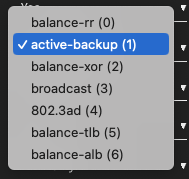
Ok, so I was searching for it and couldn´t get a clear answer...I have a motherboard with 2 NICs, one 2,5gbe (that I'm currently using) and one unused 1gbe. Unmanaged switch. If I also use this other NIC with one of the modes below, will I get a 3,5gbe connection? Setup is Bonded. tks!
-
How can I install kio-extras so my Krusader will support SMB? It does support SMB in my other server with Unraid, same version, but not on this one...searched in the Krusader site, says it should be this...go figure... Guess life will be easier once Unraid migrates to Debian...
-
I don´t understand. My system has Thunderbolt. Driver is installed, I see it in Tools-System Drivers... As you can see below, it´s active, when I connect external TB cases it´s found by the system, it even see the vendors names, etc...but nothing shows in Unassigned Devices...this is driving me nuts... it also does not show as available network interface... Any ideas??? Andre Drivers: thunderbolt. In use thunderbolt thunderbolt_net Thunderbolt/USB4 network driver In use net root@Itacoa:~# lspci | grep Thunderbolt 08:00.0 PCI bridge: Intel Corporation Thunderbolt 4 Bridge [Maple Ridge 4C 2020] (rev 02) 09:00.0 PCI bridge: Intel Corporation Thunderbolt 4 Bridge [Maple Ridge 4C 2020] (rev 02) 09:01.0 PCI bridge: Intel Corporation Thunderbolt 4 Bridge [Maple Ridge 4C 2020] (rev 02) 09:02.0 PCI bridge: Intel Corporation Thunderbolt 4 Bridge [Maple Ridge 4C 2020] (rev 02) 09:03.0 PCI bridge: Intel Corporation Thunderbolt 4 Bridge [Maple Ridge 4C 2020] (rev 02) 0a:00.0 USB controller: Intel Corporation Thunderbolt 4 NHI [Maple Ridge 4C 2020] 3e:00.0 USB controller: Intel Corporation Thunderbolt 4 USB Controller [Maple Ridge 4C 2020] root@Itacoa:~# dmesg | grep -i thunderbolt [ 22.112161] ACPI: bus type thunderbolt registered [ 4435.055551] thunderbolt 0-3: new device found, vendor=0x265 device=0x8100 [ 4435.055555] thunderbolt 0-3: Guangzhou Jiayi Information Technology Co., Ltd. JEYI SHELL Series [ 4958.413810] thunderbolt 0-3: device disconnected [ 5033.948011] thunderbolt 0-1: new device found, vendor=0x265 device=0x8100 [ 5033.948015] thunderbolt 0-1: Guangzhou Jiayi Information Technology Co., Ltd. JEYI SHELL Series [ 5073.964538] thunderbolt 0-1: device disconnected [ 5336.850716] thunderbolt 0-1: new device found, vendor=0x5a device=0xde34 [ 5336.850719] thunderbolt 0-1: Other World Computing Envoy Express [ 5371.584948] thunderbolt 0-1: device disconnected root@Itacoa:~# dmesg | grep -i thunderbolt [ 22.112161] ACPI: bus type thunderbolt registered [ 4435.055551] thunderbolt 0-3: new device found, vendor=0x265 device=0x8100 [ 4435.055555] thunderbolt 0-3: Guangzhou Jiayi Information Technology Co., Ltd. JEYI SHELL Series [ 4958.413810] thunderbolt 0-3: device disconnected [ 5033.948011] thunderbolt 0-1: new device found, vendor=0x265 device=0x8100 [ 5033.948015] thunderbolt 0-1: Guangzhou Jiayi Information Technology Co., Ltd. JEYI SHELL Series [ 5073.964538] thunderbolt 0-1: device disconnected [ 5336.850716] thunderbolt 0-1: new device found, vendor=0x5a device=0xde34 [ 5336.850719] thunderbolt 0-1: Other World Computing Envoy Express [ 5371.584948] thunderbolt 0-1: device disconnected [ 8004.282923] thunderbolt 0-3: new device found, vendor=0x265 device=0x8100 [ 8004.282927] thunderbolt 0-3: Guangzhou Jiayi Information Technology Co., Ltd. JEYI SHELL Series root@Itacoa:~#
-
Yeah, I’m in the process of doing it…in a couple of days I’ll know…I hope the TB card shows up…somewhere in the UI… I’d hate to try doing on the CLI…rsrs
-
Humm, I see… the fear I have is not being able to configure Thunderbolt in Unraid to direct connect my Mac…searching the forum and asking around I could get no definite answers about it…aside from that I’m comfortable with Unraid…
-
Humm...I´ll take that into consideration...Core or Scale? How was is the change? Always heard True NAS is harder then Unraid...was that your experience? I´m no linux geek...
-
I´m wondering...the idea of having a cache pool (or single disk) is to accelerate the work and then at some point transfering the files to the protected array, I get it. But... My system will store photography/videos in one 4TB name and documents in another 2TB NVME. I'll have an array with 4tb party and two 3TB dives, 6tb storage . I´m planning my setup as such: NVMEs to store/work on. Every night this disks are copied/synced with the array using rsync in the crontab file. The hot/cold storage strategy... Questions: 1. Under these circumstances, does it make any sense to have a cache pool? I´m already working on the fastest disks possible... 2. I´m still in doubt if the array will be XFS or BTRFS, but about the single NVMEs...the 4TB one is currently in APFS format...I can install it as an Unassigned Drive in this format and live it so...will I really gain anything by converting it to XFS or BTRFS? It will be a PITA but doable...speed will be the same I guess because the bottleneck with be the network/thunderbolt connection, but maybe stability would be better in a native format? The other NVME is in EXT4, so Linux native is stable enough? I´m about to build it, so any comments will be greatly appreciated! André
-
Yes it is…I’ll investigate what you just pointed out when I get home and get back here…thanks!

