





feam
Members
-
Joined
-
Last visited
-
@JorgeB thank you very much. After acknowledge the warnings everything went good. Appreciated.
-
@JorgeB They seem correct to me: Graphics Card: AMD Radeon RX 6600/6600 XT/6600M (03:00.0) Sound Card: AMD Navi 21/23 HDMI/DP Audio Controller (03:00.1) Graphics ROM BIOS: /boot/config/vbios/rx6600-vbios.rom how do I acknowledge this?
-
@JorgeB the bios updated did work. I was able to boot with the VT-d option on but had to change syslinux.cfg: root@Musashi:~# cat /boot/syslinux/syslinux.cfg default menu.c32 menu title Lime Technology, Inc. prompt 0 timeout 50 label Unraid OS menu default kernel /bzimage append initrd=/bzroot vfio-pci.ids=1002:73ff,1002:ab28 label Unraid OS GUI Mode kernel /bzimage append initrd=/bzroot,/bzroot-gui label Unraid OS Safe Mode (no plugins, no GUI) kernel /bzimage append initrd=/bzroot unraidsafemode label Unraid OS GUI Safe Mode (no plugins) kernel /bzimage append initrd=/bzroot,/bzroot-gui unraidsafemode label Memtest86+ kernel /memtest Also, I had to enable a option on the BIOS to use integrated cpu graphics as primary card. This way, when I boot the server it uses my CPU graphics and leaves the AMD GPU to VMs. Original problem solved. My issue now is that, for some reason, I cant start my VM with AMD GPU on passthru mode. I got the error "Start disabled due to PCI chagnes". My current VM setup is the following: <?xml version='1.0' encoding='UTF-8'?> <domain type='kvm'> <name>Windows 11</name> <uuid>d433efed-5a60-cfa1-3ecb-459ac53e0fd0</uuid> <metadata> <vmtemplate xmlns="unraid" name="Windows 11" iconold="windows11.png" icon="windows11.png" os="windowstpm" webui="" storage="default"/> </metadata> <memory unit='KiB'>25165824</memory> <currentMemory unit='KiB'>25165824</currentMemory> <memoryBacking> <nosharepages/> </memoryBacking> <vcpu placement='static'>6</vcpu> <cputune> <vcpupin vcpu='0' cpuset='0'/> <vcpupin vcpu='1' cpuset='1'/> <vcpupin vcpu='2' cpuset='2'/> <vcpupin vcpu='3' cpuset='3'/> <vcpupin vcpu='4' cpuset='4'/> <vcpupin vcpu='5' cpuset='5'/> </cputune> <os> <type arch='x86_64' machine='pc-q35-9.2'>hvm</type> <loader readonly='yes' type='pflash' format='raw'>/usr/share/qemu/ovmf-x64/OVMF_CODE-pure-efi.fd</loader> <nvram format='raw'>/etc/libvirt/qemu/nvram/d433efed-5a60-cfa1-3ecb-459ac53e0fd0_VARS-pure-efi.fd</nvram> </os> <features> <acpi/> <apic/> <hyperv mode='custom'> <relaxed state='on'/> <vapic state='on'/> <spinlocks state='on' retries='8191'/> <vpindex state='on'/> <synic state='on'/> <stimer state='on'/> <vendor_id state='on' value='none'/> </hyperv> </features> <cpu mode='host-passthrough' check='none' migratable='on'> <topology sockets='1' dies='1' clusters='1' cores='3' threads='2'/> <cache mode='passthrough'/> </cpu> <clock offset='localtime'> <timer name='hpet' present='no'/> <timer name='hypervclock' present='yes'/> </clock> <on_poweroff>destroy</on_poweroff> <on_reboot>restart</on_reboot> <on_crash>restart</on_crash> <devices> <emulator>/usr/local/sbin/qemu</emulator> <disk type='file' device='disk'> <driver name='qemu' type='raw' cache='writeback' discard='unmap'/> <source file='/mnt/user/domains/Windows 11/vdisk1.img'/> <target dev='hdc' bus='virtio'/> <serial>vdisk1</serial> <boot order='1'/> <address type='pci' domain='0x0000' bus='0x00' slot='0x05' function='0x0'/> </disk> <disk type='file' device='cdrom'> <driver name='qemu' type='raw'/> <source file='/mnt/user/isos/Win11_25H2_English_x64.iso'/> <target dev='hda' bus='sata'/> <readonly/> <boot order='2'/> <address type='drive' controller='0' bus='0' target='0' unit='0'/> </disk> <disk type='file' device='cdrom'> <driver name='qemu' type='raw'/> <source file='/mnt/user/isos/virtio-win-0.1.285.iso'/> <target dev='hdb' bus='sata'/> <readonly/> <address type='drive' controller='0' bus='0' target='0' unit='1'/> </disk> <controller type='pci' index='0' model='pcie-root'/> <controller type='pci' index='1' model='pcie-root-port'> <model name='pcie-root-port'/> <target chassis='1' port='0x8'/> <address type='pci' domain='0x0000' bus='0x00' slot='0x01' function='0x0' multifunction='on'/> </controller> <controller type='pci' index='2' model='pcie-root-port'> <model name='pcie-root-port'/> <target chassis='2' port='0x9'/> <address type='pci' domain='0x0000' bus='0x00' slot='0x01' function='0x1'/> </controller> <controller type='pci' index='3' model='pcie-root-port'> <model name='pcie-root-port'/> <target chassis='3' port='0xa'/> <address type='pci' domain='0x0000' bus='0x00' slot='0x01' function='0x2'/> </controller> <controller type='pci' index='4' model='pcie-root-port'> <model name='pcie-root-port'/> <target chassis='4' port='0xb'/> <address type='pci' domain='0x0000' bus='0x00' slot='0x01' function='0x3'/> </controller> <controller type='pci' index='5' model='pcie-root-port'> <model name='pcie-root-port'/> <target chassis='5' port='0xc'/> <address type='pci' domain='0x0000' bus='0x00' slot='0x01' function='0x4'/> </controller> <controller type='pci' index='6' model='pcie-root-port'> <model name='pcie-root-port'/> <target chassis='6' port='0xd'/> <address type='pci' domain='0x0000' bus='0x00' slot='0x01' function='0x5'/> </controller> <controller type='pci' index='7' model='pcie-to-pci-bridge'> <model name='pcie-pci-bridge'/> <address type='pci' domain='0x0000' bus='0x01' slot='0x00' function='0x0'/> </controller> <controller type='virtio-serial' index='0'> <address type='pci' domain='0x0000' bus='0x00' slot='0x04' function='0x0'/> </controller> <controller type='usb' index='0' model='ich9-ehci1'> <address type='pci' domain='0x0000' bus='0x07' slot='0x01' function='0x7'/> </controller> <controller type='sata' index='0'> <address type='pci' domain='0x0000' bus='0x00' slot='0x1f' function='0x2'/> </controller> <interface type='bridge'> <mac address='52:54:00:60:a5:ae'/> <source bridge='br0'/> <model type='e1000'/> <address type='pci' domain='0x0000' bus='0x00' slot='0x02' function='0x0'/> </interface> <serial type='pty'> <target type='isa-serial' port='0'> <model name='isa-serial'/> </target> </serial> <console type='pty'> <target type='serial' port='0'/> </console> <channel type='unix'> <target type='virtio' name='org.qemu.guest_agent.0'/> <address type='virtio-serial' controller='0' bus='0' port='1'/> </channel> <input type='mouse' bus='ps2'/> <input type='keyboard' bus='ps2'/> <audio id='1' type='none'/> <hostdev mode='subsystem' type='pci' managed='yes'> <driver name='vfio'/> <source> <address domain='0x0000' bus='0x03' slot='0x00' function='0x0'/> </source> <rom file='/boot/config/vbios/rx6600-vbios.rom'/> <address type='pci' domain='0x0000' bus='0x05' slot='0x00' function='0x0' multifunction='on'/> </hostdev> <hostdev mode='subsystem' type='pci' managed='yes'> <driver name='vfio'/> <source> <address domain='0x0000' bus='0x03' slot='0x00' function='0x1'/> </source> <address type='pci' domain='0x0000' bus='0x05' slot='0x00' function='0x1'/> </hostdev> <watchdog model='itco' action='reset'/> <memballoon model='none'/> </devices> </domain>
-
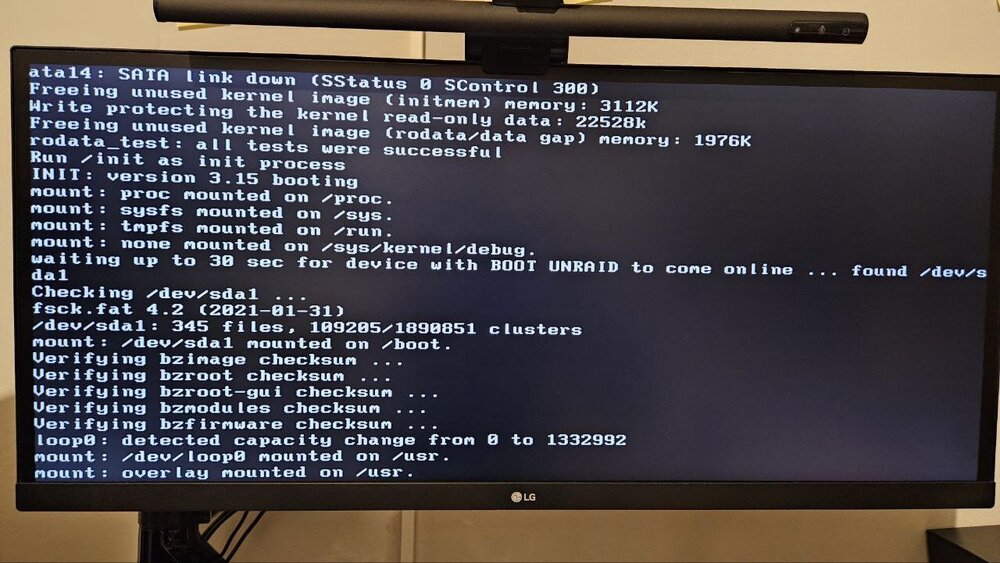
Hello everyone, I'm setting up a gaming VM on my Unraid server and facing a boot issue after installing a new GPU. Hardware Configuration:Motherboard: Gigabyte H410M H V3 CPU: Intel Core i5-10400 RAM: 32GB New GPU (for VM Passthrough): AMD Radeon RX 6600 (ASRock Challenger D) PSU: Corsair CV550 The Problem:VT-d Disabled: If I leave Intel VT-d (IOMMU) disabled in the BIOS, Unraid boots perfectly fine to the Web GUI. VT-d Enabled: If I enable Intel VT-d (IOMMU) in the BIOS (required for proper Passthrough), the Unraid boot sequence stops and freezes at the following message:Exiting up to 30 sec for device with BOOT UNRAID to come online (you can check more details on the attatched image) Question: How to solve this? I never did a GPU Passthrough before so I might be missing something. Thank you very much!
-
Hello. Please, does anyone knows if its possible to temporarily disable the Tailscale plugin? I go out for vacations once a year and I dont need a VPN besides a couple of days. Thank you all for the great work on this plugin.

