





Sonicmojo
Members
-
Joined
-
Last visited
Everything posted by Sonicmojo
-
Frank Thank you so much for the update. Cheers! S
-
I am a licensed (lifetime) Unraid user - and last September I created a server that I used for limited test run that did not work out for a number of reasons I won't go into here. I still have the original Samsung FIT (64GB) FLASH drive complete with 6.12.11 on it. How would I "update" this drive to 7.20 so I can start with that version during another "clean" server build later this fall/winter? Cheers S
-
We are way past that. I do not have a Unraid server or an install or anything right now. This key was created last summer, when I ran Unraid for a few weeks and then decided to bail on it - for specific reasons at the time. All I have now is the flash drive from that install - with a full 6.12.11 install on it and of course my license key. I want to retain the license that is bonded to this flash drive but redo it with v7 later this year. S
-
Got it. And - I was looking at an old key. Found the one from last summer and I do see a "Plus.key" on there - makes sense now. So - in a complete "rebuild" scenario - do I simply move Plus.key OFF the flash drive, create the new v7 boot key with it and copy "Plus.key" back to the same spot I found it in? S
-
itimpi Thanks for the update - however - I just looked into my existing flash drive and there is a ton of files in the Config folder. Nothing there screams "license file" to me. Do you know the exact file name? S
-
All I planned to settle into Unraid in my environment in Mid 2024 - but for reasons I won't bother going into here - I suspended it's use - with a nod to coming back to it at a futire date. Now that v7 is here - I am thinking about a poterntial "reintroduction" later this year. My question surrounds starting over - if all I have at this point is my existing 6.12.3 USB drive in the drawer here. If/when I restart - I would like to go right to v7 and need to understand how to do this. I am aware of how the ID of the Flash drive plays into the license. Some questions: 1. Does my old USB drive here matter in any way? I assume it does - and does the license need to be properly transferred from that drive? 2. Or am I overthinking this and just create a new drive with V7 and transfer the license to that drive? Or use a new drive? If anyone can decode the correct order of operations here to ensure I do not mess up my license - I would appreciate it. Cheers S
-
Thank you for the comments. Very interesting - except for the part where Exclusive Shares cannot have a secondary storage target. In my use (unlike many others it seems) Unraid here is a typical file server and the shares I want to accelerate (ideally) are those I actually send stuff to the most. In this case - shares like Backup, Software see the most activity - but I have no desire to leave daily backups (Backup) or new software packages I move to the server (Software) sitting on a cache drive forever. These items need to get to the Array eventually. I will take your cue and at least move back to XFS - that actually did make me feel a bit better in the middle of all these tests S
-
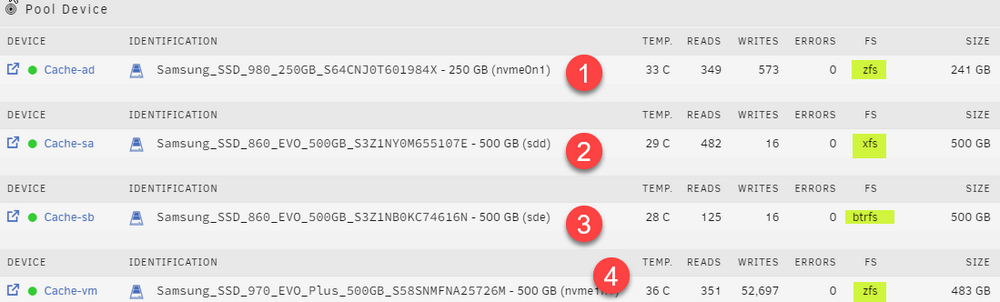
All New Unraid user for the last 3 weeks - have 6.12.11 going - with a modest build: Motherboard: ASUS ProArt Z490-Creator CPU: Intel Core™i5 10600K (LGA1200) MemoryCorsair Vengeance LPX CMK64GX4M2D3600C18 (64 GB) LAN: Intel® I219V PCIe: ASUS Hyper M.2 x16 V2 HD1 (System) Samsung USB Fit Plus (64GB) HD2 - Bay 1 (Parity) Seagate Exos 7E10 ST8000NM017B 8 TB HD3 - Bay 2 (Array 1) Seagate Exos 7E10 ST8000NM017B 8 TB HD4 (Cache-AD) Samsung SSD 980 NVMe M2 SSD (250GB) HD5 (Cache-VM) Samsung 970 EVO Plus NVMe M2 SSD (500GB) HD6 (Cache-SA) Samsung 860 EVO SSD (500GB) HD7 (Cache-SB) Samsung 860 EVO SSD (500GB) This layout at the moment - has just a single array drive and NO Parity at all. I have about 5-6 TB of data to move from a current Windows File Server and will build out the parity after the move. Network is standard 1 Gbps Ethernet, Cisco switching - stock "pro-sumer" type stuff. Testing was done from a Windows 10 22H2 ASUS workstation on the network. My questions today surround my cache layout and the frustrating disk transfer speeds I am seeing. From the Unraid Main view: I have been experimenting with the various cache combos, file systems etc and all roads seem to lead to the same end game. For this real world testing - using the Unraid Shares area - I have been bouncing my Downloads share around to these different targets and sending the same test data each time: 1. 1 GB Testfile 2. 4.80 GB of real world data from a drive om my Windows PC. This stash contains 7 folders containing all manner of files. Big. Small. Tiny and huge. 3. AND - as a third test - I also copied this same payload - directly to a share which is ARRAY Only. 4. Finally - I copied the same fileset to the Downloads folder on my Windows 2019 server (running an old Haswell era Xeon CPU and stocked with 5900 RPM Ironwolf drives) The results are both disappointing and strange 1. Sending the payload to ANY of the NVmE/SSD cache drives ranged from 1:10 to 1:21 to fully complete 2. Sending the same payload to the single (currently non-parity) Array drive was 1:14 3. Sending the same payload to various shares on Windows Server 2019 ranged from :57 - 1:05 Now - the transfer "rate" would bounce around as is expected with a wide mix of files - but everything I have read seemed to indicate that using a NVme-enabled cache (file system not withstanding) - "should" provide the fastest and most robust transfer speed possible. Even more odd - my two NVmE drives listed above - are mounted within my ASUS Hyper M.2 x16 V2 PCI-e card - whose slot is basically hardwired directly to the CPU (vs being held up by the an additional chipset layer if I use the standard NMvE slots on the motherboard.) These destinations should be the fastest possible targets - but the real world tests here - show that they are no better than a rote basic EVO 860 SSD or even writing directly to the array (non-parity of course). And then there are the file systems. I am experimenting with ZFS but for reasons unknown - it feels "slower" in almost all operations. I have also paired the two EVO 860's in a mirror, Raid0 and Raid1 combos and still cannot see a combo with a major advantage. Have converted to XFS and BTRFS will little upside as well. All I can think of is either I have hit the theoretical maximums of the network pipe and regardless of endpoint - that is as good as it is going to get. Or something else is up with the config, file system choice, or the internals of Unraid as it sits on this specific hardware. And it goes without saying that I was very disappointed to see my old creaky 2014 Windows Server run some circles around this new build. I would have thought it should be a head to head battle at least Now - I am not looking to achieve 125 MB/s maximums for every file I copy. But I am seeking advice on the best combo of device/file system etc so I can complete this build, stick it in the rack and have it be reliable and modestly robust when needed. Appreciate any insights you can share. S
-
Update Managed to get this working. After much trial and error - I found that when I add a new Win 10 (or 11) VM , choose my config and click Start - I am immediately dropped into a terminal window and after exiting that - I see the Boot Manager menu AND a handy PXE boot item - which takes me where I need to go. One item solved. Next up was navigating all the errors I was getting with the Win VM - seems that it is much easier to ensure the CDROM and Storage drivers are all set to SATA before beginning this journey. Once I fixed those two items up AND ensured there was no driver ISO loaded in the virtual CD ROM drive - the MDT Task sequence and the several restarts that are required are not interrupted by "inaccessible" boot devices. Cheers Sonic.
-
Hello First post and first question from a brand new Unraid user. So far very impressed with the OS and I am currently testing/trialling 6.12.3 on some very old bits and pieces I have here as I ponder a wholesale move from a Windows Server 2019 File Server/NAS layout (using DrivePool) to Unraid. I have setup 6.12.3 and have a healthy array, NVMe cache drive and am getting familiar with shares, users and most of the basics. One REALLY big item on the checklist for a potential full scale move to Unraid is my VM test bed - which to this point has all been Hyper-V. I use MDT/NLIte to create my custom Windows ISOs, publish the boot disks to the WDS service (WIndows Server) and then create a fresh VM using Network Boot (PXE) to install fresh VMs as needed. Seems super easy to create a Windows 10 VM within Unraid - but how do I get it to favor network boot and config it to see my existing WDS Server on the LAN? I have been hacking through the Win 10/11 templates and see Network Source, Network Model and Boot Order - but it is not clear what to do with these items or what settings to make for a PXE scenario. Any tips from the field would be appreciated. Be gentle with me Cheers Sonic
