





smaiderman
Members
-
Joined
-
Last visited
-
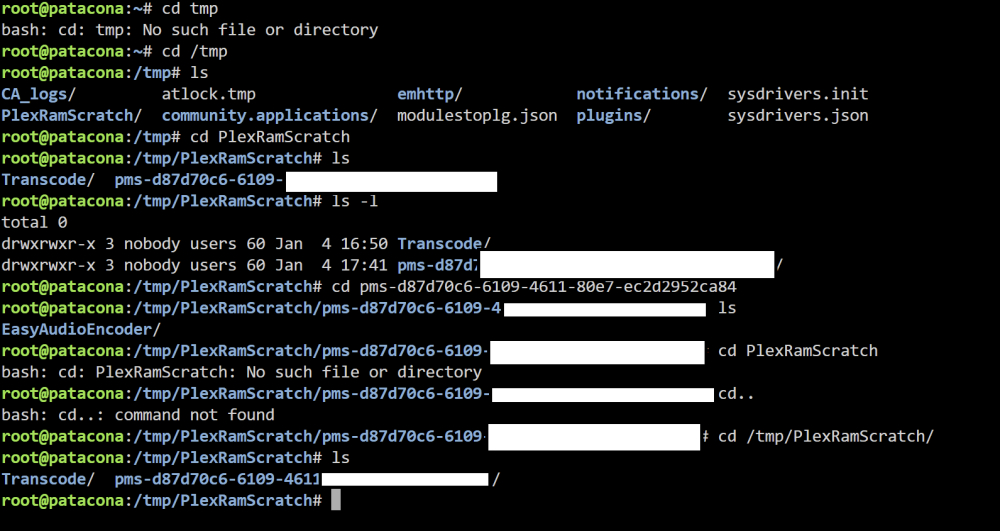
Mine looks loke this, No "sessions" folder, but others Is this working? Thank you again
-
Hi!. Thnks for all the tips. Is there a way to check if everything is working as intended? How can I know if my server is transcoding using ram? Thank you!
-
Hello, I'm trying to make immich container to work remotely. I configured it and it works flawlessly in LAN, but I want to be able to connect remotely. I tried the vpn wireguard, unraid connect, and I couldnt manage to make it work. Lastly I asked on discord, and two very kind users (dankkster and jcofer555), pointed me to do a reverse proxy, but I think this is too hard for me (very noob). I'm willing to learn, but there has to be an easier way to connect remotely. Is there? Thank you!
-
I managed to solve I entered the bios (MSI) disabled both fast boot options, and fixed the boot order to use the USB as 1st option Thanks to every participant trying to help
-
well. I tried formatting the flash drive and creating it new, but I'm still in the black screen. Should I reset bios settings?
-
That file is not present in the flash drive sadly
-
Thank you for your answer, I'll check in 3 days when I come back home.
-
Do you mean what disk is cache, parity and storage? Yes, I do know
-
Hello everyone. I wonder if you can help me. I'm a total "not windows" noob, and I'm trying to set my Unraid NAS (core i3 13100, 36GB ram, 56TB) Yesterday I did my first install, and ended up messing with something wrong I then re created the usb install, and started fresh. Today, I thought, lets try things in virtual machines, in case I break something. I managed to create a share and access it via windows network (such a score for me ), transferred the iso to the isos share, and tried to create a VM for ubuntu. I read the options, and the only one I could understand was the GPU. I changed virtualized to the i3 iGPU. As soon as I tried to start it, my screen went black (I guess you cant choose the gpu u are using in unraid to be the one used in your VM) I accessed via windows http://servername.local/Dashboard , and went to delete the VM, but there was none. So I thought, lets reboot the system. And now I'm stuck, the black screen is still there, and I lost http://servername.local/Dashboard access.... I want to create a Plex Media Server, but I don't want to move to a completely new OS and risking to lose all my data (currently 26Tb of media) I wonder if there is a safe way to start in Unraid OS or do you think I should stay in windows... I didnt think to read the forum, and now I read that it is important to habe the logs BEFORE restarting... but now it is late. I didnt have any plugin installed, and I am using the last unraid version. Thank you!
