leader-intron
Members
-
Joined
-
Last visited
-
Phenomenal. Thank you for the clear explanations and callouts. I greatly appreciate it. I’ll look at getting a replacement ASAP and report back once I’ve completed the rebuild.
-
Welp, I'm back with troubling news. Disk 2 is showing more errors. See attached diagnostics. The parity check did not complete unfortunately and I only just got around to checking this morning. I'd be interested in understanding the important pieces of data within the archived logs, but first and foremost would be next steps to take. Again, I appreciate any and all insight. unraid-diagnostics-20261028-0816.zip
-
@JorgeB I greatly appreciate you writing all that and explaining some stuff. I’ll check the cooling immediately and perform a non-correcting parity check also. Thanks again for your eyes and help!
-
I get it -- there are a lot of threads about this problem, but this is not my area of expertise and there is a lot of information obfuscated in the varied responses for existing issues. This weekend, one of my drives showed 6 read errors. Overnight, that jumped to over 7100. I don't know if it was the right move, but I performed a correcting parity check. It made sense at the time, but as I'm typing now, if the drive is having read errors, writing those incorrect values to parity probably isn't the appropriate action to take (please correct and educate me if I'm wrong in my thinking). Since the parity check completed, I also performed an extended SMART test. After restarting the system, I saw a notification that the 'Array has 0 disks with read errors'. That's not necessarily enough for me to move on without thinking something's lurking, waiting to crash everything. Diagnostics attached. Any and all insight, protips, clarity and information are truly appreciated. unraid-diagnostics-20261027-1446.zip
-
@Frank1940 So if I turn off split-level as you're suggesting, what's the process I would use to ensure that files are evenly distributed? How do I safely go about more evenly distributing my current files also? Everything I read online suggests avoiding the unBalance plugin, and since I primarily use my server for Plex purposes, I want to ensure this is done correctly without breaking video playback.
-
I'm on Unraid 6.12.6 with the following drive structure and share configuration: one 10TB parity, two 10TB data drives High-Water allocation automatically split only the top 2 directory levels as required /media share with the following folders: /movies /Movie Title Here (1900) Movie Title Here (1900).mkv /Yet Another Movie Title (1905) Yet Another Movie Title (1905).mkv /television /Series Title Here (1900) /season01 Series Title Here (1900).s01e01.mkv /staging /movies /Movie Not Added to Plex Yet (1910) Movie Not Added to Plex Yet (1910).mkv /television /Series Not Added to Plex Yet (1910) /season01 Series Not Added to Plex Yet (1910).s01e01.mkv * Note the staging folder that exists within the media share. I add things to the staging folder first because I like to add certain titles to Plex in batches. My first 10TB drive is filling up pretty much all the way; it's currently sitting at 9.8TB full. I've made sure to add a 100GB buffer to ensure it doesn't fill up. There does seem to be some recent stuff that has been added to the second drive. My concern is that it doesn't seem to be following the High-Water allocation as I understand it. Do I need to increase the split method to the top 3 folders? Or should I simply create a new staging share instead (and keep the split setting at 2 folders deep to ensure there's no delay between content when watching via Plex)? Is there some process to invoke to more evenly distribute the data among the data drives? Or should I simply move forward with a solution from question 1 since trying to manually 'high-water' anything could cause issues? All help greatly appreciated.
-
I'm fairly certain I've read that BI will have issues recording to a network share. I had an entire dedicated rig for BI that I'm trying to replace and I'd like to keep it as simple and familiar as possible, with the disk available as if it's installed alongside the boot drive within Windows.
-
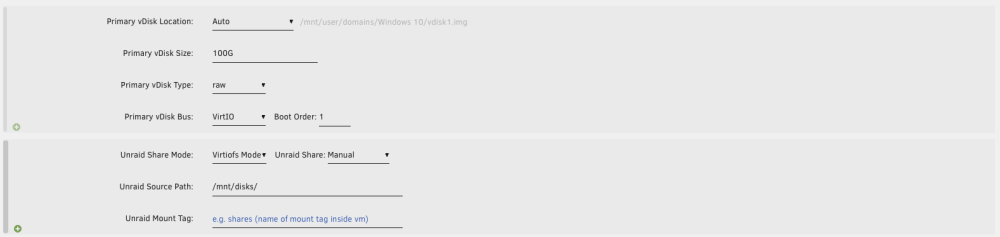
I'm attempting to set up a VM to run Blue Iris software. I have a 10TB WD Pro Purple drive I'd like to use as an additional storage drive. I'm pretty new to this stuff, and many of the topics already discussing this process use terms and verbiage that I'm unfamiliar with, so I could use some help with explanations and clarifications in simpler terms. Thanks in advance. I have the Unassigned Devices plugin installed, and I have the entire 10TB drive set to Passthrough within the device settings (see screenshot below). I'd like to ensure the boot drive uses the Unraid cache drive SSD, but I want to have the WD drive as another drive available within the OS for the purposes of writing all Blue Iris recordings to. How do I achieve this within the VM configuration page? I've seen some posts within this forum and the subreddit suggestion adding an additional vDisk location, setting to manual, and then specifying the disk by ID, but I'm not confident I'm doing this correctly. Could someone confirm that I'm doing this correctly, or let me know if there's anything I need to configure or consider before proceeding?