





frenetic-enrollment4074
Members
-
Joined
-
Last visited
Everything posted by frenetic-enrollment4074
-
This is a very delayed response to this thread as I initially thought I'd resolved this but it's returned once again. Here's the tail of the logs immediately prior to the system becoming unresponsive during a parity check (I rebooted a few times and the same thing repeated). I had Docker enabled (3x containers) and 1x VM (HAOS). parity-check-crash-sanitized.log
-
Frustratingly, after ~24 hours in safe mode the server has once again become unresponsive and requiring a restart. Initially it looked fine and load was low but I suspect after restarting the array the parity check again caused it to crash. What's the best way to further diagnose what's going on?
-
I'm not sure what that is. Can you explain a bit more about what I should be looking for?
-
Thank you, will do. Stupid question but what would have instantiated that process?
-
I've tried shutting down syncthing which I presume is driving that but it's not made a huge difference. The instance of /usr/sbin/smartctl -A /dev/sdc is using a large amount of CPU and has been running for 90+ hours - is that normal?
-
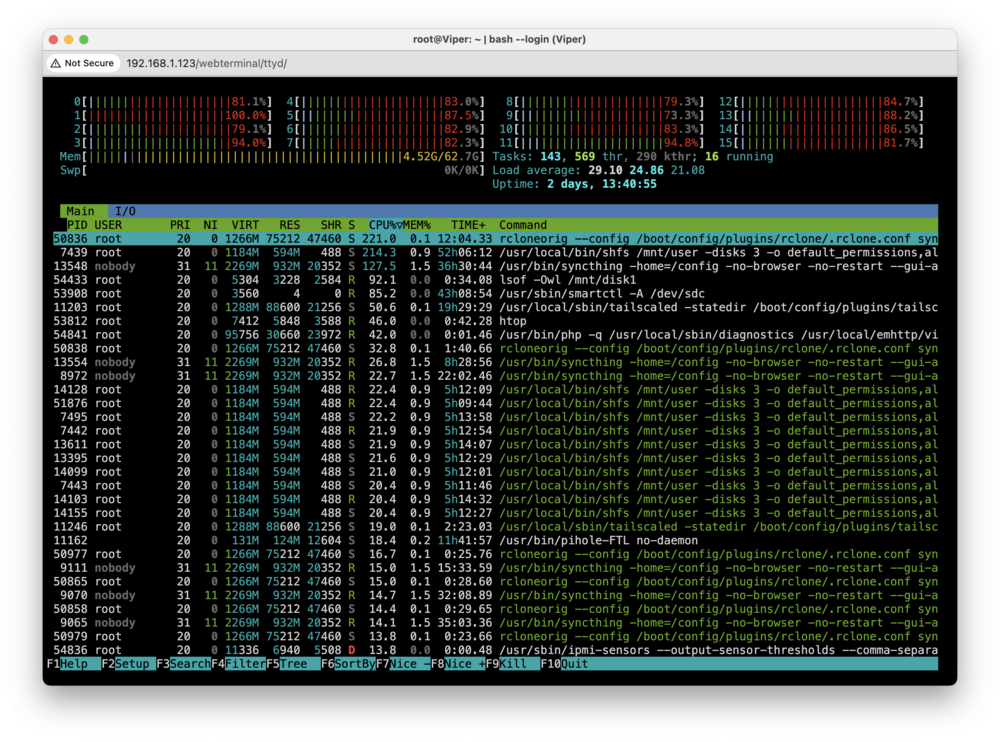
Hello! I know this has been asked before but I've not found a discussion that correctly matches the symptoms of my issue. I've been running unraid with no issues for 2-3 years. I have a small Supermicro box with two physical disks and an NVM drive used for cache. I have 3-4 Docker containers (pihole, syncthing, unifi-protect-backup, and route53 dns updater). I also have a VM running HACS. My server keeps coming unresponsive due to the parity check process and when I catch it and I'm able to log in I just see 100% (or close to) CPU utilisation across all the cores and a most of the CPU being chewed up by shfs processes. I have tried a few things including moving docker instances from /mnt/user to /mnt/cache where appropriate as well as reducing the number of applications running. Unfortunately I still seem to be getting this recurring issue and I can't figure out what changed or what I'm doing wrong. Here's an example htop from today during a parity check: I've also attached my diagnostics dump. I'd be grateful if anyone can suggest how to diagnose and resolve this issue! viper-diagnostics.zip
-
Marking as solved. My RAM was faulty and replacing has solved the issue.
-
Thank you for the reply. I've been playing around starting in safe mode, running memtest etc. to try and figure this out. One thing I've noticed is that when running Unraid for a while, the CPU usage seems very high even with docker etc. all disabled. Looking at htop it seems that the 'smartctl_type' and '/webGui/scripts/notify get' seem to be pulling 100%+ I think the former is the S.M.A.R.T. test process which is odd as the Web UI doesn't indicate a test is running. I'm not sure about the latter?
-
Unfortunately it's still crashing. It feels as though something is chewing up memory until the system crashes but I can't deduce what. Any ideas? Edit: here's the most recent logs. syslog_Aug2.txt
-
Thanks, I've done that. I'll keep an eye on it and see if it resolves the issue.
-
Thanks for the response. I can see that setting (with advanced view enabled) but it doesn't appear to be editable?
-
I was able to access the persisted syslog - it's absolutely huge so sharing the last 20k lines which include a period during which the system hung. I'm also attaching the diagnostic report generated since the most recent boot. syslog_tail.txt viper-diagnostics-20230802-1732.zip
-
Sorry, I was having some weird SSO issue and the new post form was showing the signed out view (i.e. without the attachment option).
-
I am fairly new to Unraid so please go easy! I have a pretty basic set up at the moment, running a Supermicro A+ Server 5019D-FTN4 w/ 64Gb RAM. The system is primarily running as a NAS with Docker running a few things, currently reduced to just Pi-hole and Homebridge. I've been having issues with the server randomly becoming unresponsive and requiring a reset. This initially had been fairly infrequent but recently has increased. I've tried following the advice in other posts to persist logs to flash but my `/boot/logs` directory remains empty after reset. I have attached what I have but it's not very informative. I'm hoping I can get some help diagnosing this issue and hopefully getting some better diagnostic information 🙏 syslog.txt

