





Eodyne
Members
-
Joined
-
Last visited
-
Looks like this will break with the next update of Jellyfin. I've been running the RC of Jellyfin 12 and it throws a "401 Error" now.
-
Well glad it doesn't seem to be something I messed up then. Diagnostics attached nas-diagnostics-20250225-1404.zip
-
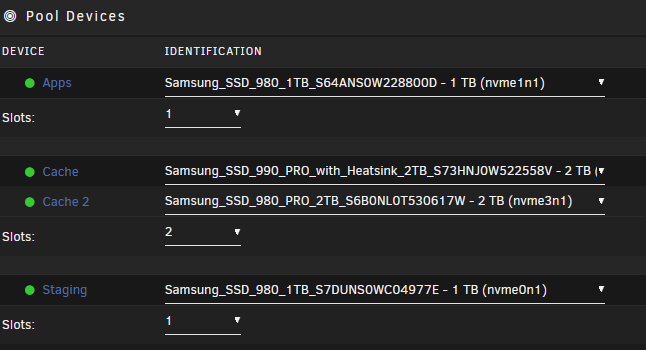
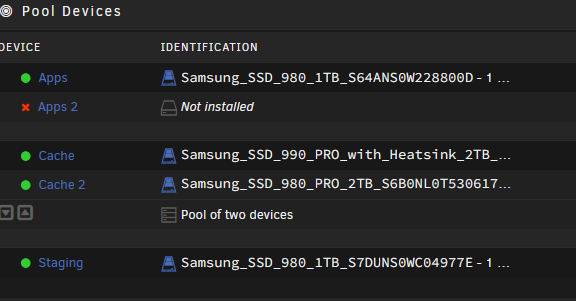
So I had a 2 drive pool where I kept my appdata. I decided to take one of the drives out of it and create another pool to use as the staging drive for Tdarr Encoding. Got that all done but now when I switch the pool from 2 drives to 1 and then start the array it always goes back to it having 2 drives with one missing and throws errors. The array starts and runs but it keeps warning me that Apps pool is missing that second drive So I set everything like image 1 - so when I start the Array it should just spin up like that. But when it does I end up with image 2 - everything works but it keeps yelling at me that I'm missing a drive in my Apps Pool
-
Installed an Ubuntu VM, everything seems to working fine except that my mouse wheel doesn't work for scrolling. Gets very annoying when navigating webpages etc. Any ideas to fix?
-
Soooo, I'm an idiot and apparently in the course of moving various network equipment (this was a full move of all by network stuff to a new rack) I swapped the router and NAS power supplies... Switched them back and BAM...all good.
-
So I recently moved my NAS to a new physical spot. No big deal, shut it down cleanly, moved it, turned it back on. But it keeps saying my parity disk is missing and I can't source the problem at all. I thought maybe something got messed up even with the clean shutdown so I took the HDD out and plugged it into my desktop, no problem, recognized I cleared it formatting wise and stuck it back in the NAS - nope doesn't show up at all, like it's not even plugged in. Ok, maybe it's the connector on the NAS itself - tried a different HDD I had in the same slot - recognized by UNRAID no problem. So for the life of me I'm at a loss. Anyone have any thoughts or should I just figure this drive got borked somehow and order a new parity disk?
-
Is there a way to export the entire users folder as a share so that I can have all my shares visible as a single network drive/network place in windows? Tried searching but didn't see anything about this as an option. Rather than have each individual share as a separate network drive I'd like to have them all collected under a single mapped drive on my PC.
