



Skip to content
View in the app

A better way to browse. Learn more.

Unraid

A full-screen app on your home screen with push notifications, badges and more.

To install this app on iOS and iPadOS
  1. Tap the Share icon in Safari
  2. Scroll the menu and tap Add to Home Screen.
  3. Tap Add in the top-right corner.
To install this app on Android
  1. Tap the 3-dot menu (⋮) in the top-right corner of the browser.
  2. Tap Add to Home screen or Install app.
  3. Confirm by tapping Install.

DakarDad

Members
  • Joined

  • Last visited

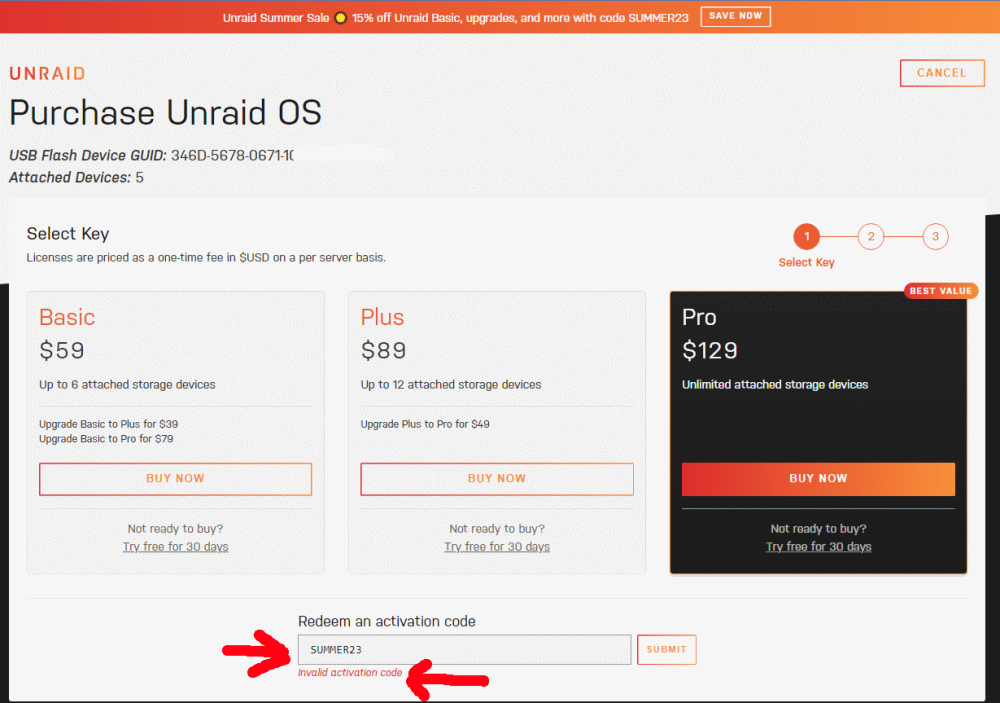
  1. Oops, I forgot to mention, the first time I used the buy link on the Media server•Tower area, and the second time I just used the https://unraid.net/pricing page. I wanted to try your software as I have all types of used hardware to choose from, and I am not really a command prompt type of guy. I was reading through your forums, and I don't think anyone has any type of support as you seem to so that made me very comfortable in thinking I could do it, and why not with your 30 day trial.
  2. NOTE: Well, I didn't pay any money the first time, so after I cleared any cookies, this time I clicked Buy Now first, then put the code in the discount area and it worked for me this time.
  3. Hello, I just tried to buy the basic license and the code does not work either, is there a work around?

Account

Navigation

Search

Search

Configure browser push notifications

Chrome (Android)
  1. Tap the lock icon next to the address bar.
  2. Tap Permissions → Notifications.
  3. Adjust your preference.
Chrome (Desktop)
  1. Click the padlock icon in the address bar.
  2. Select Site settings.
  3. Find Notifications and adjust your preference.
