alwaysblank
Members
-
Joined
-
Last visited
-
Thanks! This worked perfectly.
-
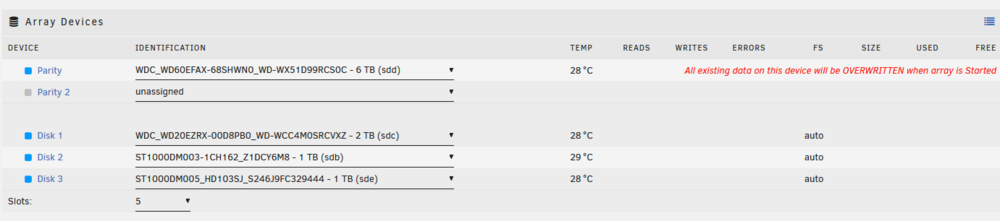
My USB OS drive recently died, and I did not have any backups of it (a mistake that I will hopefully make only once). I have contacted support and moved my key to a new USB, and I can now boot up my machine, but without the lost settings there is, of course, no array. The drives are all there, and apparently fine, but the configuration is obviously gone. Perhaps unsurprisingly, given the first sentence of this post, I do not have external backups of anything on these drives. None of it is "irreplaceable," but losing it would definitely be a bummer. I had a single parity drive, and I know which drive it was (it's 6tb while all the others are 1 or 2), but I have no idea what order the other drives were assigned in, and no way to find out (i.e. no screenshots, backups, etc). I've done some searching around the internet as to how I can create a new array without wiping the files from my drives, but I haven't been able to find a single definitive answer: It's not clear to me if I can just reassign all drives to the array and start it up, or if I need to use the "New Config" tool, or...something else. If I tentatively assign drives in the UI (but don't start the array), I get this message: I've attached my diagnostics in the zip file. Is there a way for me to recreate my array and keep my files? If you need any more information from me, please let me know. I'm using Unraid 7. I haven't installed any plugins, etc. Apart from adding the key and giving my root user a password, nothing has been changed or configured from a fresh install. tower-diagnostics-20250224-1929.zip